> ## Documentation Index
> Fetch the complete documentation index at: https://www.bolna.ai/docs/llms.txt
> Use this file to discover all available pages before exploring further.
# Dynamically identify incoming callers
> Use Bolna Voice AI agents to identify callers in real time via API, CSV, or Google Sheets and personalize calls with automatic user data injection.
## What is Caller Identification?
Link your inbound phone numbers to custom data sources. When a call comes in, your Bolna Voice AI agent automatically identifies the caller, matches their number, and pulls in relevant details like name, address, preferences, past history, or any data you provide.
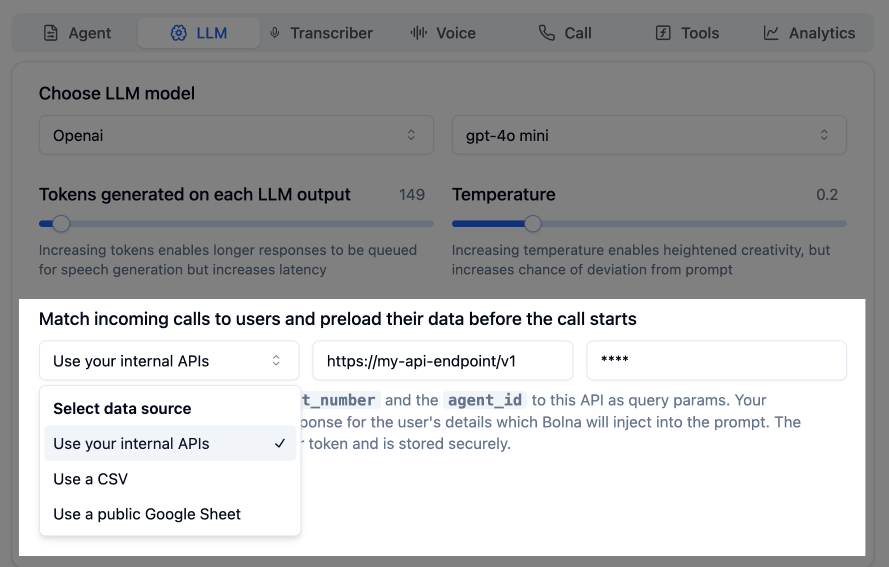 This data is seamlessly injected into the agent's prompt, making every interaction personalized and contextual.
***
## Data Source Options
**Best for:** Teams with existing databases or CRM systems.
Provide an API endpoint that accepts the caller's phone number. Bolna automatically sends the following parameters:
| Parameter | Description |
| ---------------- | ------------------------------- |
| `contact_number` | Incoming caller's phone number |
| `agent_id` | Agent handling the call |
| `execution_id` | Unique identifier for this call |
This data is seamlessly injected into the agent's prompt, making every interaction personalized and contextual.
***
## Data Source Options
**Best for:** Teams with existing databases or CRM systems.
Provide an API endpoint that accepts the caller's phone number. Bolna automatically sends the following parameters:
| Parameter | Description |
| ---------------- | ------------------------------- |
| `contact_number` | Incoming caller's phone number |
| `agent_id` | Agent handling the call |
| `execution_id` | Unique identifier for this call |
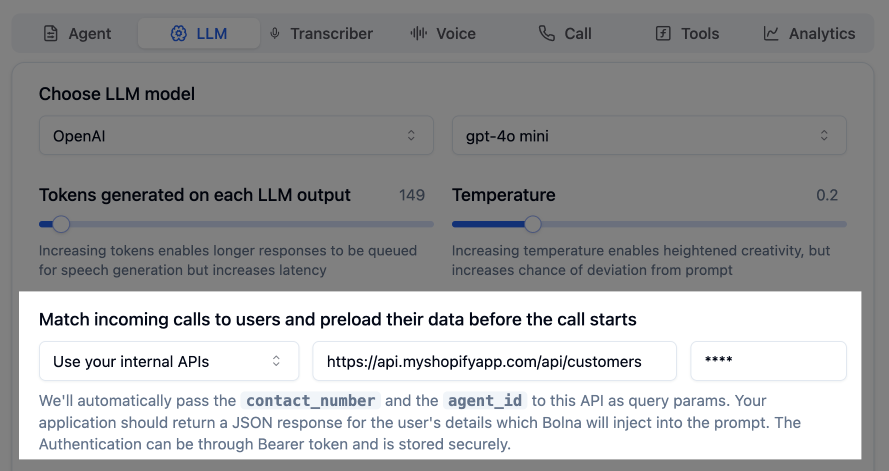 **Example request:**
```
GET https://api.your-domain.com/api/customers?contact_number=+19876543210&agent_id=06f64cb2-...&execution_id=c4be1d0b-...
```
The returned JSON data is automatically merged into the AI prompt before the call begins.
* The endpoint must be a **GET** endpoint
* Supported authentication: **Bearer Token**
**Best for:** Smaller teams who prefer simple, no-code data management.
Upload a CSV file with `contact_number` column (phone numbers with country code) and associated user info. Bolna automatically looks up the incoming number and injects matching row data into the prompt.
**Example request:**
```
GET https://api.your-domain.com/api/customers?contact_number=+19876543210&agent_id=06f64cb2-...&execution_id=c4be1d0b-...
```
The returned JSON data is automatically merged into the AI prompt before the call begins.
* The endpoint must be a **GET** endpoint
* Supported authentication: **Bearer Token**
**Best for:** Smaller teams who prefer simple, no-code data management.
Upload a CSV file with `contact_number` column (phone numbers with country code) and associated user info. Bolna automatically looks up the incoming number and injects matching row data into the prompt.
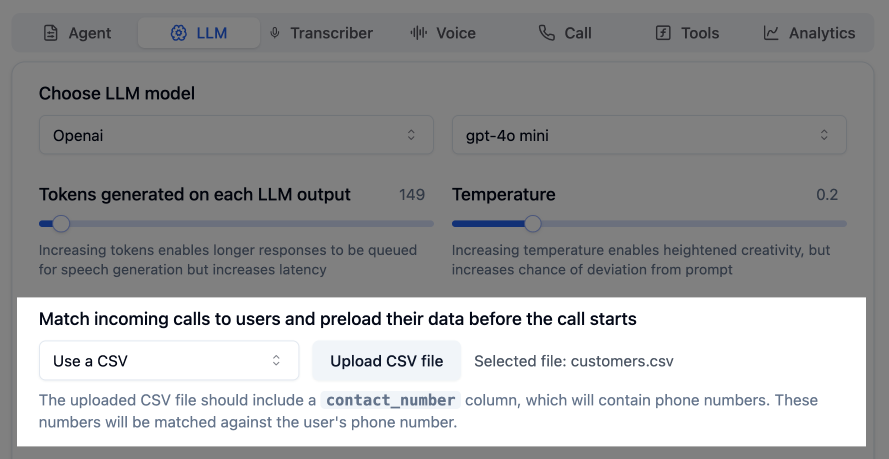 ```csv theme={"system"}
contact_number,first_name,last_name
+11231237890,Bruce,Wayne
+91012345678,Bruce,Lee
+00021000000,Satoshi,Nakamoto
+44999999007,James,Bond
```
**Best for:** Real-time sync with spreadsheet simplicity.
Link a **publicly accessible** Google Sheet with user data. Bolna auto-syncs and looks up the incoming number to pull the latest data. No re-uploads needed.
```csv theme={"system"}
contact_number,first_name,last_name
+11231237890,Bruce,Wayne
+91012345678,Bruce,Lee
+00021000000,Satoshi,Nakamoto
+44999999007,James,Bond
```
**Best for:** Real-time sync with spreadsheet simplicity.
Link a **publicly accessible** Google Sheet with user data. Bolna auto-syncs and looks up the incoming number to pull the latest data. No re-uploads needed.
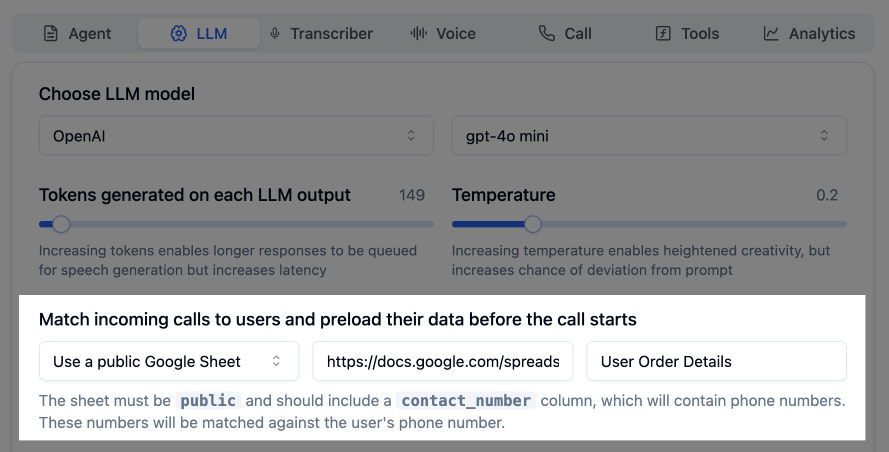 | contact\_number | first\_name | last\_name |
| --------------- | ----------- | ---------- |
| +11231237890 | Bruce | Wayne |
| +91012345678 | Bruce | Lee |
| +00021000000 | Satoshi | Nakamoto |
| +44999999007 | James | Bond |
Your Google Sheet can be updated at any time. Bolna agents automatically pick up the latest data in real time.
***
## Related Features
Configure inbound calling for your agents
Pass dynamic data to personalize conversations
Route inbound calls with IVR menus
| contact\_number | first\_name | last\_name |
| --------------- | ----------- | ---------- |
| +11231237890 | Bruce | Wayne |
| +91012345678 | Bruce | Lee |
| +00021000000 | Satoshi | Nakamoto |
| +44999999007 | James | Bond |
Your Google Sheet can be updated at any time. Bolna agents automatically pick up the latest data in real time.
***
## Related Features
Configure inbound calling for your agents
Pass dynamic data to personalize conversations
Route inbound calls with IVR menus