> ## Documentation Index
> Fetch the complete documentation index at: https://www.bolna.ai/docs/llms.txt
> Use this file to discover all available pages before exploring further.
# Graph Agents
> Build structured, multi-step voice AI conversations using a node-based graph instead of one large prompt.
A graph agent breaks a phone conversation into discrete **nodes**, each with its own purpose, instructions, and transition rules. Instead of one giant prompt that has to handle everything, you define exactly what the agent does at each step and exactly when it moves to the next one.
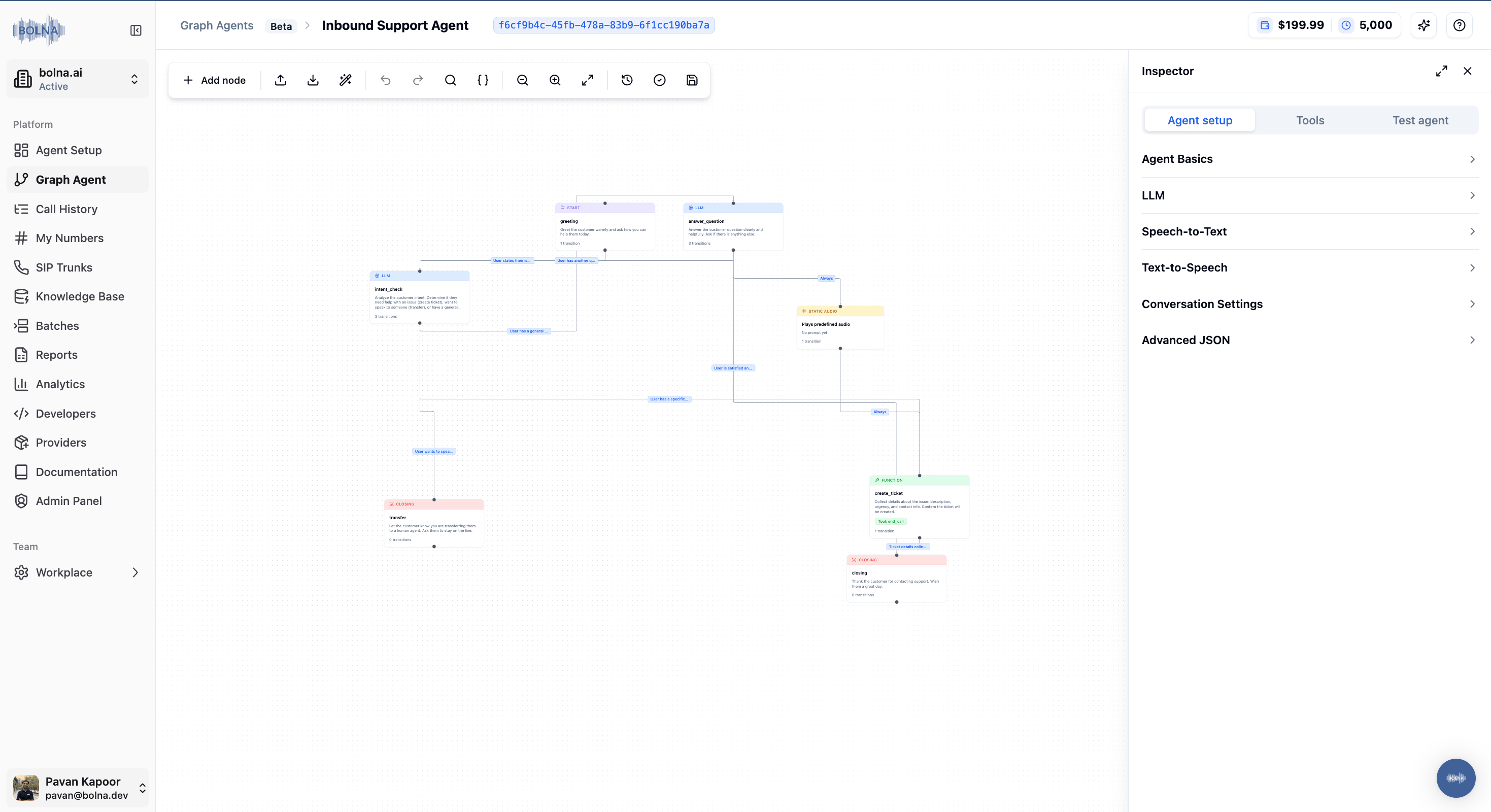 Conversations follow explicit paths. Every transition is a rule you defined.
When something breaks, you know which node failed and why.
Change one node without touching the rest of the flow.
Deterministic edges and static nodes skip the LLM entirely.
## When to use a graph agent
Pick a graph agent when the call has discrete stages with different objectives (greet, qualify, collect, confirm, close), or when you need deterministic transitions (time of day, retry count, external events). For a single-objective agent that just answers questions, a regular `simple_llm_agent` is enough.
***
## Core concepts
### Nodes
A node is one step in the conversation. Each node has one clear job.
| Field | Type | Description |
| ------------------------------ | ------ | ---------------------------------------------------------------------------------------------------- |
| `id` | string | Unique identifier. Referenced by edges and `current_node_id`. |
| `prompt` | string | Instruction given to the response LLM when the conversation is in this node. |
| `edges` | array | Possible transitions out of this node. |
| `examples` | object | Sample responses per language (`"en"`, `"hi"`). Guides tone and phrasing. |
| `node_type` | string | `"llm"` (default) or `"static"`. See [Static Nodes](/graph-agent/static-nodes). |
| `static_message` | string | Required when `node_type == "static"`. Pre-cached audio plays at runtime. |
| `repeat_after_silence_seconds` | number | Auto-replay the node after N seconds of user silence. Works on LLM and static nodes. |
| `function_call` | string | Forces the response LLM's `tool_choice` to this tool when the node is entered (e.g. transfer nodes). |
| `rag_config` | object | Optional per-node knowledge base. See [Tools & RAG](/graph-agent/tools-and-rag). |
### Edges
Edges define how the conversation moves from one node to the next.
```json theme={"system"}
{
"to_node_id": "order_status",
"condition": "Customer provides a valid order number"
}
```
If no edge matches, the agent stays on the current node and re-asks naturally. There are four edge types: LLM (default), expression, unconditional, and event. Full reference on [Edges & Routing](/graph-agent/edges-and-routing).
### Routing
After every customer message, a routing LLM evaluates the available LLM-typed edges on the current node and picks the best match.
Expression and unconditional edges are evaluated **before** the routing LLM runs. If a deterministic rule matches, the transition fires instantly with zero latency and zero cost. The routing LLM is only invoked when no deterministic rule matches.
***
## Where graph agent config lives
All graph-agent fields live inside `llm_agent`, nested under `tools_config` in your conversation task:
```
agent_config
└── tasks[]
└── tools_config
└── llm_agent ← graph agent config goes here
├── agent_type: "graph_agent"
├── agent_information
├── routing_instructions
├── current_node_id
└── nodes[]
```
### Top-level fields
| Field | Description |
| -------------------------- | ------------------------------------------------------------------------------------------------------------------------------------------------------------------------------------------- |
| `agent_type` | Must be `"graph_agent"` to enable the node-based flow. |
| `agent_information` | Global system prompt. Persona, language rules, guardrails. Applied to every node. |
| `routing_instructions` | Prompt given to the routing LLM. Prepended to every routing request. Supports `{variable}` substitution from `context_data`. |
| `current_node_id` | Starting node when a new call begins. |
| `nodes` | Array of all node objects. |
| `rag_config` | Optional global knowledge base. Nodes without their own `rag_config` fall back to this. See [Tools & RAG](/graph-agent/tools-and-rag). |
| `variable_types` | Optional map of `{variable: type}` that types values used in expression edges (`"string"`, `"number"`, `"boolean"`). See [Edges & Routing](/graph-agent/edges-and-routing#typed-variables). |
| `model` | Response LLM. Defaults to `gpt-4.1-mini`. |
| `routing_model` | Routing LLM. Defaults to `gpt-4.1-mini`. |
| `routing_max_tokens` | Cap on routing response tokens. Defaults: 250 (non-GPT-5), 150 (GPT-5). |
| `routing_reasoning_effort` | GPT-5 routing models only. `"minimal"` / `"low"` / `"medium"` / `"high"`. |
### `agent_information` is the identity layer
This prompt is applied to every node. Use it for persona, response rules (max sentence count, language switching), pronunciation rules, and hard guardrails.
`agent_information` is sent with every LLM call. Keep it focused. Save specifics for individual node prompts.
***
## Writing effective node prompts
A well-written `prompt` includes the node's purpose, the exact question to ask, validation rules, a fallback, and any voice formatting rules.
**Weak:**
```
Get the order number from the customer.
```
**Strong:**
```
Collect the customer's 10-digit order number.
ASK: 'Can you please share your 10-digit order number?'
VALIDATION:
- Accept only numeric input, exactly 10 digits.
- Expand spoken phrases: 'double four' becomes 'four four'.
- If the customer gives fewer or more digits, ask once more politely.
- After 2 failed attempts, offer to transfer to a live agent.
FORMAT: Confirm the number in groups of 3-3-4 with a short pause between groups.
Spell each digit as a word. Never use numerals in speech.
```
**One node, one job.** A node that collects an order number should only collect the order number. Don't also ask for the customer's name or call reason in the same node.
***
## Next steps
Edge types, expression operators, built-in variables, inline data extraction.
Pre-cached audio messages with auto-replay on user silence.
Drive transitions and proactive speech from external events via REST.
Call transfer, custom API tools, per-node knowledge bases.
Routing logs, common scenarios, and how to fix them.
Complete annotated JSON skeleton showing every feature end-to-end.
Conversations follow explicit paths. Every transition is a rule you defined.
When something breaks, you know which node failed and why.
Change one node without touching the rest of the flow.
Deterministic edges and static nodes skip the LLM entirely.
## When to use a graph agent
Pick a graph agent when the call has discrete stages with different objectives (greet, qualify, collect, confirm, close), or when you need deterministic transitions (time of day, retry count, external events). For a single-objective agent that just answers questions, a regular `simple_llm_agent` is enough.
***
## Core concepts
### Nodes
A node is one step in the conversation. Each node has one clear job.
| Field | Type | Description |
| ------------------------------ | ------ | ---------------------------------------------------------------------------------------------------- |
| `id` | string | Unique identifier. Referenced by edges and `current_node_id`. |
| `prompt` | string | Instruction given to the response LLM when the conversation is in this node. |
| `edges` | array | Possible transitions out of this node. |
| `examples` | object | Sample responses per language (`"en"`, `"hi"`). Guides tone and phrasing. |
| `node_type` | string | `"llm"` (default) or `"static"`. See [Static Nodes](/graph-agent/static-nodes). |
| `static_message` | string | Required when `node_type == "static"`. Pre-cached audio plays at runtime. |
| `repeat_after_silence_seconds` | number | Auto-replay the node after N seconds of user silence. Works on LLM and static nodes. |
| `function_call` | string | Forces the response LLM's `tool_choice` to this tool when the node is entered (e.g. transfer nodes). |
| `rag_config` | object | Optional per-node knowledge base. See [Tools & RAG](/graph-agent/tools-and-rag). |
### Edges
Edges define how the conversation moves from one node to the next.
```json theme={"system"}
{
"to_node_id": "order_status",
"condition": "Customer provides a valid order number"
}
```
If no edge matches, the agent stays on the current node and re-asks naturally. There are four edge types: LLM (default), expression, unconditional, and event. Full reference on [Edges & Routing](/graph-agent/edges-and-routing).
### Routing
After every customer message, a routing LLM evaluates the available LLM-typed edges on the current node and picks the best match.
Expression and unconditional edges are evaluated **before** the routing LLM runs. If a deterministic rule matches, the transition fires instantly with zero latency and zero cost. The routing LLM is only invoked when no deterministic rule matches.
***
## Where graph agent config lives
All graph-agent fields live inside `llm_agent`, nested under `tools_config` in your conversation task:
```
agent_config
└── tasks[]
└── tools_config
└── llm_agent ← graph agent config goes here
├── agent_type: "graph_agent"
├── agent_information
├── routing_instructions
├── current_node_id
└── nodes[]
```
### Top-level fields
| Field | Description |
| -------------------------- | ------------------------------------------------------------------------------------------------------------------------------------------------------------------------------------------- |
| `agent_type` | Must be `"graph_agent"` to enable the node-based flow. |
| `agent_information` | Global system prompt. Persona, language rules, guardrails. Applied to every node. |
| `routing_instructions` | Prompt given to the routing LLM. Prepended to every routing request. Supports `{variable}` substitution from `context_data`. |
| `current_node_id` | Starting node when a new call begins. |
| `nodes` | Array of all node objects. |
| `rag_config` | Optional global knowledge base. Nodes without their own `rag_config` fall back to this. See [Tools & RAG](/graph-agent/tools-and-rag). |
| `variable_types` | Optional map of `{variable: type}` that types values used in expression edges (`"string"`, `"number"`, `"boolean"`). See [Edges & Routing](/graph-agent/edges-and-routing#typed-variables). |
| `model` | Response LLM. Defaults to `gpt-4.1-mini`. |
| `routing_model` | Routing LLM. Defaults to `gpt-4.1-mini`. |
| `routing_max_tokens` | Cap on routing response tokens. Defaults: 250 (non-GPT-5), 150 (GPT-5). |
| `routing_reasoning_effort` | GPT-5 routing models only. `"minimal"` / `"low"` / `"medium"` / `"high"`. |
### `agent_information` is the identity layer
This prompt is applied to every node. Use it for persona, response rules (max sentence count, language switching), pronunciation rules, and hard guardrails.
`agent_information` is sent with every LLM call. Keep it focused. Save specifics for individual node prompts.
***
## Writing effective node prompts
A well-written `prompt` includes the node's purpose, the exact question to ask, validation rules, a fallback, and any voice formatting rules.
**Weak:**
```
Get the order number from the customer.
```
**Strong:**
```
Collect the customer's 10-digit order number.
ASK: 'Can you please share your 10-digit order number?'
VALIDATION:
- Accept only numeric input, exactly 10 digits.
- Expand spoken phrases: 'double four' becomes 'four four'.
- If the customer gives fewer or more digits, ask once more politely.
- After 2 failed attempts, offer to transfer to a live agent.
FORMAT: Confirm the number in groups of 3-3-4 with a short pause between groups.
Spell each digit as a word. Never use numerals in speech.
```
**One node, one job.** A node that collects an order number should only collect the order number. Don't also ask for the customer's name or call reason in the same node.
***
## Next steps
Edge types, expression operators, built-in variables, inline data extraction.
Pre-cached audio messages with auto-replay on user silence.
Drive transitions and proactive speech from external events via REST.
Call transfer, custom API tools, per-node knowledge bases.
Routing logs, common scenarios, and how to fix them.
Complete annotated JSON skeleton showing every feature end-to-end.