> ## Documentation Index
> Fetch the complete documentation index at: https://www.bolna.ai/docs/llms.txt
> Use this file to discover all available pages before exploring further.
# Serving Twilio On Prem
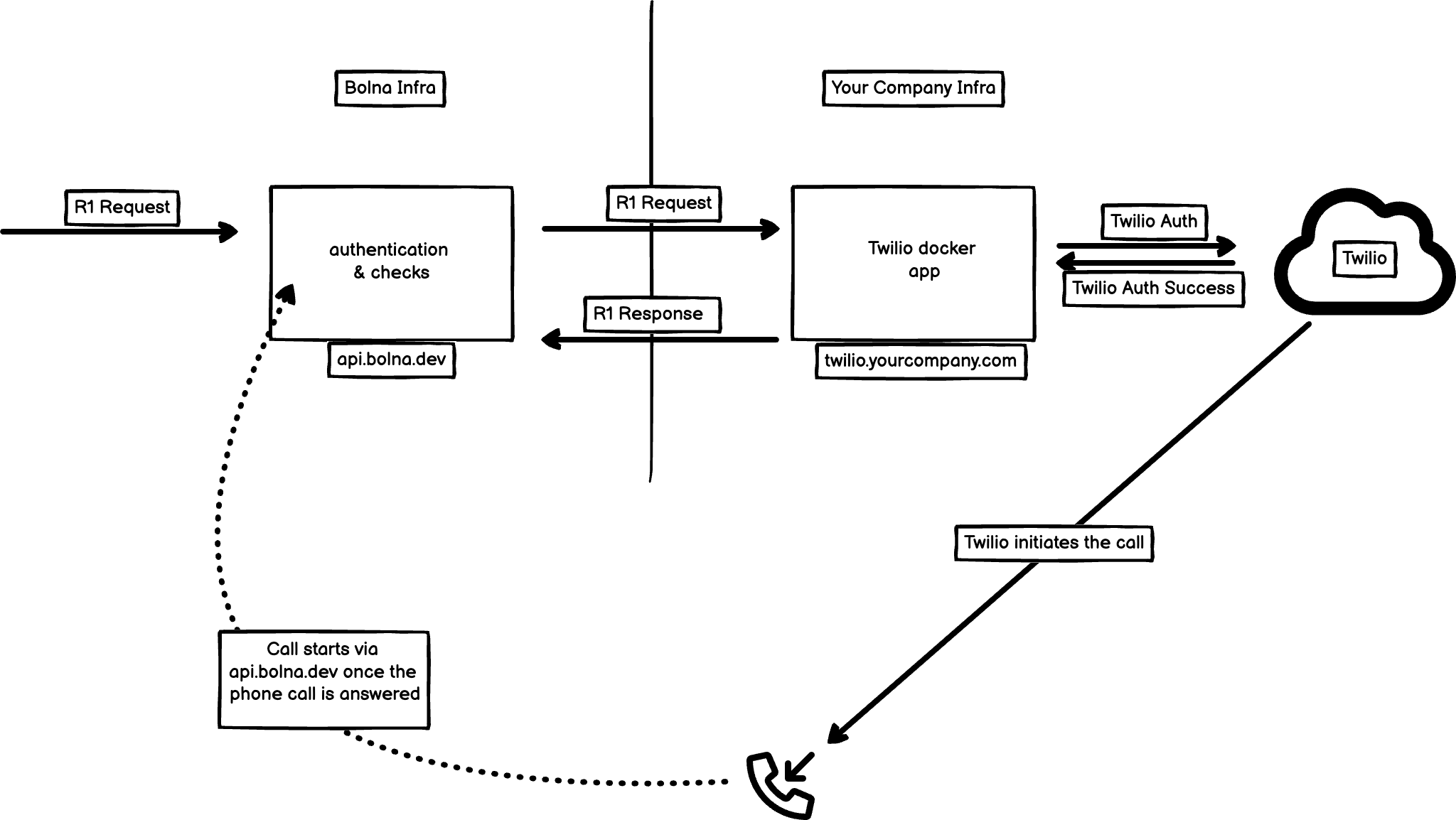
> Enterprises can now connect their Twilio infrastructure securely to Bolna
Bolna will provide access to docker image for hosting a Twilio application which you can deploy and connect with your Twilio account in your own infrastructure (AWS/GCP/DigitalOcean etc.)
 ## Login to docker
Use the docker login command to access the docker images: `docker login -u bolnahq`.
You will be given a password for authentication.
## Inject Twilio credentials as environment variables
Create a `.env` file:
```.env theme={"system"}
# Bolna API and Websocket hosts
BOLNA_HOST=https://api.bolna.ai
BOLNA_WS_URL=wss://ws.bolna.dev
# Twilio credentials
TWILIO_ACCOUNT_SID=
TWILIO_AUTH_TOKEN=
TWILIO_API_KEY=
TWILIO_API_SECRET=
# Twilio external auth URL
TWILIO_CREDENTIALS_FROM_URL=
# Call recording enable/disable
RECORD_CALL=True
RECORDING_CHANNELS=dual
```
Bolna will never have access to the recordings.
This `.env` file will be used to inject the variables while running the docker image.
## Starting docker
The following example illustrates on how to start the docker image using docker compose using the `.env` file in the same directory. You can have any other method of starting docker.
```docker-compose.yml theme={"system"}
services:
twilio-app:
image: bolnahq/twilio-app:1.0.0
ports:
- "8081:5000"
env_file:
- .env
```
The `twilio-app` service uses the `bolnahq/twilio-app:1.0.0` image which runs on `5000` port.
It then binds the container and the host machine to the exposed port, `8081`. You can specify any other port to bind the container with the host machine.
## Login to docker
Use the docker login command to access the docker images: `docker login -u bolnahq`.
You will be given a password for authentication.
## Inject Twilio credentials as environment variables
Create a `.env` file:
```.env theme={"system"}
# Bolna API and Websocket hosts
BOLNA_HOST=https://api.bolna.ai
BOLNA_WS_URL=wss://ws.bolna.dev
# Twilio credentials
TWILIO_ACCOUNT_SID=
TWILIO_AUTH_TOKEN=
TWILIO_API_KEY=
TWILIO_API_SECRET=
# Twilio external auth URL
TWILIO_CREDENTIALS_FROM_URL=
# Call recording enable/disable
RECORD_CALL=True
RECORDING_CHANNELS=dual
```
Bolna will never have access to the recordings.
This `.env` file will be used to inject the variables while running the docker image.
## Starting docker
The following example illustrates on how to start the docker image using docker compose using the `.env` file in the same directory. You can have any other method of starting docker.
```docker-compose.yml theme={"system"}
services:
twilio-app:
image: bolnahq/twilio-app:1.0.0
ports:
- "8081:5000"
env_file:
- .env
```
The `twilio-app` service uses the `bolnahq/twilio-app:1.0.0` image which runs on `5000` port.
It then binds the container and the host machine to the exposed port, `8081`. You can specify any other port to bind the container with the host machine.