> ## Documentation Index
> Fetch the complete documentation index at: https://www.bolna.ai/docs/llms.txt
> Use this file to discover all available pages before exploring further.
# Receive Bolna Voice AI call updates
> Receive real-time call status updates from Bolna Voice AI using webhooks. Automate workflows, update CRM, and sync data with your systems.
## What are Webhooks?
Webhooks allow you to receive real-time call data from Bolna as call status updates happen. When a call status changes, Bolna sends an HTTP POST request to your server with the execution data.
 ***
## Setting Up Webhooks
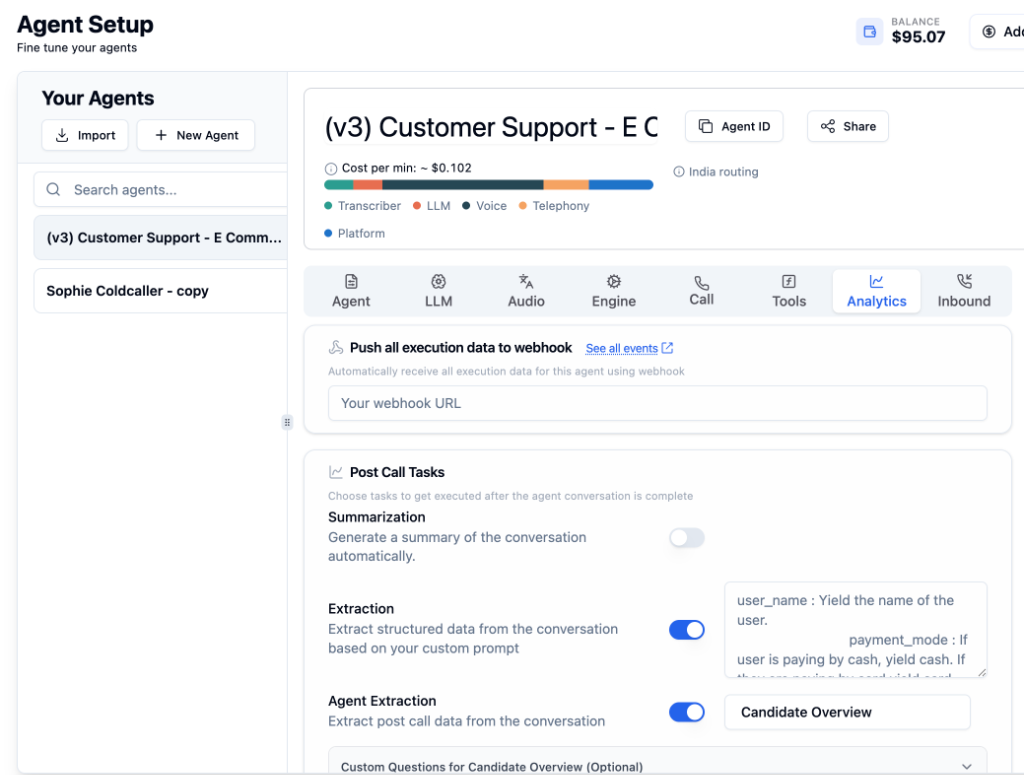
Open your agent and navigate to the **[Analytics Tab](/agent-setup/analytics-tab)**.
In the **"Push all execution data to webhook"** section, enter your webhook endpoint URL.
Click **Save agent** to activate the webhook.
**Your webhook endpoint must be publicly accessible** and able to receive HTTP POST requests. Bolna will POST data to this URL as call status updates.
***
## IP Whitelist
Webhooks are sent from the following IP address. **Whitelist this IP** on your server to ensure you receive all webhook events.
```
13.203.39.153
```
***
## Webhook Payload
The webhook payload is the **same structure as the Raw Call Data** you see in [Call History](/call-history). It matches the [Get Execution API](/api-reference/executions/get_execution) response format.
As call status updates (scheduled → queued → in-progress → completed), Bolna sends POST requests to your webhook with the current execution data.
Test your webhook integration using [webhook.site](https://webhook.site) before implementing a production server.
***
## Pre-call Webhooks
The same payload shape is reused for **pre-call webhooks** — notifications fired by a [custom function tool](/tool-calling/custom-function-calls#pre-call-webhooks) or the [Transfer Call tool](/tool-calling/transfer-calls#pre-call-webhook) *before* the tool runs (for example, to send a transfer reason before a call is transferred).
If a tool sets a `pre_call_webhook_param` without its own `pre_call_webhook_url`, the pre-call webhook is sent to **this agent-level Webhook URL**. The endpoint you configure here may therefore receive in-progress pre-call webhooks in addition to your post-call execution webhooks. Distinguish them by the `in-progress` `status` and the extra fields from the tool's `pre_call_webhook_param`.
Learn more in the [Pre-call Webhooks](/tool-calling/custom-function-calls#pre-call-webhooks) section of the Custom Functions guide, or the [Transfer Call](/tool-calling/transfer-calls#pre-call-webhook) guide.
***
## Use Cases
Automatically update customer records after each call
Build live dashboards with call metrics and analytics
Trigger actions based on call outcomes
Log all call data to your preferred storage system
***
## Call Statuses
Learn about all valid call status types in Bolna Voice AI
***
## Next Steps
Configure post-call extraction and summarization
View raw call data and recordings
Understand the execution data structure
Automate outbound calling campaigns
***
## Setting Up Webhooks
Open your agent and navigate to the **[Analytics Tab](/agent-setup/analytics-tab)**.
In the **"Push all execution data to webhook"** section, enter your webhook endpoint URL.
Click **Save agent** to activate the webhook.
**Your webhook endpoint must be publicly accessible** and able to receive HTTP POST requests. Bolna will POST data to this URL as call status updates.
***
## IP Whitelist
Webhooks are sent from the following IP address. **Whitelist this IP** on your server to ensure you receive all webhook events.
```
13.203.39.153
```
***
## Webhook Payload
The webhook payload is the **same structure as the Raw Call Data** you see in [Call History](/call-history). It matches the [Get Execution API](/api-reference/executions/get_execution) response format.
As call status updates (scheduled → queued → in-progress → completed), Bolna sends POST requests to your webhook with the current execution data.
Test your webhook integration using [webhook.site](https://webhook.site) before implementing a production server.
***
## Pre-call Webhooks
The same payload shape is reused for **pre-call webhooks** — notifications fired by a [custom function tool](/tool-calling/custom-function-calls#pre-call-webhooks) or the [Transfer Call tool](/tool-calling/transfer-calls#pre-call-webhook) *before* the tool runs (for example, to send a transfer reason before a call is transferred).
If a tool sets a `pre_call_webhook_param` without its own `pre_call_webhook_url`, the pre-call webhook is sent to **this agent-level Webhook URL**. The endpoint you configure here may therefore receive in-progress pre-call webhooks in addition to your post-call execution webhooks. Distinguish them by the `in-progress` `status` and the extra fields from the tool's `pre_call_webhook_param`.
Learn more in the [Pre-call Webhooks](/tool-calling/custom-function-calls#pre-call-webhooks) section of the Custom Functions guide, or the [Transfer Call](/tool-calling/transfer-calls#pre-call-webhook) guide.
***
## Use Cases
Automatically update customer records after each call
Build live dashboards with call metrics and analytics
Trigger actions based on call outcomes
Log all call data to your preferred storage system
***
## Call Statuses
Learn about all valid call status types in Bolna Voice AI
***
## Next Steps
Configure post-call extraction and summarization
View raw call data and recordings
Understand the execution data structure
Automate outbound calling campaigns