> ## Documentation Index
> Fetch the complete documentation index at: https://www.bolna.ai/docs/llms.txt
> Use this file to discover all available pages before exploring further.
# Set Up Your SIP Trunk on Bolna
> Step-by-step guide to configure your SIP provider and create a SIP trunk on Bolna for AI-powered voice calls using your own telephony infrastructure.
## Prerequisites
Before creating a trunk in Bolna, configure the following on your SIP trunk provider's portal.
### 1. Whitelist Bolna's IP Address
Bolna's SIP media server IP is:
```
13.200.45.61
```
You **must** whitelist this IP on your SIP trunk so that Bolna's outbound SIP INVITE and RTP packets are accepted. In most provider portals this is called an **IP whitelist**, **allowed IP**, **trusted IP**, or **ACL**.
If you are using `ip-based` authentication, this is the IP you will add as your identifier -- Bolna will be recognized solely by its source IP.
### 2. Set the Origination URL (for inbound calls)
If you want calls to your DID numbers to ring through to Bolna, point your SIP trunk's **origination URI** to one of the following, depending on the transport you've chosen for the trunk:
| Trunk transport | Origination URI |
| ------------------------- | ------------------------------------- |
| UDP or TCP | `sip:sip.bolna.ai:5060` |
| TLS (encrypted signaling) | `sip:sip.bolna.ai:5061;transport=tls` |
In your provider portal this is usually labeled as:
* **Origination URI** or **Origination URL**
* **Inbound SIP URI**
* **SIP Termination Point**
* **Route to** / **Forward to**
Set this for every DID number (or for the trunk as a whole, depending on your provider) that you intend to route to Bolna.
If your provider only accepts an IP, use `sip:13.200.45.61:5060` for UDP/TCP. TLS inbound requires a hostname so the carrier can validate Bolna's TLS certificate.
### 3. Codec Configuration
Bolna's SIP layer uses **G.711 u-law (ulaw)** audio by default. Ensure your trunk allows ulaw, or at minimum alaw, in its codec preferences. G.729 and other compressed codecs are not recommended.
### 4. Decide on media encryption (optional)
Bolna supports two media modes for BYOT trunks:
* **Plain RTP (default)** -- works on every transport. No setup needed on your side.
* **SDES (encrypted RTP)** -- supported on the **TLS** transport only, since the encryption keys travel inside the SIP signaling channel. To use SDES, your carrier must also have SDES/SRTP enabled on its end.
If you're not sure, leave this on plain RTP -- most production trunks run unencrypted at the media layer, and you can switch later by editing the trunk.
***
## Create your trunk via the dashboard
The dashboard is the easiest way to onboard a trunk. If you'd rather use the API, skip ahead to [Or via API](#or-via-api).
### 1. Open SIP Trunks → New Trunk
In the dashboard, navigate to **SIP Trunks** and click **New Trunk**.
### 2. Fill in the basics
* **Name** -- a label only you see, e.g. `Twilio Production`.
* **Provider** -- the carrier (e.g. `twilio`, `plivo`, `telnyx`, `vonage`, `custom`).
* **Auth type** -- pick **Username / Password** or **IP-based**, then fill in the matching fields.
* **Gateways** -- add at least one gateway. Each row needs a hostname and a port; default port is `5060` for UDP/TCP and `5061` for TLS.
### 3. Open Advanced Settings
Expand **Advanced Settings** to choose your transport, codecs, and media encryption.
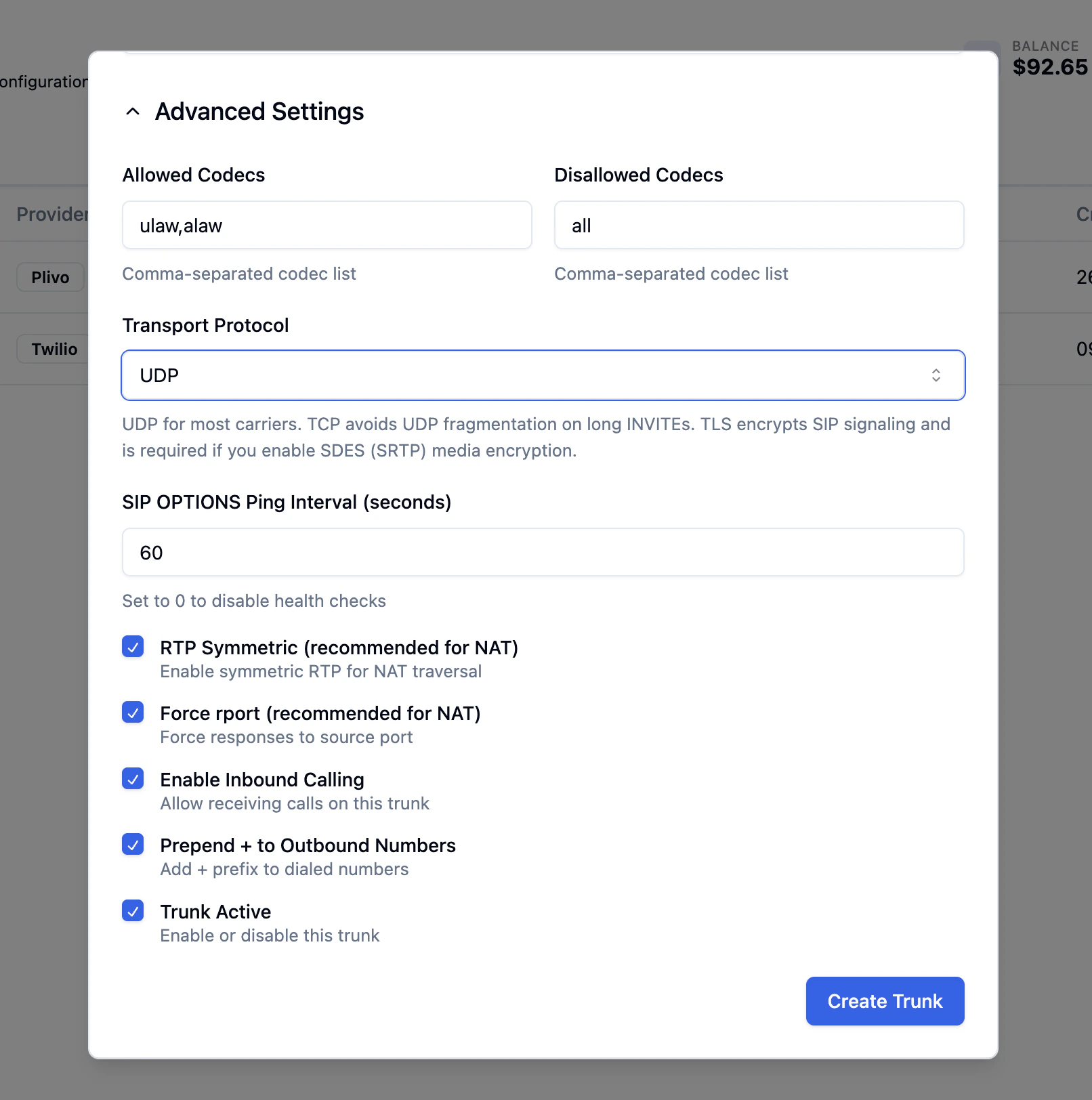 #### Transport Protocol
Pick the SIP signaling transport:
* **UDP** -- the default, used by most carriers.
* **TCP** -- avoids UDP fragmentation when SIP INVITEs carry long headers (multiple Diversion / P-Asserted-Identity / Route entries). Pick this if outbound calls intermittently fail to negotiate media.
* **TLS (encrypted signaling)** -- encrypts the SIP signaling channel. Required if you want **SDES (SRTP)** media encryption. Use port `5061` on your gateways.
#### Media Encryption (TLS only)
When you set transport to **TLS**, a **Media Encryption** field appears. Pick **SDES (RTP/SAVP, AES-128)** to encrypt the audio stream end-to-end with your carrier. Leaving it on **No** keeps media as plain RTP even on a TLS-signaled trunk.
#### Transport Protocol
Pick the SIP signaling transport:
* **UDP** -- the default, used by most carriers.
* **TCP** -- avoids UDP fragmentation when SIP INVITEs carry long headers (multiple Diversion / P-Asserted-Identity / Route entries). Pick this if outbound calls intermittently fail to negotiate media.
* **TLS (encrypted signaling)** -- encrypts the SIP signaling channel. Required if you want **SDES (SRTP)** media encryption. Use port `5061` on your gateways.
#### Media Encryption (TLS only)
When you set transport to **TLS**, a **Media Encryption** field appears. Pick **SDES (RTP/SAVP, AES-128)** to encrypt the audio stream end-to-end with your carrier. Leaving it on **No** keeps media as plain RTP even on a TLS-signaled trunk.
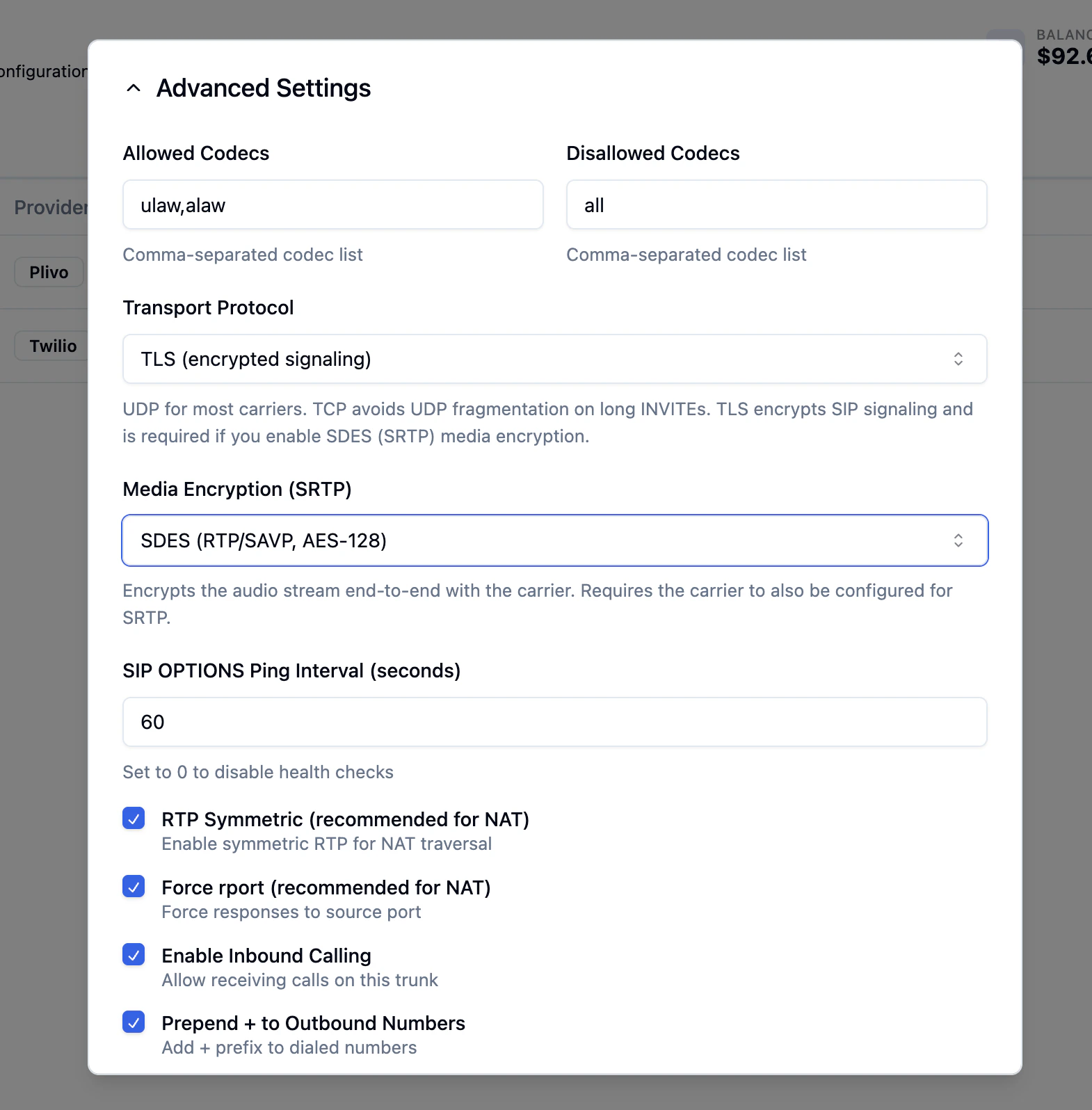 SDES requires the carrier to also be configured for SRTP. Check this in your provider's portal before enabling it.
#### Other advanced fields
* **Allowed / Disallowed Codecs** -- defaults `ulaw,alaw` and `all` are correct for most setups.
* **SIP OPTIONS Ping Interval** -- how often Bolna pings the carrier for trunk health. Default `60` seconds; set `0` to disable.
* **RTP Symmetric / Force rport** -- keep enabled for NAT traversal.
* **Enable Inbound Calling** -- turn on if you want Bolna to receive calls on this trunk.
* **Prepend + to Outbound Numbers** -- typically on (E.164 dialing).
* **Trunk Active** -- the master switch; uncheck to pause the trunk.
### 4. Click Create Trunk
The trunk is created with a generated ID. Use that ID when adding phone numbers (next section) and when wiring inbound or outbound calling to your AI agents.
***
## Or via API
Use the [Create SIP Trunk API](/api-reference/sip-trunks/create) to register your trunk programmatically.
### Example -- Twilio Elastic SIP Trunk (userpass)
```bash request theme={"system"}
curl -X POST https://api.bolna.ai/sip-trunks/trunks \
-H "Authorization: Bearer " \
-H "Content-Type: application/json" \
-d '{
"name": "Twilio Production",
"provider": "twilio",
"description": "Main Twilio Elastic SIP trunk",
"auth_type": "userpass",
"auth_username": "",
"auth_password": "",
"gateways": [
{
"gateway_address": "your-trunk.pstn.twilio.com",
"port": 5060,
"priority": 1
}
],
"transport": "transport-udp",
"allow": "ulaw,alaw",
"disallow": "all",
"inbound_enabled": true,
"outbound_leading_plus_enabled": true
}'
```
```json response theme={"system"}
{
"id": "01HQXYZ123ABC456DEF",
"name": "Twilio Production",
"provider": "twilio",
"description": "Main Twilio Elastic SIP trunk",
"auth_type": "userpass",
"auth_username": "",
"gateways": [
{
"id": "01HQXYZ111AAA111BBB",
"gateway_address": "your-trunk.pstn.twilio.com",
"port": 5060,
"priority": 1,
"created_at": "2026-05-09T10:00:00Z"
}
],
"ip_identifiers": [],
"phone_numbers": [],
"allow": "ulaw,alaw",
"disallow": "all",
"transport": "transport-udp",
"direct_media": false,
"rtp_symmetric": true,
"force_rport": true,
"media_encryption": "no",
"media_encryption_optimistic": false,
"qualify_frequency": 60,
"inbound_enabled": true,
"outbound_leading_plus_enabled": true,
"is_active": true,
"created_at": "2026-05-09T10:00:00Z",
"updated_at": "2026-05-09T10:00:00Z"
}
```
### Example -- Plivo Elastic SIP Trunk (ip-based)
```bash request theme={"system"}
curl -X POST https://api.bolna.ai/sip-trunks/trunks \
-H "Authorization: Bearer " \
-H "Content-Type: application/json" \
-d '{
"name": "Plivo Elastic Trunk",
"provider": "plivo",
"auth_type": "ip-based",
"gateways": [
{
"gateway_address": "21467306465797919.zt.plivo.com",
"port": 5060,
"priority": 1
}
],
"ip_identifiers": [
{ "ip_address": "15.207.90.192/31" },
{ "ip_address": "204.89.151.128/27" },
{ "ip_address": "13.52.9.0/25" }
],
"transport": "transport-udp",
"inbound_enabled": true
}'
```
```json response theme={"system"}
{
"id": "01HQXYZ789GHI012JKL",
"name": "Plivo Elastic Trunk",
"provider": "plivo",
"auth_type": "ip-based",
"gateways": [
{
"id": "01HQXYZ222BBB222CCC",
"gateway_address": "21467306465797919.zt.plivo.com",
"port": 5060,
"priority": 1,
"created_at": "2026-05-09T10:00:00Z"
}
],
"ip_identifiers": [
{ "ip_address": "15.207.90.192/31" },
{ "ip_address": "204.89.151.128/27" },
{ "ip_address": "13.52.9.0/25" }
],
"phone_numbers": [],
"transport": "transport-udp",
"media_encryption": "no",
"media_encryption_optimistic": false,
"is_active": true,
"inbound_enabled": true,
"created_at": "2026-05-09T10:00:00Z",
"updated_at": "2026-05-09T10:00:00Z"
}
```
### Example -- Twilio Elastic SIP Trunk, TLS + SDES (encrypted)
```bash request theme={"system"}
curl -X POST https://api.bolna.ai/sip-trunks/trunks \
-H "Authorization: Bearer " \
-H "Content-Type: application/json" \
-d '{
"name": "Twilio Production (encrypted)",
"provider": "twilio",
"auth_type": "userpass",
"auth_username": "",
"auth_password": "",
"gateways": [
{
"gateway_address": "your-trunk.pstn.twilio.com",
"port": 5061,
"priority": 1
}
],
"transport": "transport-tls",
"media_encryption": "sdes",
"media_encryption_optimistic": false,
"allow": "ulaw,alaw",
"disallow": "all",
"inbound_enabled": true
}'
```
```json response theme={"system"}
{
"id": "01HQXYZ555TLS888SDES",
"name": "Twilio Production (encrypted)",
"provider": "twilio",
"auth_type": "userpass",
"gateways": [
{
"id": "01HQXYZ333CCC333DDD",
"gateway_address": "your-trunk.pstn.twilio.com",
"port": 5061,
"priority": 1,
"created_at": "2026-05-09T10:00:00Z"
}
],
"transport": "transport-tls",
"media_encryption": "sdes",
"media_encryption_optimistic": false,
"inbound_enabled": true,
"is_active": true,
"created_at": "2026-05-09T10:00:00Z",
"updated_at": "2026-05-09T10:00:00Z"
}
```
Save the `id` field from the response -- this is your **trunk ID** used in all subsequent API requests.
***
## Add Phone Numbers to Your Trunk
After creating a trunk, add your DID phone numbers using the [Add Phone Number API](/api-reference/sip-trunks/add_number).
```bash request theme={"system"}
curl -X POST https://api.bolna.ai/sip-trunks/trunks/01HQXYZ123ABC456DEF/numbers \
-H "Authorization: Bearer " \
-H "Content-Type: application/json" \
-d '{
"phone_number": "919876543210",
"name": "Mumbai Support Line"
}'
```
```json response theme={"system"}
{
"id": "01HQNUMBER111222333",
"phone_number": "919876543210",
"byot_trunk_id": "01HQXYZ123ABC456DEF",
"telephony_provider": "sip-trunk",
"deleted": false,
"created_at": "2026-05-09T10:05:00Z",
"updated_at": "2026-05-09T10:05:00Z"
}
```
Save the `id` field -- this is the **phone number ID** used when setting up inbound call routing or making outbound calls.
**Phone number format:** Bolna stores the number exactly as provided. When matching inbound calls, the platform performs a flexible lookup that checks both the number with and without a `+` prefix. Use a consistent format across your trunk and inbound DID configuration.
***
## Create Trunk field reference
| Field | Type | Required | Default | Description |
| ------------------------------- | ------- | ----------- | ----------------- | ----------------------------------------------------------------------------------------------------------------------------------- |
| `name` | string | **Yes** | -- | Human-readable label. Must be unique per account. |
| `provider` | string | **Yes** | -- | SIP provider name (e.g. `"twilio"`, `"plivo"`, `"telnyx"`, `"vonage"`, `"custom"`). |
| `description` | string | No | `null` | Optional description for internal reference. |
| `auth_type` | string | **Yes** | -- | `"userpass"` or `"ip-based"`. |
| `auth_username` | string | Conditional | `null` | Required when `auth_type` is `"userpass"`. |
| `auth_password` | string | Conditional | `null` | Required when `auth_type` is `"userpass"`. |
| `gateways` | array | **Yes** | -- | At least one gateway. Each has `gateway_address` (required), `port` (default `5060`, use `5061` for TLS), `priority` (default `1`). |
| `ip_identifiers` | array | Conditional | `[]` | Required when `auth_type` is `"ip-based"`. List of `{ "ip_address": "..." }` objects. |
| `allow` | string | No | `"ulaw,alaw"` | Comma-separated codecs to allow. Always include `ulaw`. |
| `disallow` | string | No | `"all"` | Comma-separated codecs to disallow. |
| `inbound_enabled` | boolean | No | `false` | Set `true` to receive inbound calls. |
| `outbound_leading_plus_enabled` | boolean | No | `true` | Prepend `+` to outbound dialed numbers. |
| `transport` | enum | No | `"transport-udp"` | One of `"transport-udp"`, `"transport-tcp"`, `"transport-tls"`. |
| `media_encryption` | enum | No | `"no"` | One of `"no"`, `"sdes"`. `"sdes"` requires `transport="transport-tls"`. |
| `media_encryption_optimistic` | boolean | No | `false` | When `media_encryption="sdes"`, fall back to clear RTP if the carrier does not offer crypto in its SDP. |
| `direct_media` | boolean | No | `false` | RTP routed directly between caller and callee. Keep `false`. |
| `rtp_symmetric` | boolean | No | `true` | Symmetric RTP. Required for NAT. |
| `force_rport` | boolean | No | `true` | Force responses to source port. Required for NAT. |
| `qualify_frequency` | integer | No | `60` | SIP OPTIONS ping interval in seconds. `0` to disable. |
| `phone_numbers` | array | No | `[]` | Optional phone numbers to add at creation time. |
***
## Troubleshooting
### Inbound calls connect but the caller hears silence (one-way audio)
The most common cause is an SRTP mismatch between Bolna and your carrier. If the trunk has `media_encryption="sdes"` but the carrier has SRTP disabled (or vice versa), the SIP call sets up but the media path never establishes.
* Confirm SRTP is enabled on your provider's side.
* If you need a quick test, set `media_encryption_optimistic=true` -- Bolna will fall back to clear RTP if the carrier does not offer crypto in its SDP.
* If you don't need encrypted media, set `media_encryption="no"` and use UDP or TCP transport.
### `422` from Create / Update with `media_encryption='sdes' requires transport='transport-tls'`
SDES exchanges its keys inside SDP, so it must travel over an encrypted signaling channel. Either:
* Switch `transport` to `"transport-tls"` (and update the gateway port to `5061`), or
* Set `media_encryption` back to `"no"`.
### Outbound INVITE fails or rings forever on a particular carrier
If your carrier sends large SIP headers (long Diversion, P-Asserted-Identity, multiple Route headers), the INVITE may exceed the UDP MTU and get fragmented or dropped silently.
* Switch `transport` to `"transport-tcp"` -- this avoids UDP fragmentation. You don't need TLS for this; TCP alone is enough.
***
## Next steps
* [Set up inbound calls](/sip-trunking/byot-inbound-calls) to route incoming calls to your AI agents
* [Make outbound calls](/sip-trunking/byot-outbound-calls) from your SIP trunk numbers
* [Manage your trunk](/api-reference/sip-trunks/overview) using the full SIP Trunk API
SDES requires the carrier to also be configured for SRTP. Check this in your provider's portal before enabling it.
#### Other advanced fields
* **Allowed / Disallowed Codecs** -- defaults `ulaw,alaw` and `all` are correct for most setups.
* **SIP OPTIONS Ping Interval** -- how often Bolna pings the carrier for trunk health. Default `60` seconds; set `0` to disable.
* **RTP Symmetric / Force rport** -- keep enabled for NAT traversal.
* **Enable Inbound Calling** -- turn on if you want Bolna to receive calls on this trunk.
* **Prepend + to Outbound Numbers** -- typically on (E.164 dialing).
* **Trunk Active** -- the master switch; uncheck to pause the trunk.
### 4. Click Create Trunk
The trunk is created with a generated ID. Use that ID when adding phone numbers (next section) and when wiring inbound or outbound calling to your AI agents.
***
## Or via API
Use the [Create SIP Trunk API](/api-reference/sip-trunks/create) to register your trunk programmatically.
### Example -- Twilio Elastic SIP Trunk (userpass)
```bash request theme={"system"}
curl -X POST https://api.bolna.ai/sip-trunks/trunks \
-H "Authorization: Bearer " \
-H "Content-Type: application/json" \
-d '{
"name": "Twilio Production",
"provider": "twilio",
"description": "Main Twilio Elastic SIP trunk",
"auth_type": "userpass",
"auth_username": "",
"auth_password": "",
"gateways": [
{
"gateway_address": "your-trunk.pstn.twilio.com",
"port": 5060,
"priority": 1
}
],
"transport": "transport-udp",
"allow": "ulaw,alaw",
"disallow": "all",
"inbound_enabled": true,
"outbound_leading_plus_enabled": true
}'
```
```json response theme={"system"}
{
"id": "01HQXYZ123ABC456DEF",
"name": "Twilio Production",
"provider": "twilio",
"description": "Main Twilio Elastic SIP trunk",
"auth_type": "userpass",
"auth_username": "",
"gateways": [
{
"id": "01HQXYZ111AAA111BBB",
"gateway_address": "your-trunk.pstn.twilio.com",
"port": 5060,
"priority": 1,
"created_at": "2026-05-09T10:00:00Z"
}
],
"ip_identifiers": [],
"phone_numbers": [],
"allow": "ulaw,alaw",
"disallow": "all",
"transport": "transport-udp",
"direct_media": false,
"rtp_symmetric": true,
"force_rport": true,
"media_encryption": "no",
"media_encryption_optimistic": false,
"qualify_frequency": 60,
"inbound_enabled": true,
"outbound_leading_plus_enabled": true,
"is_active": true,
"created_at": "2026-05-09T10:00:00Z",
"updated_at": "2026-05-09T10:00:00Z"
}
```
### Example -- Plivo Elastic SIP Trunk (ip-based)
```bash request theme={"system"}
curl -X POST https://api.bolna.ai/sip-trunks/trunks \
-H "Authorization: Bearer " \
-H "Content-Type: application/json" \
-d '{
"name": "Plivo Elastic Trunk",
"provider": "plivo",
"auth_type": "ip-based",
"gateways": [
{
"gateway_address": "21467306465797919.zt.plivo.com",
"port": 5060,
"priority": 1
}
],
"ip_identifiers": [
{ "ip_address": "15.207.90.192/31" },
{ "ip_address": "204.89.151.128/27" },
{ "ip_address": "13.52.9.0/25" }
],
"transport": "transport-udp",
"inbound_enabled": true
}'
```
```json response theme={"system"}
{
"id": "01HQXYZ789GHI012JKL",
"name": "Plivo Elastic Trunk",
"provider": "plivo",
"auth_type": "ip-based",
"gateways": [
{
"id": "01HQXYZ222BBB222CCC",
"gateway_address": "21467306465797919.zt.plivo.com",
"port": 5060,
"priority": 1,
"created_at": "2026-05-09T10:00:00Z"
}
],
"ip_identifiers": [
{ "ip_address": "15.207.90.192/31" },
{ "ip_address": "204.89.151.128/27" },
{ "ip_address": "13.52.9.0/25" }
],
"phone_numbers": [],
"transport": "transport-udp",
"media_encryption": "no",
"media_encryption_optimistic": false,
"is_active": true,
"inbound_enabled": true,
"created_at": "2026-05-09T10:00:00Z",
"updated_at": "2026-05-09T10:00:00Z"
}
```
### Example -- Twilio Elastic SIP Trunk, TLS + SDES (encrypted)
```bash request theme={"system"}
curl -X POST https://api.bolna.ai/sip-trunks/trunks \
-H "Authorization: Bearer " \
-H "Content-Type: application/json" \
-d '{
"name": "Twilio Production (encrypted)",
"provider": "twilio",
"auth_type": "userpass",
"auth_username": "",
"auth_password": "",
"gateways": [
{
"gateway_address": "your-trunk.pstn.twilio.com",
"port": 5061,
"priority": 1
}
],
"transport": "transport-tls",
"media_encryption": "sdes",
"media_encryption_optimistic": false,
"allow": "ulaw,alaw",
"disallow": "all",
"inbound_enabled": true
}'
```
```json response theme={"system"}
{
"id": "01HQXYZ555TLS888SDES",
"name": "Twilio Production (encrypted)",
"provider": "twilio",
"auth_type": "userpass",
"gateways": [
{
"id": "01HQXYZ333CCC333DDD",
"gateway_address": "your-trunk.pstn.twilio.com",
"port": 5061,
"priority": 1,
"created_at": "2026-05-09T10:00:00Z"
}
],
"transport": "transport-tls",
"media_encryption": "sdes",
"media_encryption_optimistic": false,
"inbound_enabled": true,
"is_active": true,
"created_at": "2026-05-09T10:00:00Z",
"updated_at": "2026-05-09T10:00:00Z"
}
```
Save the `id` field from the response -- this is your **trunk ID** used in all subsequent API requests.
***
## Add Phone Numbers to Your Trunk
After creating a trunk, add your DID phone numbers using the [Add Phone Number API](/api-reference/sip-trunks/add_number).
```bash request theme={"system"}
curl -X POST https://api.bolna.ai/sip-trunks/trunks/01HQXYZ123ABC456DEF/numbers \
-H "Authorization: Bearer " \
-H "Content-Type: application/json" \
-d '{
"phone_number": "919876543210",
"name": "Mumbai Support Line"
}'
```
```json response theme={"system"}
{
"id": "01HQNUMBER111222333",
"phone_number": "919876543210",
"byot_trunk_id": "01HQXYZ123ABC456DEF",
"telephony_provider": "sip-trunk",
"deleted": false,
"created_at": "2026-05-09T10:05:00Z",
"updated_at": "2026-05-09T10:05:00Z"
}
```
Save the `id` field -- this is the **phone number ID** used when setting up inbound call routing or making outbound calls.
**Phone number format:** Bolna stores the number exactly as provided. When matching inbound calls, the platform performs a flexible lookup that checks both the number with and without a `+` prefix. Use a consistent format across your trunk and inbound DID configuration.
***
## Create Trunk field reference
| Field | Type | Required | Default | Description |
| ------------------------------- | ------- | ----------- | ----------------- | ----------------------------------------------------------------------------------------------------------------------------------- |
| `name` | string | **Yes** | -- | Human-readable label. Must be unique per account. |
| `provider` | string | **Yes** | -- | SIP provider name (e.g. `"twilio"`, `"plivo"`, `"telnyx"`, `"vonage"`, `"custom"`). |
| `description` | string | No | `null` | Optional description for internal reference. |
| `auth_type` | string | **Yes** | -- | `"userpass"` or `"ip-based"`. |
| `auth_username` | string | Conditional | `null` | Required when `auth_type` is `"userpass"`. |
| `auth_password` | string | Conditional | `null` | Required when `auth_type` is `"userpass"`. |
| `gateways` | array | **Yes** | -- | At least one gateway. Each has `gateway_address` (required), `port` (default `5060`, use `5061` for TLS), `priority` (default `1`). |
| `ip_identifiers` | array | Conditional | `[]` | Required when `auth_type` is `"ip-based"`. List of `{ "ip_address": "..." }` objects. |
| `allow` | string | No | `"ulaw,alaw"` | Comma-separated codecs to allow. Always include `ulaw`. |
| `disallow` | string | No | `"all"` | Comma-separated codecs to disallow. |
| `inbound_enabled` | boolean | No | `false` | Set `true` to receive inbound calls. |
| `outbound_leading_plus_enabled` | boolean | No | `true` | Prepend `+` to outbound dialed numbers. |
| `transport` | enum | No | `"transport-udp"` | One of `"transport-udp"`, `"transport-tcp"`, `"transport-tls"`. |
| `media_encryption` | enum | No | `"no"` | One of `"no"`, `"sdes"`. `"sdes"` requires `transport="transport-tls"`. |
| `media_encryption_optimistic` | boolean | No | `false` | When `media_encryption="sdes"`, fall back to clear RTP if the carrier does not offer crypto in its SDP. |
| `direct_media` | boolean | No | `false` | RTP routed directly between caller and callee. Keep `false`. |
| `rtp_symmetric` | boolean | No | `true` | Symmetric RTP. Required for NAT. |
| `force_rport` | boolean | No | `true` | Force responses to source port. Required for NAT. |
| `qualify_frequency` | integer | No | `60` | SIP OPTIONS ping interval in seconds. `0` to disable. |
| `phone_numbers` | array | No | `[]` | Optional phone numbers to add at creation time. |
***
## Troubleshooting
### Inbound calls connect but the caller hears silence (one-way audio)
The most common cause is an SRTP mismatch between Bolna and your carrier. If the trunk has `media_encryption="sdes"` but the carrier has SRTP disabled (or vice versa), the SIP call sets up but the media path never establishes.
* Confirm SRTP is enabled on your provider's side.
* If you need a quick test, set `media_encryption_optimistic=true` -- Bolna will fall back to clear RTP if the carrier does not offer crypto in its SDP.
* If you don't need encrypted media, set `media_encryption="no"` and use UDP or TCP transport.
### `422` from Create / Update with `media_encryption='sdes' requires transport='transport-tls'`
SDES exchanges its keys inside SDP, so it must travel over an encrypted signaling channel. Either:
* Switch `transport` to `"transport-tls"` (and update the gateway port to `5061`), or
* Set `media_encryption` back to `"no"`.
### Outbound INVITE fails or rings forever on a particular carrier
If your carrier sends large SIP headers (long Diversion, P-Asserted-Identity, multiple Route headers), the INVITE may exceed the UDP MTU and get fragmented or dropped silently.
* Switch `transport` to `"transport-tcp"` -- this avoids UDP fragmentation. You don't need TLS for this; TCP alone is enough.
***
## Next steps
* [Set up inbound calls](/sip-trunking/byot-inbound-calls) to route incoming calls to your AI agents
* [Make outbound calls](/sip-trunking/byot-outbound-calls) from your SIP trunk numbers
* [Manage your trunk](/api-reference/sip-trunks/overview) using the full SIP Trunk API