> ## Documentation Index
> Fetch the complete documentation index at: https://www.bolna.ai/docs/llms.txt
> Use this file to discover all available pages before exploring further.
# Troubleshoot SIP trunk calls
> Fix SIP trunk calls that are refused, fail to connect or have no audio: every SIP response Bolna sends your carrier, outbound errors and audio problems.
## Start with the trunk page
Open **SIP Trunks** and the trunk in question.
* **Health** on the **Overview** tab: **Waiting for carrier** means no call has crossed the trunk yet. **Degraded** means the last three or more outbound calls failed at the carrier; one answered call clears it. **Disabled** means the trunk is switched off, so it takes and places no calls.
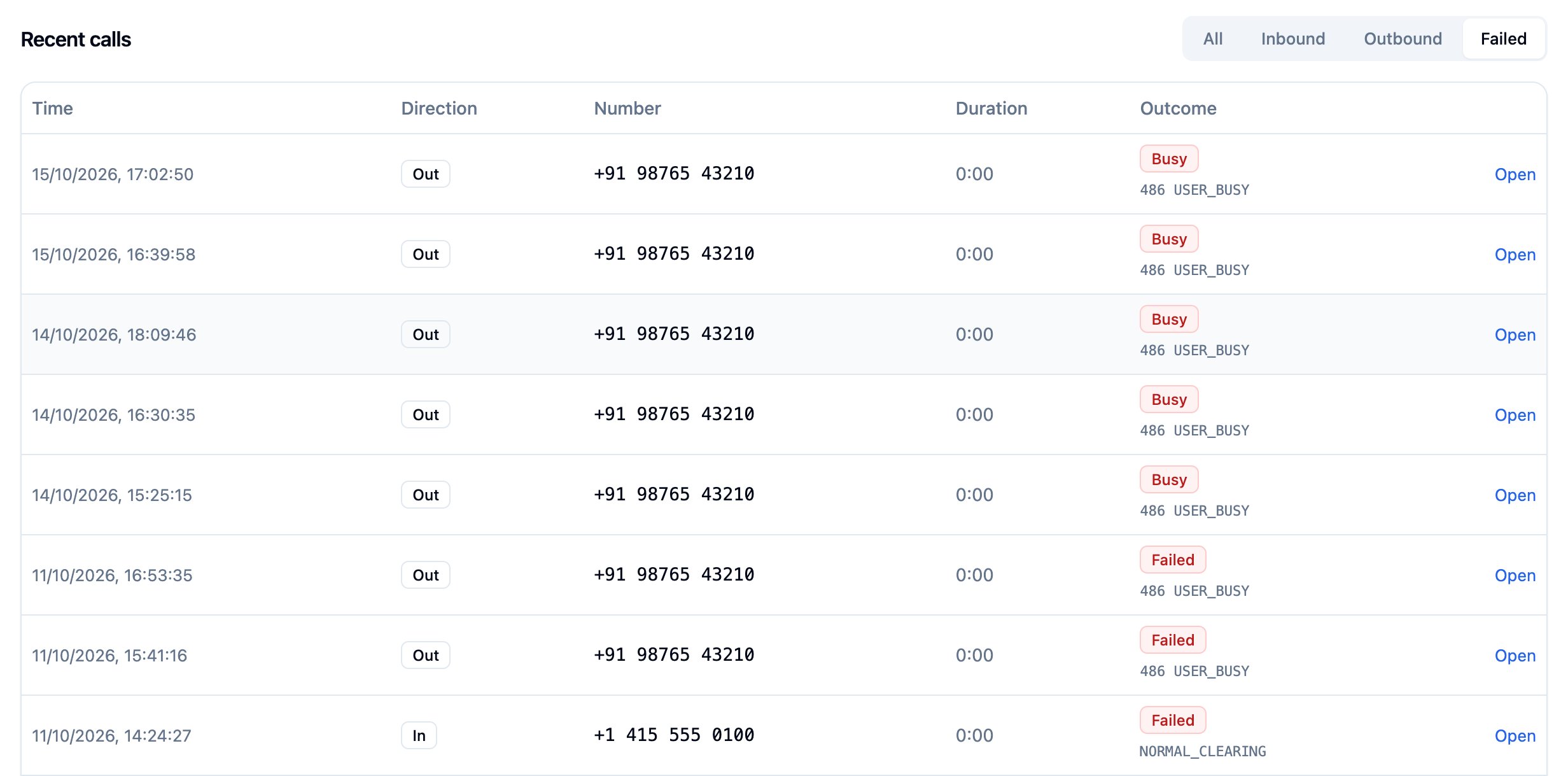
* **Recent calls** on the **Activity** tab lists the trunk's calls. Filter by **Failed** to see calls that did not connect, with the SIP code and cause each one ended with. **Open** takes you to the call in Call History.
* **Test inbound** and **Test outbound** on the same tab place an echo call without an agent, which separates carrier problems from agent problems. See [Verify with a test call](/docs/sip-trunking/connect-carrier#verify-with-a-test-call).
 ## Inbound calls are refused
When Bolna refuses an inbound call, it answers your carrier's INVITE with one of these responses. Your carrier's call logs show the code.
| Response | Meaning | Fix |
| - | - | - |
| `403 Forbidden` | The INVITE came from an address that is not on the carrier IPs of any active trunk. | Add the address your carrier sends from on the trunk's **Connection** tab. Carriers often send from several regions; add every signalling IP they publish. Check that the trunk is enabled. |
| `403 Rejected` | The agent's inbound rules refused the caller, for example a [blocked or unknown caller](/docs/customizations/block-incoming-callers) or an inbound call limit. The call is in Call History as canceled. | Review the agent's **Inbound Calling** settings. |
| `404 Rejected` | Bolna found no number to send the call to. Either the called number is not on a trunk that lists this carrier address, or the number has no agent and the trunk has no default agent, or the agent was deleted. | Check the called number in your carrier's log against the trunk's numbers. If your carrier sends a different format, such as a national number, set it as the number's **Destination key**. Assign an agent or a default agent. |
| `402 Rejected` | Your Bolna balance is too low. | Add credits. |
| `486 Rejected` | Every channel on the trunk is in use. | Raise **Channels** under **Advanced** on the **Connection** tab. Transfers and test calls use channels too. |
| `488` | The INVITE had no SDP offer (delayed offer), or offered no codec Bolna supports. | Configure the carrier to send SDP in the INVITE, with `PCMU` or `PCMA`. |
| `405 Method Not Allowed` | Your carrier sent a REFER during the call. | Bolna does not accept transfers started by the carrier. Use the agent's [Transfer Call tool](/docs/sip-trunking/call-transfer). |
| `503 Service Unavailable` with `Retry-After: 1` | Too many new calls per second from one carrier address. | Retry; spread bursts over a few seconds. |
| `503` with another reason | Bolna could not set up the call. | Retry the call. If it persists, contact support with the time and the called number. |
Changes to carrier IPs apply within 5 seconds. Bolna checks only the source address of the INVITE; it never trusts the `From` header to identify the carrier.
## Outbound calls fail
A failed outbound call carries an error on its execution. These come from Bolna:
| Error | Fix |
| - | - |
| `Calling from_number is not on an outbound-enabled trunk.` | Send one of the trunk's numbers as `from_phone_number`, and check that the trunk is enabled. Bolna's shared numbers cannot be used with a SIP Trunk agent. |
| `Trunk has no gateway to dial through.` | Add a gateway on the **Connection** tab. |
| `gateway did not resolve to a dialable address` | The gateway's DNS name did not resolve, or resolved to a private address. Check the host. |
| `a shared gateway needs carrier credentials on every trunk that uses it` | Another trunk on Bolna dials the same gateway address. Add the carrier credentials your carrier issued to the trunk. |
| `Call could not be connected.` | The call ended before it connected, with no more specific cause. Check the SIP code on the **Activity** tab. |
When your carrier refuses the call, the **Activity** tab shows its SIP code:
| Carrier response | Usual cause |
| - | - |
| `401` or `407` | The carrier wants credentials and the trunk has none, or they are wrong. Set **Carrier credentials** on the **Connection** tab. |
| `403` | The carrier does not accept calls from Bolna. Allowlist `15.252.21.46` and `13.206.230.198`, and check that the caller ID is a number the carrier lets you send. |
| `404` or `484` | The carrier cannot route the number. Try switching **Dial with leading plus**. |
| `408`, or no answer from the gateway | The gateway is unreachable on the trunk's port and transport. Bolna waits 5 seconds, then tries the next gateway. Check the host, the port, and whether the carrier expects UDP or TCP. |
| `488` | No codec in common. Allow `PCMU` or `PCMA` on the carrier side. |
| `5xx` | The carrier's gateway failed. Bolna tries the next gateway; add a second gateway for failover. |
A busy line or a callee who does not answer within 60 seconds ends the call as `busy` or `no-answer`; that is not a trunk fault and does not affect the trunk's health.
If outbound calls stay queued, every channel on the trunk is in use. Calls wait for a free channel rather than failing; raise **Channels** if they wait too long.
## The call connects but there is no audio
Audio on a trunk call is RTP over UDP between your carrier and `15.252.21.46`, on ports `30000`-`40000`.
* **Nobody hears anything, or only one side does.** The carrier, or a firewall between it and Bolna, is blocking RTP. Allow UDP `30000`-`40000` to and from `15.252.21.46`, and check that the carrier sends media to the address and port in Bolna's SDP answer.
* **The call drops about a minute after audio stops arriving.** Bolna hangs up a call when it receives no RTP from the carrier for 60 seconds. Fix the RTP path as above, and turn off silence suppression on the carrier if it stops sending RTP while nobody speaks.
* **Keypad presses are ignored.** Bolna reads DTMF only as RFC 2833 telephone events. SIP INFO digits are ignored. Set the carrier to RFC 2833, also called RFC 4733 or out-of-band DTMF.
## "Call could not be connected."
Bolna records this error on a call that never reached the agent and has no more specific cause. On an inbound call, it usually means the carrier cancelled the call before it was answered, or Bolna could not connect it to the agent. On an outbound call, see [Outbound calls fail](#outbound-calls-fail).
## Transfers fail
A transfer that is dialled and then fails, because the target is busy or does not answer, ends the call. A transfer Bolna cannot dial at all, for example a SIP URI that is not on one of the trunk's gateways, rings nothing. See [Call transfer](/docs/sip-trunking/call-transfer) for both cases.
## Still stuck?
Send support the trunk ID (**Copy trunk ID** in the trunk's menu), the execution ID of a failed call, and your carrier's log entry for it. Every outbound and transfer INVITE carries the execution ID in its `X-CLIENT-CALL-ID` header, which helps match the two.
This documentation is built and hosted on [Mintlify](https://mintlify.com), a developer documentation platform.
## Inbound calls are refused
When Bolna refuses an inbound call, it answers your carrier's INVITE with one of these responses. Your carrier's call logs show the code.
| Response | Meaning | Fix |
| - | - | - |
| `403 Forbidden` | The INVITE came from an address that is not on the carrier IPs of any active trunk. | Add the address your carrier sends from on the trunk's **Connection** tab. Carriers often send from several regions; add every signalling IP they publish. Check that the trunk is enabled. |
| `403 Rejected` | The agent's inbound rules refused the caller, for example a [blocked or unknown caller](/docs/customizations/block-incoming-callers) or an inbound call limit. The call is in Call History as canceled. | Review the agent's **Inbound Calling** settings. |
| `404 Rejected` | Bolna found no number to send the call to. Either the called number is not on a trunk that lists this carrier address, or the number has no agent and the trunk has no default agent, or the agent was deleted. | Check the called number in your carrier's log against the trunk's numbers. If your carrier sends a different format, such as a national number, set it as the number's **Destination key**. Assign an agent or a default agent. |
| `402 Rejected` | Your Bolna balance is too low. | Add credits. |
| `486 Rejected` | Every channel on the trunk is in use. | Raise **Channels** under **Advanced** on the **Connection** tab. Transfers and test calls use channels too. |
| `488` | The INVITE had no SDP offer (delayed offer), or offered no codec Bolna supports. | Configure the carrier to send SDP in the INVITE, with `PCMU` or `PCMA`. |
| `405 Method Not Allowed` | Your carrier sent a REFER during the call. | Bolna does not accept transfers started by the carrier. Use the agent's [Transfer Call tool](/docs/sip-trunking/call-transfer). |
| `503 Service Unavailable` with `Retry-After: 1` | Too many new calls per second from one carrier address. | Retry; spread bursts over a few seconds. |
| `503` with another reason | Bolna could not set up the call. | Retry the call. If it persists, contact support with the time and the called number. |
Changes to carrier IPs apply within 5 seconds. Bolna checks only the source address of the INVITE; it never trusts the `From` header to identify the carrier.
## Outbound calls fail
A failed outbound call carries an error on its execution. These come from Bolna:
| Error | Fix |
| - | - |
| `Calling from_number is not on an outbound-enabled trunk.` | Send one of the trunk's numbers as `from_phone_number`, and check that the trunk is enabled. Bolna's shared numbers cannot be used with a SIP Trunk agent. |
| `Trunk has no gateway to dial through.` | Add a gateway on the **Connection** tab. |
| `gateway did not resolve to a dialable address` | The gateway's DNS name did not resolve, or resolved to a private address. Check the host. |
| `a shared gateway needs carrier credentials on every trunk that uses it` | Another trunk on Bolna dials the same gateway address. Add the carrier credentials your carrier issued to the trunk. |
| `Call could not be connected.` | The call ended before it connected, with no more specific cause. Check the SIP code on the **Activity** tab. |
When your carrier refuses the call, the **Activity** tab shows its SIP code:
| Carrier response | Usual cause |
| - | - |
| `401` or `407` | The carrier wants credentials and the trunk has none, or they are wrong. Set **Carrier credentials** on the **Connection** tab. |
| `403` | The carrier does not accept calls from Bolna. Allowlist `15.252.21.46` and `13.206.230.198`, and check that the caller ID is a number the carrier lets you send. |
| `404` or `484` | The carrier cannot route the number. Try switching **Dial with leading plus**. |
| `408`, or no answer from the gateway | The gateway is unreachable on the trunk's port and transport. Bolna waits 5 seconds, then tries the next gateway. Check the host, the port, and whether the carrier expects UDP or TCP. |
| `488` | No codec in common. Allow `PCMU` or `PCMA` on the carrier side. |
| `5xx` | The carrier's gateway failed. Bolna tries the next gateway; add a second gateway for failover. |
A busy line or a callee who does not answer within 60 seconds ends the call as `busy` or `no-answer`; that is not a trunk fault and does not affect the trunk's health.
If outbound calls stay queued, every channel on the trunk is in use. Calls wait for a free channel rather than failing; raise **Channels** if they wait too long.
## The call connects but there is no audio
Audio on a trunk call is RTP over UDP between your carrier and `15.252.21.46`, on ports `30000`-`40000`.
* **Nobody hears anything, or only one side does.** The carrier, or a firewall between it and Bolna, is blocking RTP. Allow UDP `30000`-`40000` to and from `15.252.21.46`, and check that the carrier sends media to the address and port in Bolna's SDP answer.
* **The call drops about a minute after audio stops arriving.** Bolna hangs up a call when it receives no RTP from the carrier for 60 seconds. Fix the RTP path as above, and turn off silence suppression on the carrier if it stops sending RTP while nobody speaks.
* **Keypad presses are ignored.** Bolna reads DTMF only as RFC 2833 telephone events. SIP INFO digits are ignored. Set the carrier to RFC 2833, also called RFC 4733 or out-of-band DTMF.
## "Call could not be connected."
Bolna records this error on a call that never reached the agent and has no more specific cause. On an inbound call, it usually means the carrier cancelled the call before it was answered, or Bolna could not connect it to the agent. On an outbound call, see [Outbound calls fail](#outbound-calls-fail).
## Transfers fail
A transfer that is dialled and then fails, because the target is busy or does not answer, ends the call. A transfer Bolna cannot dial at all, for example a SIP URI that is not on one of the trunk's gateways, rings nothing. See [Call transfer](/docs/sip-trunking/call-transfer) for both cases.
## Still stuck?
Send support the trunk ID (**Copy trunk ID** in the trunk's menu), the execution ID of a failed call, and your carrier's log entry for it. Every outbound and transfer INVITE carries the execution ID in its `X-CLIENT-CALL-ID` header, which helps match the two.
This documentation is built and hosted on [Mintlify](https://mintlify.com), a developer documentation platform.