> ## Documentation Index
> Fetch the complete documentation index at: https://www.bolna.ai/docs/llms.txt
> Use this file to discover all available pages before exploring further.
# Custom Function Calls: Complete Guide for Bolna Voice AI
> Build custom function tools with Bolna Voice agents using OpenAI standards. Complete guide with schema examples, code snippets & implementation best practices.
## What are Custom Functions?
Custom functions let your Voice AI agent call your own APIs during live conversations. Check order status, update a CRM, book appointments, or integrate with any system - all while on a call.
Bolna custom functions follow the [OpenAI function calling specification](https://platform.openai.com/docs/guides/function-calling). If you've used OpenAI function calling before, you'll feel right at home.
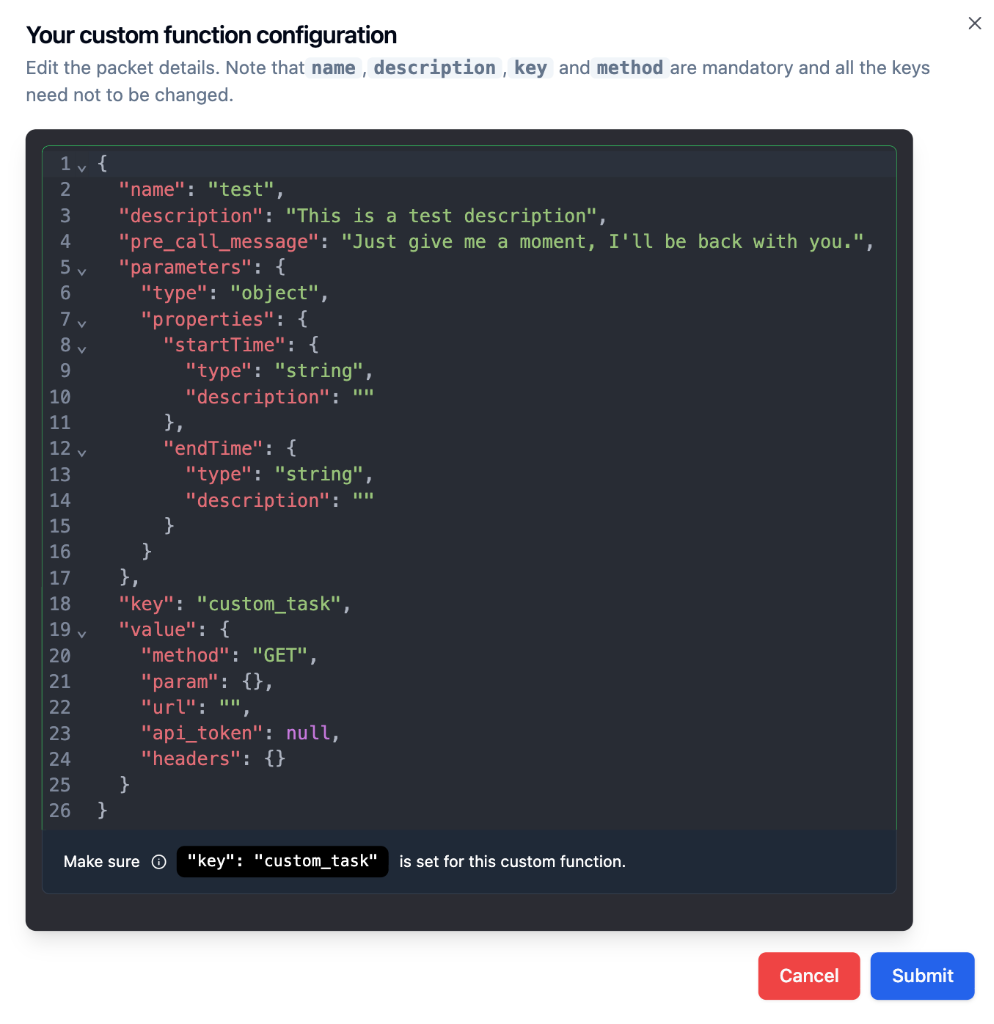 ***
## How Custom Functions Work
The LLM sees your function's `name` and `description` to understand what the function does
Based on conversation context, the LLM decides if this function should be triggered
The LLM collects required parameter values from the conversation with the caller
Bolna makes the HTTP request to your API endpoint with the extracted parameters
The API response is returned to the LLM, which continues the conversation naturally
**The description is everything.** The LLM relies heavily on your description to know when to call the function. A vague description = unreliable triggering.
***
## Creating a Custom Function
You can create a custom function in two ways from the [Tools Tab](/agent-setup/tools-tab):
***
## How Custom Functions Work
The LLM sees your function's `name` and `description` to understand what the function does
Based on conversation context, the LLM decides if this function should be triggered
The LLM collects required parameter values from the conversation with the caller
Bolna makes the HTTP request to your API endpoint with the extracted parameters
The API response is returned to the LLM, which continues the conversation naturally
**The description is everything.** The LLM relies heavily on your description to know when to call the function. A vague description = unreliable triggering.
***
## Creating a Custom Function
You can create a custom function in two ways from the [Tools Tab](/agent-setup/tools-tab):
 Click **Write manually** to open the JSON editor and define the function schema from scratch. This gives you full control over every field.
The fields `name`, `description`, `key`, and `method` are mandatory. The `key` must always be set to `"custom_task"`.
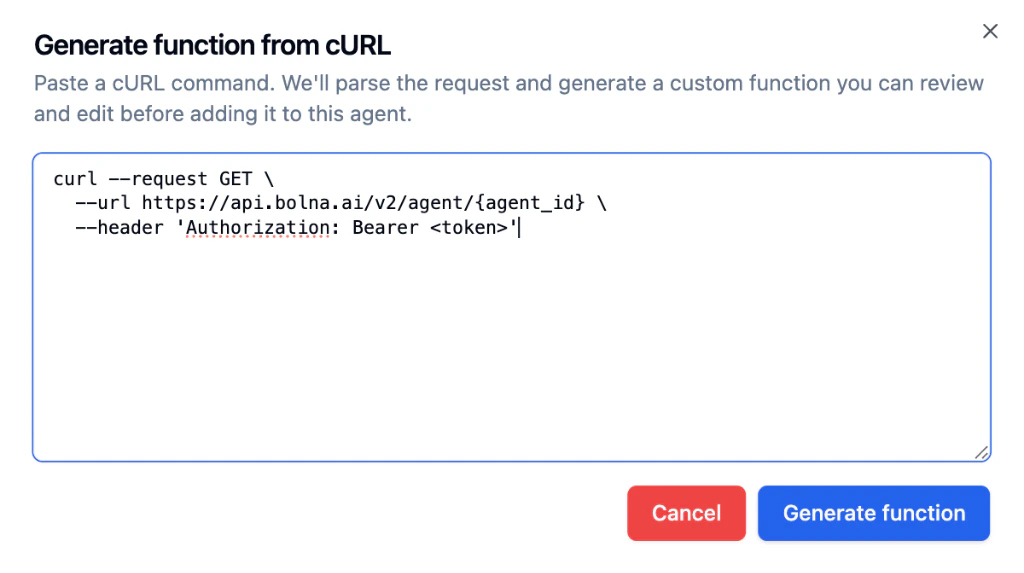
If you already have a working API request in `curl`, click **Generate from cURL** to auto-generate a function schema instead of building it manually.
### How to use it
In the Tools Tab, click the **Generate from cURL** button under Add a Custom Tool.
Paste the full cURL request into the text area. Bolna will parse the URL, method, headers, and body.
Click **Write manually** to open the JSON editor and define the function schema from scratch. This gives you full control over every field.
The fields `name`, `description`, `key`, and `method` are mandatory. The `key` must always be set to `"custom_task"`.
If you already have a working API request in `curl`, click **Generate from cURL** to auto-generate a function schema instead of building it manually.
### How to use it
In the Tools Tab, click the **Generate from cURL** button under Add a Custom Tool.
Paste the full cURL request into the text area. Bolna will parse the URL, method, headers, and body.
 Bolna generates a function configuration with auto-populated name, description, method, URL, and auth. Review all fields carefully.
Update the function name, improve the description for better LLM triggering, confirm parameters, and click **Submit**.
Bolna generates a function configuration with auto-populated name, description, method, URL, and auth. Review all fields carefully.
Update the function name, improve the description for better LLM triggering, confirm parameters, and click **Submit**.
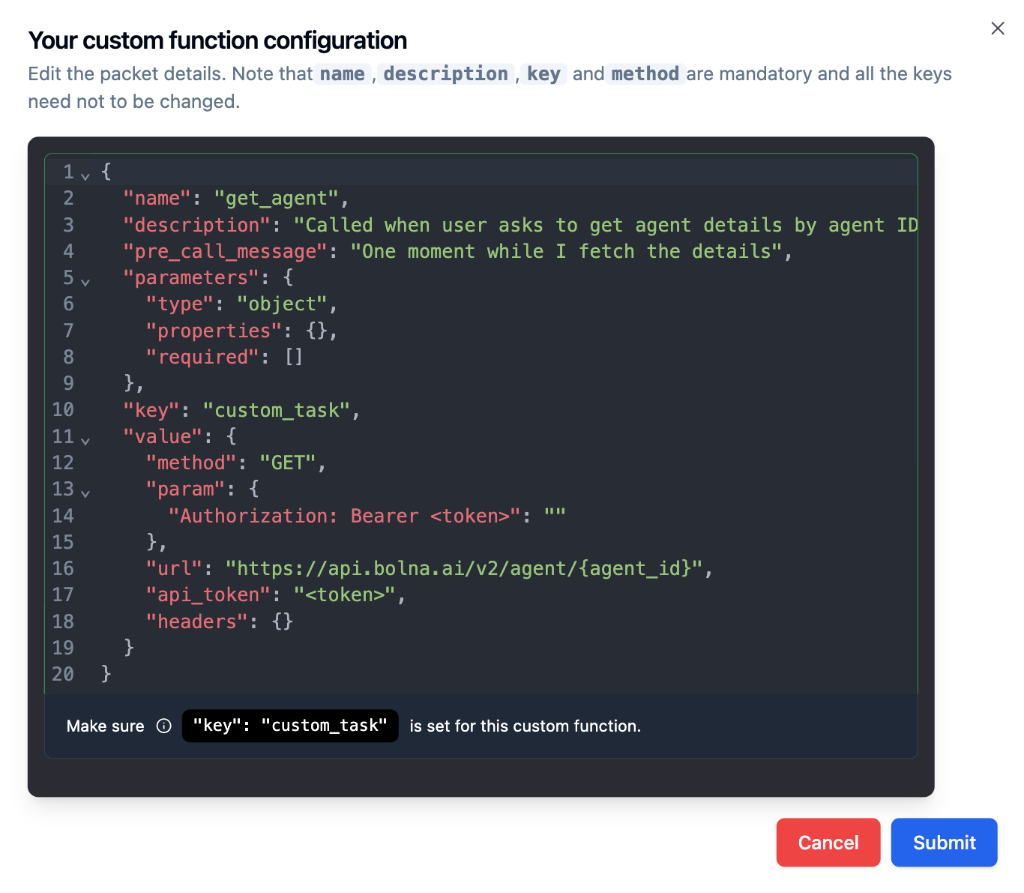 The import is a starting point, not a final configuration. Always verify authentication, parameter names, required fields, and the API URL before using the function in production.
### After generating, always check
Make it clear and use `snake_case` (e.g., `get_order_status`)
Describe *when* the model should call the function, not just what the API does
Remove anything the caller will never provide; mark only essential fields as required
Confirm secrets, tokens, and custom headers are correct for your environment
Add a short spoken message so callers know the agent is checking something
Combine with [context variables](/using-context) to avoid asking for data you already have
***
## Complete Schema Structure
Every custom function has two parts: **Function Definition** (tells LLM what it does) and **API Configuration** (tells Bolna how to call your API).
```json theme={"system"}
{
"name": "function_name",
"description": "Detailed description of when to call this function",
"pre_call_message": "What agent says while the API is being called",
"parameters": {
"type": "object",
"properties": {
"param_name": {
"type": "string",
"description": "What this parameter represents"
}
},
"required": ["param_name"]
},
"key": "custom_task",
"value": {
"method": "GET",
"param": {
"param_name": "%(param_name)s"
},
"url": "https://your-api.com/endpoint",
"api_token": "Bearer your_token",
"headers": {}
}
}
```
**Mandatory:** The field `"key": "custom_task"` must be present exactly as shown. Do not modify this value.
***
## Schema Reference
Parts 1-2 follow the [OpenAI function calling specification](https://platform.openai.com/docs/guides/function-calling) - they define **what** the function does. Parts 3-5 are Bolna extensions that define **how** to execute the API call automatically.
### 1. Function Definition
These fields tell the LLM about your function:
| Field | Required | Description |
| ------------- | -------- | ----------------------------------------------------------------------- |
| `name` | Yes | Unique function identifier. Use `snake_case` (e.g., `get_order_status`) |
| `description` | Yes | Tells the LLM when to trigger this function. Be specific and detailed. |
| `parameters` | Yes | Defines what information to collect from the caller |
### 2. Parameters Object
The `parameters` object defines what information the LLM should collect from the caller.
```json theme={"system"}
"parameters": {
"type": "object",
"properties": {
"customer_name": {
"type": "string",
"description": "The customer's full name"
},
"order_id": {
"type": "string",
"description": "The order ID, usually starts with ORD-"
},
"quantity": {
"type": "integer",
"description": "Number of items"
}
},
"required": ["customer_name", "order_id"]
}
```
**Supported Data Types:**
| Type | Use Case | Example Values |
| --------- | ------------------------------- | --------------------------- |
| `string` | Text, names, IDs, phone numbers | `"John Doe"`, `"ORD-12345"` |
| `integer` | Whole numbers | `5`, `100`, `-10` |
| `number` | Decimal numbers | `29.99`, `3.14` |
| `boolean` | True/false flags | `true`, `false` |
**Required vs Optional:**
| In `required` array? | Behavior |
| -------------------- | --------------------------------------------------- |
| Yes | LLM will keep asking until this value is provided |
| No | Optional - included if mentioned, skipped otherwise |
### 3. Bolna Extensions
These fields are specific to Bolna:
| Field | Required | Description |
| ------------------ | -------- | -------------------------------------------------------------------------------- |
| `pre_call_message` | No | Message the agent speaks while API is executing (e.g., *"One moment please..."*) |
| `key` | Yes | Must be `"custom_task"` - identifies this as a custom function |
| `value` | Yes | API configuration object (see below) |
### 4. API Configuration (`value` object)
This tells Bolna how to make the HTTP request:
| Field | Required | Description |
| ------------------------ | -------- | -------------------------------------------------------------------------------------------------------------------------------------------------------------------------- |
| `method` | Yes | HTTP method: `GET`, `POST`, `PUT`, `PATCH`, `DELETE` |
| `url` | Yes | Your API endpoint URL |
| `param` | Yes | Maps parameters to API request using format specifiers |
| `api_token` | No | Authorization header value (e.g., `Bearer your_token`) |
| `headers` | No | Additional HTTP headers as key-value pairs |
| `pre_call_webhook_param` | No | Body template for a [pre-call webhook](#pre-call-webhooks) that fires *before* the main API call. This is the on/off switch — if it is not set, no pre-call webhook fires. |
| `pre_call_webhook_url` | No | Where to send the pre-call webhook. If omitted, the agent-level Webhook URL is used. See [Pre-call Webhooks](#pre-call-webhooks). |
### 5. Format Specifiers
The `param` object maps your parameters to the API request. Use Python-style format specifiers:
| Data Type | Format Specifier | Example |
| --------- | ---------------- | ---------------------------------- |
| String | `%(param_name)s` | `"customer_id": "%(customer_id)s"` |
| Integer | `%(param_name)i` | `"quantity": "%(quantity)i"` |
| Float | `%(param_name)f` | `"price": "%(price)f"` |
**Parameter names must match exactly.** The name in `properties` must be identical to the name in `param` mapping (case-sensitive).
***
## Examples
The following examples use **illustrative endpoints and credentials** to demonstrate the schema structure. Replace the URLs, tokens, and parameter values with your own API details when implementing.
A customer calls and asks *"Where is my order?"* The agent collects the order ID and fetches the status from your backend.
**What the agent says:** *"Let me check the status of your order."*
**What Bolna sends:**
```bash theme={"system"}
curl --location 'https://api.yourstore.com/orders?order_id=ORD-78234' \
--header 'Authorization: Bearer sk_live_abc123'
```
**Function schema:**
```json theme={"system"}
{
"name": "check_order_status",
"description": "Use this function when the customer asks about their order status, delivery update, shipping progress, or tracking information. The customer must provide their order ID.",
"pre_call_message": "Let me check the status of your order.",
"parameters": {
"type": "object",
"properties": {
"order_id": {
"type": "string",
"description": "The customer's order ID. Usually starts with ORD- followed by numbers, e.g., ORD-78234."
}
},
"required": ["order_id"]
},
"key": "custom_task",
"value": {
"method": "GET",
"param": {
"order_id": "%(order_id)s"
},
"url": "https://api.yourstore.com/orders",
"api_token": "Bearer sk_live_abc123",
"headers": {}
}
}
```
**Example API response the LLM receives:**
```json theme={"system"}
{
"order_id": "ORD-78234",
"status": "shipped",
"estimated_delivery": "March 15, 2026",
"tracking_number": "1Z999AA10123456784"
}
```
The agent would then say something like: *"Your order ORD-78234 has been shipped and is expected to arrive by March 15th. Your tracking number is 1Z999AA10123456784."*
A customer calls and asks *"What's my current balance?"* The agent verifies their identity using their registered phone number and account ID, then fetches the balance.
**What the agent says:** *"Let me pull up your account details."*
**What Bolna sends:**
```bash theme={"system"}
curl --location 'https://api.yourbank.com/accounts/balance?account_id=ACC-991042&phone=%2B919876543210' \
--header 'Authorization: Bearer fin_api_key_001' \
--header 'X-Request-Source: voice-agent'
```
**Function schema:**
```json theme={"system"}
{
"name": "get_account_balance",
"description": "Use this function when the customer asks about their account balance, available credit, remaining amount, or account summary. Requires the customer's account ID and phone number for verification.",
"pre_call_message": "Let me pull up your account details.",
"parameters": {
"type": "object",
"properties": {
"account_id": {
"type": "string",
"description": "The customer's account ID, usually starts with ACC- followed by numbers."
},
"phone": {
"type": "string",
"description": "The customer's registered phone number for identity verification."
}
},
"required": ["account_id", "phone"]
},
"key": "custom_task",
"value": {
"method": "GET",
"param": {
"account_id": "%(account_id)s",
"phone": "%(phone)s"
},
"url": "https://api.yourbank.com/accounts/balance",
"api_token": "Bearer fin_api_key_001",
"headers": {
"X-Request-Source": "voice-agent"
}
}
}
```
**Example API response the LLM receives:**
```json theme={"system"}
{
"account_id": "ACC-991042",
"name": "Rahul Verma",
"current_balance": 24500.75,
"currency": "INR",
"last_transaction": "2026-03-12"
}
```
The agent would then say something like: *"Your current account balance is Rs. 24,500.75. Your last transaction was on March 12th."*
The `phone` parameter can be auto-injected using the `{from_number}` [context variable](/using-context), so the caller does not need to repeat their number.
A caller wants to schedule a consultation. The agent collects their name, preferred date, and time, then creates the booking.
**What the agent says:** *"I'm booking that appointment for you now."*
**What Bolna sends:**
```bash theme={"system"}
curl --location 'https://api.yourclinic.com/v1/appointments' \
--header 'Content-Type: application/json' \
--header 'Authorization: Bearer clinic_token_xyz' \
--data '{
"patient_name": "Priya Sharma",
"preferred_date": "2026-03-20",
"preferred_time": "10:30 AM",
"reason": "General consultation"
}'
```
**Function schema:**
```json theme={"system"}
{
"name": "book_appointment",
"description": "Use this function when the caller wants to book, schedule, or set up an appointment, consultation, or visit. Collect the patient's name, their preferred date and time, and the reason for the visit.",
"pre_call_message": "I'm booking that appointment for you now.",
"parameters": {
"type": "object",
"properties": {
"patient_name": {
"type": "string",
"description": "Full name of the patient"
},
"preferred_date": {
"type": "string",
"description": "Preferred appointment date in YYYY-MM-DD format"
},
"preferred_time": {
"type": "string",
"description": "Preferred time, e.g., '10:30 AM' or '2:00 PM'"
},
"reason": {
"type": "string",
"description": "Brief reason for the appointment, e.g., 'General consultation' or 'Follow-up'"
}
},
"required": ["patient_name", "preferred_date", "preferred_time"]
},
"key": "custom_task",
"value": {
"method": "POST",
"param": {
"patient_name": "%(patient_name)s",
"preferred_date": "%(preferred_date)s",
"preferred_time": "%(preferred_time)s",
"reason": "%(reason)s"
},
"url": "https://api.yourclinic.com/v1/appointments",
"api_token": "Bearer clinic_token_xyz",
"headers": {
"Content-Type": "application/json"
}
}
}
```
The `reason` field is optional (not in the `required` array). If the caller mentions a reason, the LLM includes it. If not, it is skipped without asking.
A customer calls with a complaint or issue. The agent collects the details and creates a support ticket in your helpdesk system.
**What the agent says:** *"I'm creating a support ticket for this issue right away."*
**What Bolna sends:**
```bash theme={"system"}
curl --location 'https://api.yourhelpdesk.com/tickets' \
--header 'Content-Type: application/json' \
--header 'Authorization: Bearer helpdesk_key_789' \
--data '{
"caller_phone": "+919876543210",
"issue_category": "billing",
"description": "Customer was charged twice for their February subscription",
"priority": "high"
}'
```
**Function schema:**
```json theme={"system"}
{
"name": "create_support_ticket",
"description": "Use this function when the customer reports a problem, complaint, issue, or bug. Create a support ticket with the issue category, a summary of the problem, and priority level. The caller's phone number is automatically available.",
"pre_call_message": "I'm creating a support ticket for this issue right away.",
"parameters": {
"type": "object",
"properties": {
"caller_phone": {
"type": "string",
"description": "The customer's phone number"
},
"issue_category": {
"type": "string",
"description": "Category of the issue: billing, technical, account, shipping, or other"
},
"description": {
"type": "string",
"description": "A brief summary of the customer's issue in 1-2 sentences"
},
"priority": {
"type": "string",
"description": "Priority level: low, medium, or high. Set to high if the customer is upset or the issue is time-sensitive."
}
},
"required": ["caller_phone", "issue_category", "description"]
},
"key": "custom_task",
"value": {
"method": "POST",
"param": {
"caller_phone": "%(caller_phone)s",
"issue_category": "%(issue_category)s",
"description": "%(description)s",
"priority": "%(priority)s"
},
"url": "https://api.yourhelpdesk.com/tickets",
"api_token": "Bearer helpdesk_key_789",
"headers": {
"Content-Type": "application/json"
}
}
}
```
The `caller_phone` can be auto-injected using [context variables](/using-context). Add `{from_number}` to your agent prompt, and the LLM will use it automatically instead of asking the caller for their number.
***
## Using Variables and Dynamic Context
[Context variables](/using-context) defined in your agent prompt are automatically substituted into custom functions. The LLM won't ask the caller for these values - they're already available.
### Auto-Injected System Variables
| Variable | Description |
| --------------- | -------------------------------------------------------- |
| `{agent_id}` | The `id` of the agent |
| `{call_sid}` | Unique `id` of the phone call (from Twilio, Plivo, etc.) |
| `{from_number}` | Phone number that **initiated** the call |
| `{to_number}` | Phone number that **received** the call |
### How Variable Substitution Works
```text agent_prompt theme={"system"}
You are agent Sam speaking to {customer_name}.
The agent ID is "{agent_id}".
The call ID is "{call_sid}".
The customer's phone is "{to_number}".
```
```json custom_function theme={"system"}
{
"name": "log_interaction",
"description": "Log customer interaction to CRM",
"parameters": {
"type": "object",
"properties": {
"to_number": {
"type": "string",
"description": "Customer's phone number"
},
"agent_id": {
"type": "string",
"description": "Agent ID"
},
"customer_name": {
"type": "string",
"description": "Customer's name"
},
"customer_address": {
"type": "string",
"description": "Customer's address"
}
},
"required": ["to_number", "agent_id", "customer_name", "customer_address"]
},
"key": "custom_task",
"value": {
"method": "POST",
"param": {
"to_number": "%(to_number)s",
"agent_id": "%(agent_id)s",
"customer_name": "%(customer_name)s",
"customer_address": "%(customer_address)s"
},
"url": "https://my-api-dev.xyz",
"api_token": "Bearer your_token",
"headers": {}
}
}
```
```json runtime_substitution theme={"system"}
{
"to_number": "+19876543210",
"agent_id": "7d86b904-da64-4b8e-8f51-6fef2c630380",
"customer_name": "Bruce",
"customer_address": "221B Baker Street"
}
```
| Parameter | Defined in Prompt? | Result |
| ------------------ | --------------------- | ---------------------------- |
| `to_number` | Yes (system) | Auto-substituted |
| `agent_id` | Yes (system) | Auto-substituted |
| `customer_name` | Yes (passed via call) | Auto-substituted |
| `customer_address` | No | LLM will collect from caller |
***
## Pre-call Webhooks
A custom function can fire a **pre-call webhook** — a notification sent to a URL of your choice *before* the tool's main API call runs. A common use case is a tool that transfers the call, where your system needs to receive the transfer reason *before* the transfer happens.
The pre-call webhook is **fire-and-forget**. A slow or failing webhook endpoint never blocks or fails the function call itself.
The built-in [Transfer Call](/tool-calling/transfer-calls#pre-call-webhook) tool supports the same pre-call webhook fields, fired *before* the transfer happens.
### How It Works
The LLM produces the arguments for your custom function as usual.
If the tool has a `pre_call_webhook_param` configured, Bolna first POSTs the pre-call webhook to the resolved URL.
The tool's main function call then executes exactly as it normally would.
### Configuring the Webhook Body
`pre_call_webhook_param` is a JSON template that is completely independent from the tool's main `param`. You can reference any argument the LLM produced for the tool using the same `%(field)s` [substitution syntax](#format-specifiers) used by `param`. Static values are passed through as-is.
```json theme={"system"}
{
"name": "transfer_support",
"description": "Transfers the call to a support agent when the caller asks for a human or has an issue the agent cannot resolve.",
"parameters": {
"type": "object",
"properties": {
"reason": {
"type": "string",
"description": "Why the caller wants a transfer"
}
},
"required": ["reason"]
},
"key": "custom_task",
"value": {
"method": "POST",
"url": "https://your-api.com/transfer",
"param": {
"reason": "%(reason)s"
},
"pre_call_webhook_url": "https://your-api.com/pre-transfer-hook",
"pre_call_webhook_param": {
"transfer_reason": "%(reason)s",
"channel": "voice"
}
}
}
```
In the example above, `%(reason)s` is replaced with the LLM's argument for this tool call, while `"channel": "voice"` is a static value passed through unchanged.
### What Your Endpoint Receives
The webhook body is the **same execution record** you receive on the [post-call execution webhook](/polling-call-status-webhooks) (execution id, agent id, telephony details, status, etc.), merged with the fields from your `pre_call_webhook_param`:
```json theme={"system"}
{
"id": "",
"agent_id": "",
"status": "in-progress",
"telephony_data": { "...": "..." },
"...": "...",
"transfer_reason": "customer asked for billing",
"channel": "voice"
}
```
Because the call is still in progress when the pre-call webhook fires, fields that are only finalized at call end (transcript, cost, summary) won't be complete yet.
### URL Resolution Rules
| `pre_call_webhook_param` | `pre_call_webhook_url` | Result |
| ------------------------ | ---------------------- | ----------------------------------------------------------------------------------------------------- |
| Set | Set | Webhook sent to the tool's `pre_call_webhook_url`. |
| Set | Not set | Webhook sent to the **agent-level Webhook URL** (the same URL used for post-call execution webhooks). |
| Not set | Set or not set | **No pre-call webhook fires.** |
**`pre_call_webhook_param` is the master switch.** If it is not set, no pre-call webhook fires — even if `pre_call_webhook_url` is configured. The agent's normal post-call webhook is unaffected.
**Agent-level URL fallback:** when `pre_call_webhook_param` is set without a `pre_call_webhook_url`, the pre-call webhook is sent to your agent's configured [Webhook URL](/polling-call-status-webhooks). If you already use that endpoint for post-call execution webhooks, it will now also receive pre-call webhooks. Distinguish them by the in-progress `status` and the extra fields from your `pre_call_webhook_param`.
### UI Configuration
In the agent dashboard, the custom tool configuration (on the [Tools Tab](/agent-setup/tools-tab)) has two optional inputs that map to these fields:
* **Pre-call webhook URL** — the endpoint to notify (`pre_call_webhook_url`).
* **Pre-call webhook parameters** — the JSON body template with `%(field)s` substitution (`pre_call_webhook_param`).
Both save with the tool and round-trip on edit.
***
## Best Practices
Include synonyms and variations: *"Use when customer asks about order status, shipping, delivery, or tracking"*
Set a friendly message like *"Let me check that for you"* so callers know to wait
Only mark parameters as required if the function truly cannot work without them
Verify your API works with tools like curl or Postman before adding to Bolna
Put known data in the agent prompt to avoid asking callers for information you already have
Parameter names in `properties` and `param` must be identical (case-sensitive)
***
## Troubleshooting
**Cause:** Description doesn't match what the caller is saying.
**Fix:** Make your description more comprehensive. Include synonyms and example phrases.
**Cause:** Incorrect URL, authentication, or headers.
**Fix:** Test your API with curl or Postman first. Verify `api_token` format and required headers.
**Cause:** Typo or format specifier mismatch.
**Fix:** Ensure parameter names match exactly between `properties` and `param`. Use `%(name)s` format.
**Cause:** Variable not defined in agent prompt.
**Fix:** Add the variable to your agent prompt using `{variable_name}` syntax.
***
## Next Steps
Learn about dynamic variable injection
Route calls to human agents
Book appointments via Cal.com
Receive execution data, including pre-call webhooks
Programmatic function configuration
The import is a starting point, not a final configuration. Always verify authentication, parameter names, required fields, and the API URL before using the function in production.
### After generating, always check
Make it clear and use `snake_case` (e.g., `get_order_status`)
Describe *when* the model should call the function, not just what the API does
Remove anything the caller will never provide; mark only essential fields as required
Confirm secrets, tokens, and custom headers are correct for your environment
Add a short spoken message so callers know the agent is checking something
Combine with [context variables](/using-context) to avoid asking for data you already have
***
## Complete Schema Structure
Every custom function has two parts: **Function Definition** (tells LLM what it does) and **API Configuration** (tells Bolna how to call your API).
```json theme={"system"}
{
"name": "function_name",
"description": "Detailed description of when to call this function",
"pre_call_message": "What agent says while the API is being called",
"parameters": {
"type": "object",
"properties": {
"param_name": {
"type": "string",
"description": "What this parameter represents"
}
},
"required": ["param_name"]
},
"key": "custom_task",
"value": {
"method": "GET",
"param": {
"param_name": "%(param_name)s"
},
"url": "https://your-api.com/endpoint",
"api_token": "Bearer your_token",
"headers": {}
}
}
```
**Mandatory:** The field `"key": "custom_task"` must be present exactly as shown. Do not modify this value.
***
## Schema Reference
Parts 1-2 follow the [OpenAI function calling specification](https://platform.openai.com/docs/guides/function-calling) - they define **what** the function does. Parts 3-5 are Bolna extensions that define **how** to execute the API call automatically.
### 1. Function Definition
These fields tell the LLM about your function:
| Field | Required | Description |
| ------------- | -------- | ----------------------------------------------------------------------- |
| `name` | Yes | Unique function identifier. Use `snake_case` (e.g., `get_order_status`) |
| `description` | Yes | Tells the LLM when to trigger this function. Be specific and detailed. |
| `parameters` | Yes | Defines what information to collect from the caller |
### 2. Parameters Object
The `parameters` object defines what information the LLM should collect from the caller.
```json theme={"system"}
"parameters": {
"type": "object",
"properties": {
"customer_name": {
"type": "string",
"description": "The customer's full name"
},
"order_id": {
"type": "string",
"description": "The order ID, usually starts with ORD-"
},
"quantity": {
"type": "integer",
"description": "Number of items"
}
},
"required": ["customer_name", "order_id"]
}
```
**Supported Data Types:**
| Type | Use Case | Example Values |
| --------- | ------------------------------- | --------------------------- |
| `string` | Text, names, IDs, phone numbers | `"John Doe"`, `"ORD-12345"` |
| `integer` | Whole numbers | `5`, `100`, `-10` |
| `number` | Decimal numbers | `29.99`, `3.14` |
| `boolean` | True/false flags | `true`, `false` |
**Required vs Optional:**
| In `required` array? | Behavior |
| -------------------- | --------------------------------------------------- |
| Yes | LLM will keep asking until this value is provided |
| No | Optional - included if mentioned, skipped otherwise |
### 3. Bolna Extensions
These fields are specific to Bolna:
| Field | Required | Description |
| ------------------ | -------- | -------------------------------------------------------------------------------- |
| `pre_call_message` | No | Message the agent speaks while API is executing (e.g., *"One moment please..."*) |
| `key` | Yes | Must be `"custom_task"` - identifies this as a custom function |
| `value` | Yes | API configuration object (see below) |
### 4. API Configuration (`value` object)
This tells Bolna how to make the HTTP request:
| Field | Required | Description |
| ------------------------ | -------- | -------------------------------------------------------------------------------------------------------------------------------------------------------------------------- |
| `method` | Yes | HTTP method: `GET`, `POST`, `PUT`, `PATCH`, `DELETE` |
| `url` | Yes | Your API endpoint URL |
| `param` | Yes | Maps parameters to API request using format specifiers |
| `api_token` | No | Authorization header value (e.g., `Bearer your_token`) |
| `headers` | No | Additional HTTP headers as key-value pairs |
| `pre_call_webhook_param` | No | Body template for a [pre-call webhook](#pre-call-webhooks) that fires *before* the main API call. This is the on/off switch — if it is not set, no pre-call webhook fires. |
| `pre_call_webhook_url` | No | Where to send the pre-call webhook. If omitted, the agent-level Webhook URL is used. See [Pre-call Webhooks](#pre-call-webhooks). |
### 5. Format Specifiers
The `param` object maps your parameters to the API request. Use Python-style format specifiers:
| Data Type | Format Specifier | Example |
| --------- | ---------------- | ---------------------------------- |
| String | `%(param_name)s` | `"customer_id": "%(customer_id)s"` |
| Integer | `%(param_name)i` | `"quantity": "%(quantity)i"` |
| Float | `%(param_name)f` | `"price": "%(price)f"` |
**Parameter names must match exactly.** The name in `properties` must be identical to the name in `param` mapping (case-sensitive).
***
## Examples
The following examples use **illustrative endpoints and credentials** to demonstrate the schema structure. Replace the URLs, tokens, and parameter values with your own API details when implementing.
A customer calls and asks *"Where is my order?"* The agent collects the order ID and fetches the status from your backend.
**What the agent says:** *"Let me check the status of your order."*
**What Bolna sends:**
```bash theme={"system"}
curl --location 'https://api.yourstore.com/orders?order_id=ORD-78234' \
--header 'Authorization: Bearer sk_live_abc123'
```
**Function schema:**
```json theme={"system"}
{
"name": "check_order_status",
"description": "Use this function when the customer asks about their order status, delivery update, shipping progress, or tracking information. The customer must provide their order ID.",
"pre_call_message": "Let me check the status of your order.",
"parameters": {
"type": "object",
"properties": {
"order_id": {
"type": "string",
"description": "The customer's order ID. Usually starts with ORD- followed by numbers, e.g., ORD-78234."
}
},
"required": ["order_id"]
},
"key": "custom_task",
"value": {
"method": "GET",
"param": {
"order_id": "%(order_id)s"
},
"url": "https://api.yourstore.com/orders",
"api_token": "Bearer sk_live_abc123",
"headers": {}
}
}
```
**Example API response the LLM receives:**
```json theme={"system"}
{
"order_id": "ORD-78234",
"status": "shipped",
"estimated_delivery": "March 15, 2026",
"tracking_number": "1Z999AA10123456784"
}
```
The agent would then say something like: *"Your order ORD-78234 has been shipped and is expected to arrive by March 15th. Your tracking number is 1Z999AA10123456784."*
A customer calls and asks *"What's my current balance?"* The agent verifies their identity using their registered phone number and account ID, then fetches the balance.
**What the agent says:** *"Let me pull up your account details."*
**What Bolna sends:**
```bash theme={"system"}
curl --location 'https://api.yourbank.com/accounts/balance?account_id=ACC-991042&phone=%2B919876543210' \
--header 'Authorization: Bearer fin_api_key_001' \
--header 'X-Request-Source: voice-agent'
```
**Function schema:**
```json theme={"system"}
{
"name": "get_account_balance",
"description": "Use this function when the customer asks about their account balance, available credit, remaining amount, or account summary. Requires the customer's account ID and phone number for verification.",
"pre_call_message": "Let me pull up your account details.",
"parameters": {
"type": "object",
"properties": {
"account_id": {
"type": "string",
"description": "The customer's account ID, usually starts with ACC- followed by numbers."
},
"phone": {
"type": "string",
"description": "The customer's registered phone number for identity verification."
}
},
"required": ["account_id", "phone"]
},
"key": "custom_task",
"value": {
"method": "GET",
"param": {
"account_id": "%(account_id)s",
"phone": "%(phone)s"
},
"url": "https://api.yourbank.com/accounts/balance",
"api_token": "Bearer fin_api_key_001",
"headers": {
"X-Request-Source": "voice-agent"
}
}
}
```
**Example API response the LLM receives:**
```json theme={"system"}
{
"account_id": "ACC-991042",
"name": "Rahul Verma",
"current_balance": 24500.75,
"currency": "INR",
"last_transaction": "2026-03-12"
}
```
The agent would then say something like: *"Your current account balance is Rs. 24,500.75. Your last transaction was on March 12th."*
The `phone` parameter can be auto-injected using the `{from_number}` [context variable](/using-context), so the caller does not need to repeat their number.
A caller wants to schedule a consultation. The agent collects their name, preferred date, and time, then creates the booking.
**What the agent says:** *"I'm booking that appointment for you now."*
**What Bolna sends:**
```bash theme={"system"}
curl --location 'https://api.yourclinic.com/v1/appointments' \
--header 'Content-Type: application/json' \
--header 'Authorization: Bearer clinic_token_xyz' \
--data '{
"patient_name": "Priya Sharma",
"preferred_date": "2026-03-20",
"preferred_time": "10:30 AM",
"reason": "General consultation"
}'
```
**Function schema:**
```json theme={"system"}
{
"name": "book_appointment",
"description": "Use this function when the caller wants to book, schedule, or set up an appointment, consultation, or visit. Collect the patient's name, their preferred date and time, and the reason for the visit.",
"pre_call_message": "I'm booking that appointment for you now.",
"parameters": {
"type": "object",
"properties": {
"patient_name": {
"type": "string",
"description": "Full name of the patient"
},
"preferred_date": {
"type": "string",
"description": "Preferred appointment date in YYYY-MM-DD format"
},
"preferred_time": {
"type": "string",
"description": "Preferred time, e.g., '10:30 AM' or '2:00 PM'"
},
"reason": {
"type": "string",
"description": "Brief reason for the appointment, e.g., 'General consultation' or 'Follow-up'"
}
},
"required": ["patient_name", "preferred_date", "preferred_time"]
},
"key": "custom_task",
"value": {
"method": "POST",
"param": {
"patient_name": "%(patient_name)s",
"preferred_date": "%(preferred_date)s",
"preferred_time": "%(preferred_time)s",
"reason": "%(reason)s"
},
"url": "https://api.yourclinic.com/v1/appointments",
"api_token": "Bearer clinic_token_xyz",
"headers": {
"Content-Type": "application/json"
}
}
}
```
The `reason` field is optional (not in the `required` array). If the caller mentions a reason, the LLM includes it. If not, it is skipped without asking.
A customer calls with a complaint or issue. The agent collects the details and creates a support ticket in your helpdesk system.
**What the agent says:** *"I'm creating a support ticket for this issue right away."*
**What Bolna sends:**
```bash theme={"system"}
curl --location 'https://api.yourhelpdesk.com/tickets' \
--header 'Content-Type: application/json' \
--header 'Authorization: Bearer helpdesk_key_789' \
--data '{
"caller_phone": "+919876543210",
"issue_category": "billing",
"description": "Customer was charged twice for their February subscription",
"priority": "high"
}'
```
**Function schema:**
```json theme={"system"}
{
"name": "create_support_ticket",
"description": "Use this function when the customer reports a problem, complaint, issue, or bug. Create a support ticket with the issue category, a summary of the problem, and priority level. The caller's phone number is automatically available.",
"pre_call_message": "I'm creating a support ticket for this issue right away.",
"parameters": {
"type": "object",
"properties": {
"caller_phone": {
"type": "string",
"description": "The customer's phone number"
},
"issue_category": {
"type": "string",
"description": "Category of the issue: billing, technical, account, shipping, or other"
},
"description": {
"type": "string",
"description": "A brief summary of the customer's issue in 1-2 sentences"
},
"priority": {
"type": "string",
"description": "Priority level: low, medium, or high. Set to high if the customer is upset or the issue is time-sensitive."
}
},
"required": ["caller_phone", "issue_category", "description"]
},
"key": "custom_task",
"value": {
"method": "POST",
"param": {
"caller_phone": "%(caller_phone)s",
"issue_category": "%(issue_category)s",
"description": "%(description)s",
"priority": "%(priority)s"
},
"url": "https://api.yourhelpdesk.com/tickets",
"api_token": "Bearer helpdesk_key_789",
"headers": {
"Content-Type": "application/json"
}
}
}
```
The `caller_phone` can be auto-injected using [context variables](/using-context). Add `{from_number}` to your agent prompt, and the LLM will use it automatically instead of asking the caller for their number.
***
## Using Variables and Dynamic Context
[Context variables](/using-context) defined in your agent prompt are automatically substituted into custom functions. The LLM won't ask the caller for these values - they're already available.
### Auto-Injected System Variables
| Variable | Description |
| --------------- | -------------------------------------------------------- |
| `{agent_id}` | The `id` of the agent |
| `{call_sid}` | Unique `id` of the phone call (from Twilio, Plivo, etc.) |
| `{from_number}` | Phone number that **initiated** the call |
| `{to_number}` | Phone number that **received** the call |
### How Variable Substitution Works
```text agent_prompt theme={"system"}
You are agent Sam speaking to {customer_name}.
The agent ID is "{agent_id}".
The call ID is "{call_sid}".
The customer's phone is "{to_number}".
```
```json custom_function theme={"system"}
{
"name": "log_interaction",
"description": "Log customer interaction to CRM",
"parameters": {
"type": "object",
"properties": {
"to_number": {
"type": "string",
"description": "Customer's phone number"
},
"agent_id": {
"type": "string",
"description": "Agent ID"
},
"customer_name": {
"type": "string",
"description": "Customer's name"
},
"customer_address": {
"type": "string",
"description": "Customer's address"
}
},
"required": ["to_number", "agent_id", "customer_name", "customer_address"]
},
"key": "custom_task",
"value": {
"method": "POST",
"param": {
"to_number": "%(to_number)s",
"agent_id": "%(agent_id)s",
"customer_name": "%(customer_name)s",
"customer_address": "%(customer_address)s"
},
"url": "https://my-api-dev.xyz",
"api_token": "Bearer your_token",
"headers": {}
}
}
```
```json runtime_substitution theme={"system"}
{
"to_number": "+19876543210",
"agent_id": "7d86b904-da64-4b8e-8f51-6fef2c630380",
"customer_name": "Bruce",
"customer_address": "221B Baker Street"
}
```
| Parameter | Defined in Prompt? | Result |
| ------------------ | --------------------- | ---------------------------- |
| `to_number` | Yes (system) | Auto-substituted |
| `agent_id` | Yes (system) | Auto-substituted |
| `customer_name` | Yes (passed via call) | Auto-substituted |
| `customer_address` | No | LLM will collect from caller |
***
## Pre-call Webhooks
A custom function can fire a **pre-call webhook** — a notification sent to a URL of your choice *before* the tool's main API call runs. A common use case is a tool that transfers the call, where your system needs to receive the transfer reason *before* the transfer happens.
The pre-call webhook is **fire-and-forget**. A slow or failing webhook endpoint never blocks or fails the function call itself.
The built-in [Transfer Call](/tool-calling/transfer-calls#pre-call-webhook) tool supports the same pre-call webhook fields, fired *before* the transfer happens.
### How It Works
The LLM produces the arguments for your custom function as usual.
If the tool has a `pre_call_webhook_param` configured, Bolna first POSTs the pre-call webhook to the resolved URL.
The tool's main function call then executes exactly as it normally would.
### Configuring the Webhook Body
`pre_call_webhook_param` is a JSON template that is completely independent from the tool's main `param`. You can reference any argument the LLM produced for the tool using the same `%(field)s` [substitution syntax](#format-specifiers) used by `param`. Static values are passed through as-is.
```json theme={"system"}
{
"name": "transfer_support",
"description": "Transfers the call to a support agent when the caller asks for a human or has an issue the agent cannot resolve.",
"parameters": {
"type": "object",
"properties": {
"reason": {
"type": "string",
"description": "Why the caller wants a transfer"
}
},
"required": ["reason"]
},
"key": "custom_task",
"value": {
"method": "POST",
"url": "https://your-api.com/transfer",
"param": {
"reason": "%(reason)s"
},
"pre_call_webhook_url": "https://your-api.com/pre-transfer-hook",
"pre_call_webhook_param": {
"transfer_reason": "%(reason)s",
"channel": "voice"
}
}
}
```
In the example above, `%(reason)s` is replaced with the LLM's argument for this tool call, while `"channel": "voice"` is a static value passed through unchanged.
### What Your Endpoint Receives
The webhook body is the **same execution record** you receive on the [post-call execution webhook](/polling-call-status-webhooks) (execution id, agent id, telephony details, status, etc.), merged with the fields from your `pre_call_webhook_param`:
```json theme={"system"}
{
"id": "",
"agent_id": "",
"status": "in-progress",
"telephony_data": { "...": "..." },
"...": "...",
"transfer_reason": "customer asked for billing",
"channel": "voice"
}
```
Because the call is still in progress when the pre-call webhook fires, fields that are only finalized at call end (transcript, cost, summary) won't be complete yet.
### URL Resolution Rules
| `pre_call_webhook_param` | `pre_call_webhook_url` | Result |
| ------------------------ | ---------------------- | ----------------------------------------------------------------------------------------------------- |
| Set | Set | Webhook sent to the tool's `pre_call_webhook_url`. |
| Set | Not set | Webhook sent to the **agent-level Webhook URL** (the same URL used for post-call execution webhooks). |
| Not set | Set or not set | **No pre-call webhook fires.** |
**`pre_call_webhook_param` is the master switch.** If it is not set, no pre-call webhook fires — even if `pre_call_webhook_url` is configured. The agent's normal post-call webhook is unaffected.
**Agent-level URL fallback:** when `pre_call_webhook_param` is set without a `pre_call_webhook_url`, the pre-call webhook is sent to your agent's configured [Webhook URL](/polling-call-status-webhooks). If you already use that endpoint for post-call execution webhooks, it will now also receive pre-call webhooks. Distinguish them by the in-progress `status` and the extra fields from your `pre_call_webhook_param`.
### UI Configuration
In the agent dashboard, the custom tool configuration (on the [Tools Tab](/agent-setup/tools-tab)) has two optional inputs that map to these fields:
* **Pre-call webhook URL** — the endpoint to notify (`pre_call_webhook_url`).
* **Pre-call webhook parameters** — the JSON body template with `%(field)s` substitution (`pre_call_webhook_param`).
Both save with the tool and round-trip on edit.
***
## Best Practices
Include synonyms and variations: *"Use when customer asks about order status, shipping, delivery, or tracking"*
Set a friendly message like *"Let me check that for you"* so callers know to wait
Only mark parameters as required if the function truly cannot work without them
Verify your API works with tools like curl or Postman before adding to Bolna
Put known data in the agent prompt to avoid asking callers for information you already have
Parameter names in `properties` and `param` must be identical (case-sensitive)
***
## Troubleshooting
**Cause:** Description doesn't match what the caller is saying.
**Fix:** Make your description more comprehensive. Include synonyms and example phrases.
**Cause:** Incorrect URL, authentication, or headers.
**Fix:** Test your API with curl or Postman first. Verify `api_token` format and required headers.
**Cause:** Typo or format specifier mismatch.
**Fix:** Ensure parameter names match exactly between `properties` and `param`. Use `%(name)s` format.
**Cause:** Variable not defined in agent prompt.
**Fix:** Add the variable to your agent prompt using `{variable_name}` syntax.
***
## Next Steps
Learn about dynamic variable injection
Route calls to human agents
Book appointments via Cal.com
Receive execution data, including pre-call webhooks
Programmatic function configuration