> ## Documentation Index
> Fetch the complete documentation index at: https://www.bolna.ai/docs/llms.txt
> Use this file to discover all available pages before exploring further.

# Create Bolna Webhook connection with Make.com

> Step-by-step tutorial on integrating Bolna Voice AI agents with Make.com using webhook connections for seamless workflow automations.

## Following are the steps to create a Webhook connection

In this tutorial, we will:

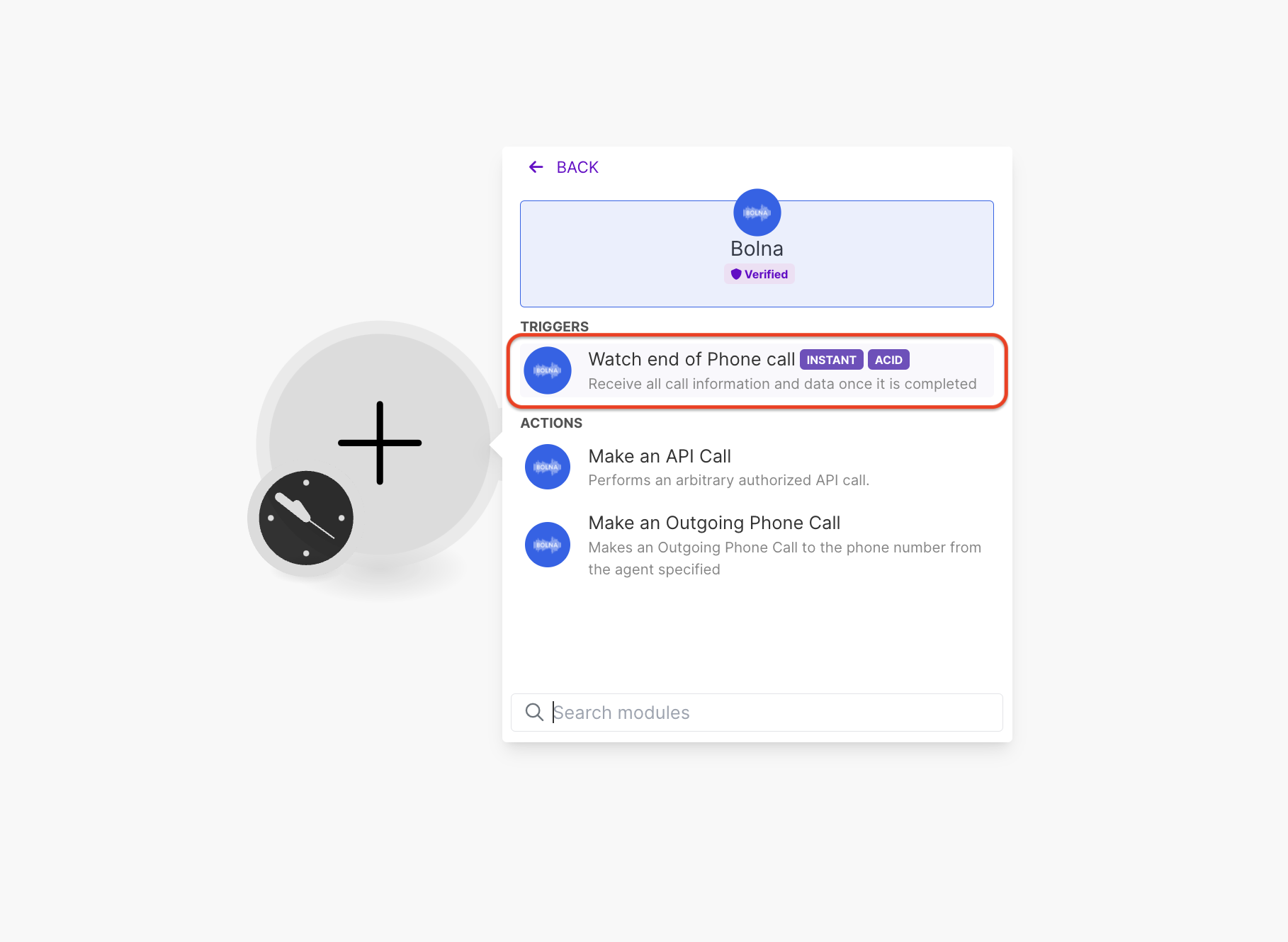
1. Use Bolna's Make.com Trigger <b>`Watch end of Phone call`</b> module
2. Create a new Webhook connection
3. Generate a Webhook URL on Make.com
4. Use the Webhook URL created by Make.com in Bolna's voice AI agent
<Steps>
  <Step title="Add &#x22;Bolna Watch end of Phone call&#x22; trigger module to your make.com scenario">
    <Frame caption="Adding &#x22;Bolna Watch end of Phone call&#x22; module to make.com">
      <img src="https://mintcdn.com/bolna-54a2d4fe/n6ISBDZpjo2_6G0U/images/tutorials/make-com/create_bolna_webhook_connection_step_1.png?fit=max&auto=format&n=n6ISBDZpjo2_6G0U&q=85&s=13767ab8db49aa8e541edd2907226e31" alt="Make.com scenario with Bolna Watch end of Phone call trigger module for webhook integration setup" width="1818" height="1330" data-path="images/tutorials/make-com/create_bolna_webhook_connection_step_1.png" />
    </Frame>
  </Step>

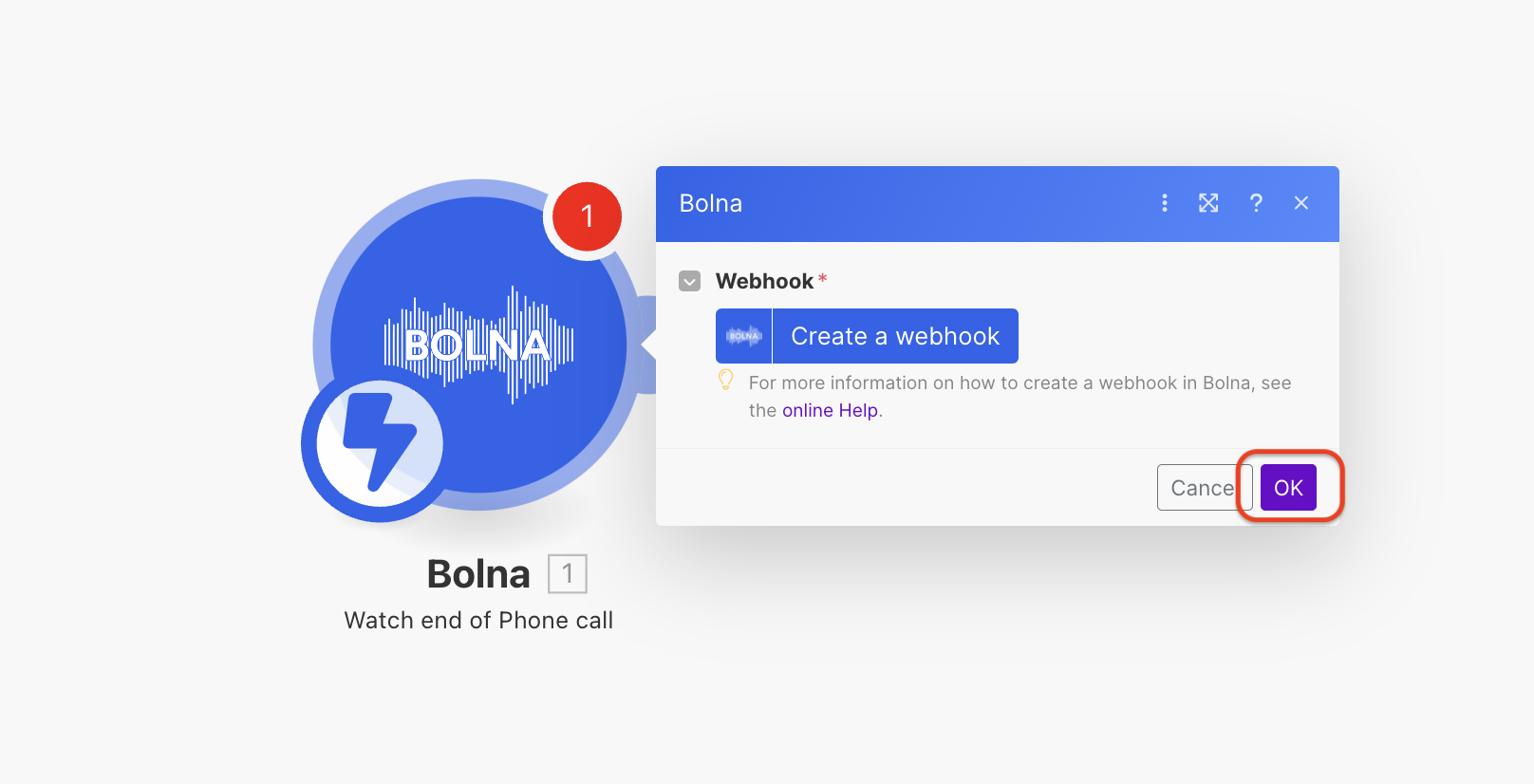
  <Step title="Follow steps to create a webhook connection">
    <Frame caption="Click the button to proceed with webhook creation">
      <img src="https://mintcdn.com/bolna-54a2d4fe/n6ISBDZpjo2_6G0U/images/tutorials/make-com/create_bolna_webhook_connection_step_2.png?fit=max&auto=format&n=n6ISBDZpjo2_6G0U&q=85&s=13c361ecef318f0c9b6f08c3fa591e74" alt="Make.com webhook connection creation button for establishing Bolna Voice AI integration with automation workflows" width="1616" height="826" data-path="images/tutorials/make-com/create_bolna_webhook_connection_step_2.png" />
    </Frame>
  </Step>

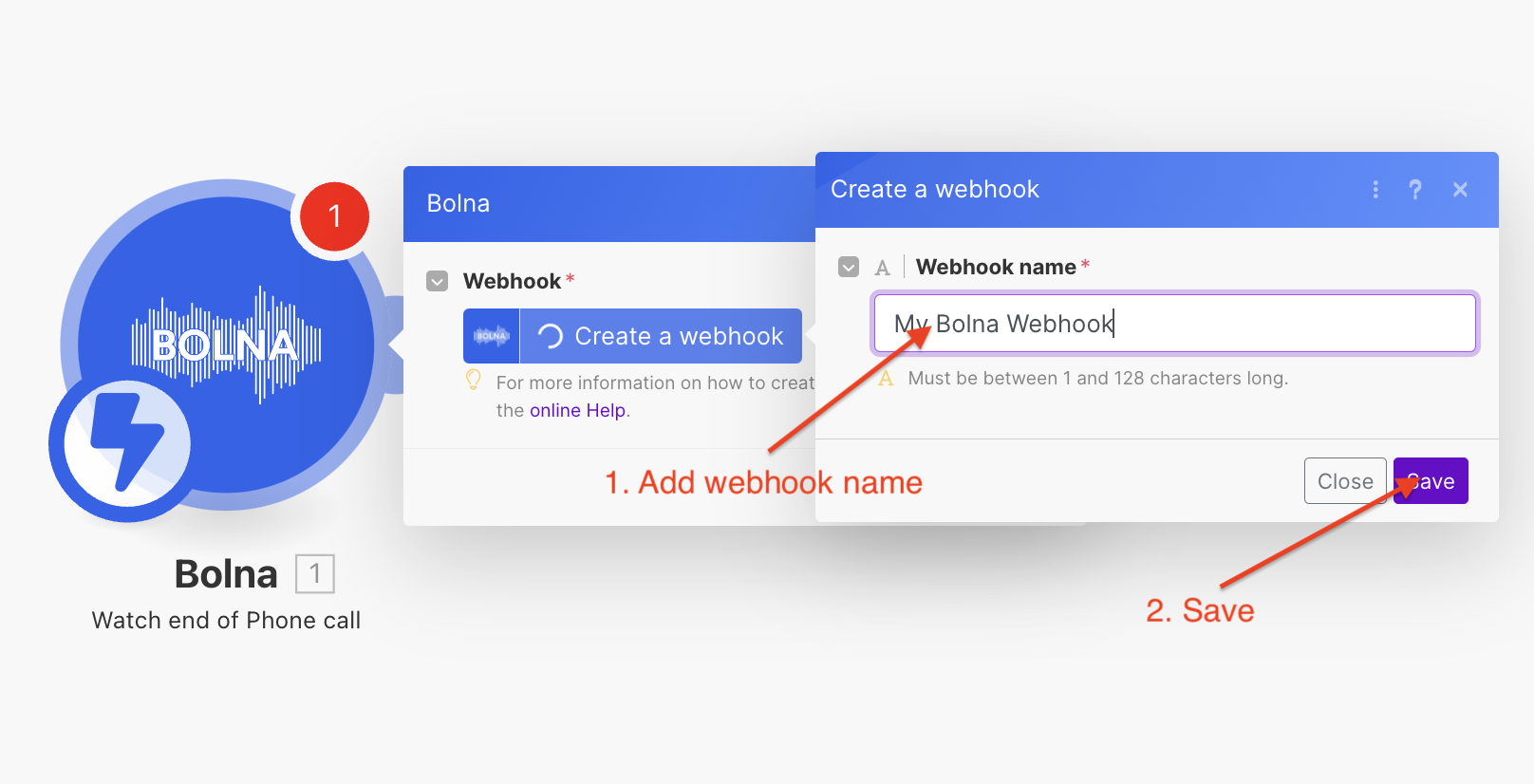
  <Step title="Enter a webhook connection name and save it">
    <Frame caption="Entering the webhook connection name">
      <img src="https://mintcdn.com/bolna-54a2d4fe/n6ISBDZpjo2_6G0U/images/tutorials/make-com/create_bolna_webhook_connection_step_3.png?fit=max&auto=format&n=n6ISBDZpjo2_6G0U&q=85&s=4544b9a59d661209a88e8b3fe12267dc" alt="Webhook connection naming interface in Make.com for Bolna Voice AI call completion notifications" width="1616" height="826" data-path="images/tutorials/make-com/create_bolna_webhook_connection_step_3.png" />
    </Frame>
  </Step>

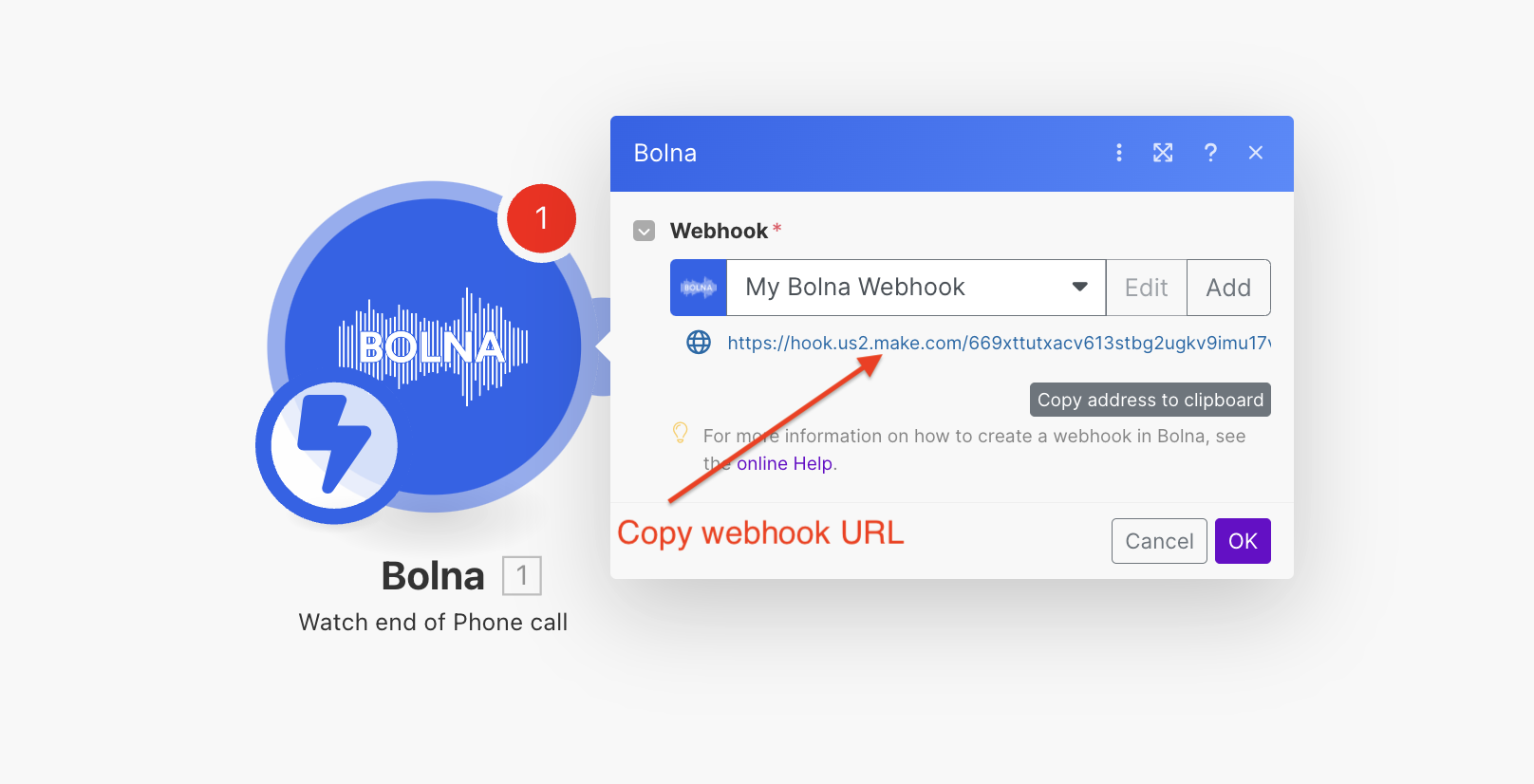
  <Step title="Copy the webhook URL from the created webhook connection">
    <Frame caption="Copy the webhook URL">
      <img src="https://mintcdn.com/bolna-54a2d4fe/n6ISBDZpjo2_6G0U/images/tutorials/make-com/create_bolna_webhook_connection_step_4.png?fit=max&auto=format&n=n6ISBDZpjo2_6G0U&q=85&s=a094871df87ca3209a16d875f46fdbf9" alt="Webhook URL copying interface in Make.com showing generated endpoint for Bolna Voice AI integration" width="1616" height="826" data-path="images/tutorials/make-com/create_bolna_webhook_connection_step_4.png" />
    </Frame>
  </Step>

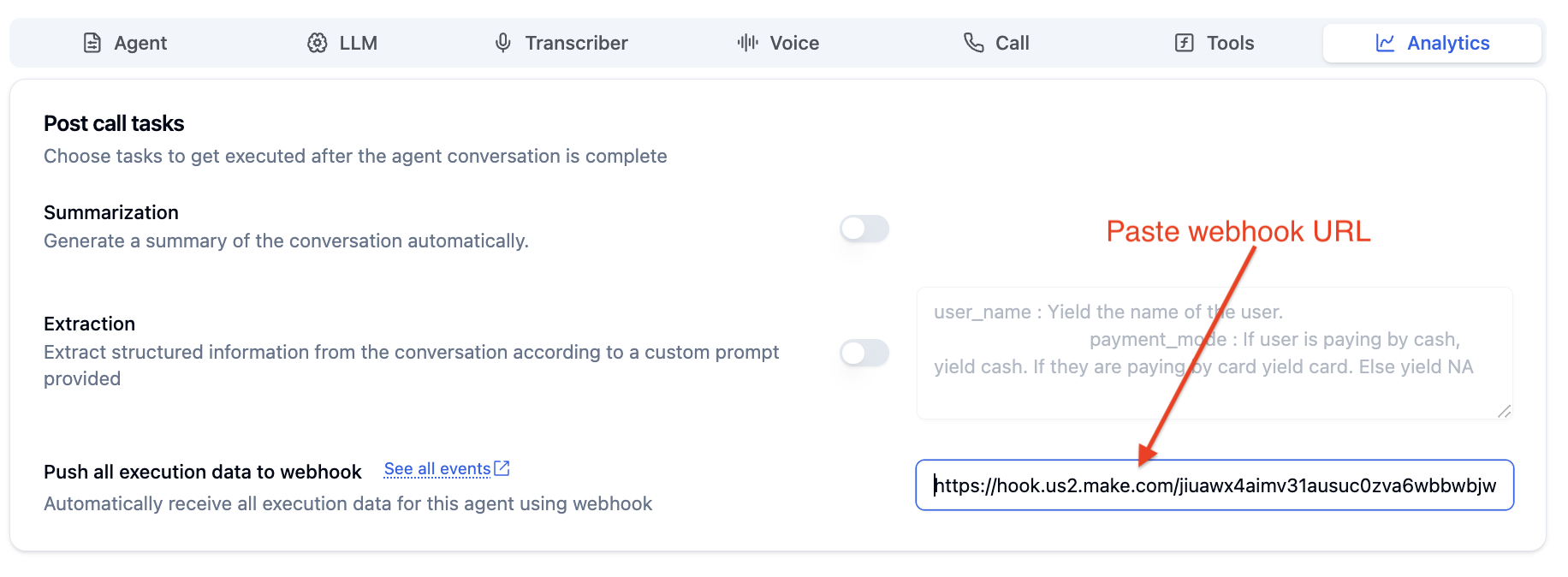
  <Step title="Paste this URL in your agent's webhook and save your agent. This will notify make.com once the call is completed.">
    <Frame caption="Paste the webhook URL">
      <img src="https://mintcdn.com/bolna-54a2d4fe/n6ISBDZpjo2_6G0U/images/tutorials/make-com/create_bolna_webhook_connection_step_5.png?fit=max&auto=format&n=n6ISBDZpjo2_6G0U&q=85&s=44cdef1909ac3eeedb60d4550ce5f30b" alt="Bolna agent webhook configuration showing Make.com URL integration for automated call completion notifications" width="1832" height="674" data-path="images/tutorials/make-com/create_bolna_webhook_connection_step_5.png" />
    </Frame>
  </Step>
</Steps>

<Check>
  After completing the above steps, your Bolna Voice AI agent is successfully configured to automatically send phone call information to Make.com.
</Check>


Built with [Mintlify](https://mintlify.com).