Building a multi-lingual conversationalist for India

Sonam Bala
Author
A collections agent calls a borrower about an overdue EMI. It opens in Hindi.
Agent (Hindi): नमस्ते, मैं बोलना से बोल रहा हूँ। आपकी EMI ड्यू है।
Hello, I'm calling from Bolna. Your EMI is due.Customer: हाँ हाँ… मला माहीत आहे, पण पगार उद्या येतोय.
Yes, yes… I know, but my salary comes in tomorrow.
The first two words are Hindi. The rest is Marathi. The borrower answered in the language they thought the caller wanted, then switched to their own as soon as the call reached what mattered: when they can pay.
The agent switched too.
Agent (Marathi): काही हरकत नाही. उद्या पेमेंट लिंक पाठवतो, चालेल का?
No problem. I'll send the payment link tomorrow. Does that work?
The call ended with a date and a payment link. If the agent had stayed in Hindi, the borrower would have had to explain their salary date in a language they speak less easily. Most people don't. They say "theek hai" and hang up.
The same moment shows up in other industries. On an insurance renewal call in Bengaluru, a customer answers in English and then says in Kannada that this month is difficult. An English-only agent misses the one thing that mattered. On a hospital reminder in Kolkata, a son picks up and hands the phone to his mother, who speaks Bengali. The agent has to follow her, not him.
On Bolna last month, about one in eight calls with live language detection switched language at least once.
Why language keeps changing in India
In 2011, the Census asked every resident for their mother tongue. It got back 19,569 different answers, which were grouped into 121 languages. Twenty-two of these are listed in the Constitution.
Even these numbers simplify things. "Hindi" in the Census covers more than fifty mother tongues, including Bhojpuri, which alone has about 5 crore speakers. States are also less uniform than a map suggests. A third of Karnataka grew up speaking something other than Kannada. Assam is about half Assamese and nearly a third Bengali.
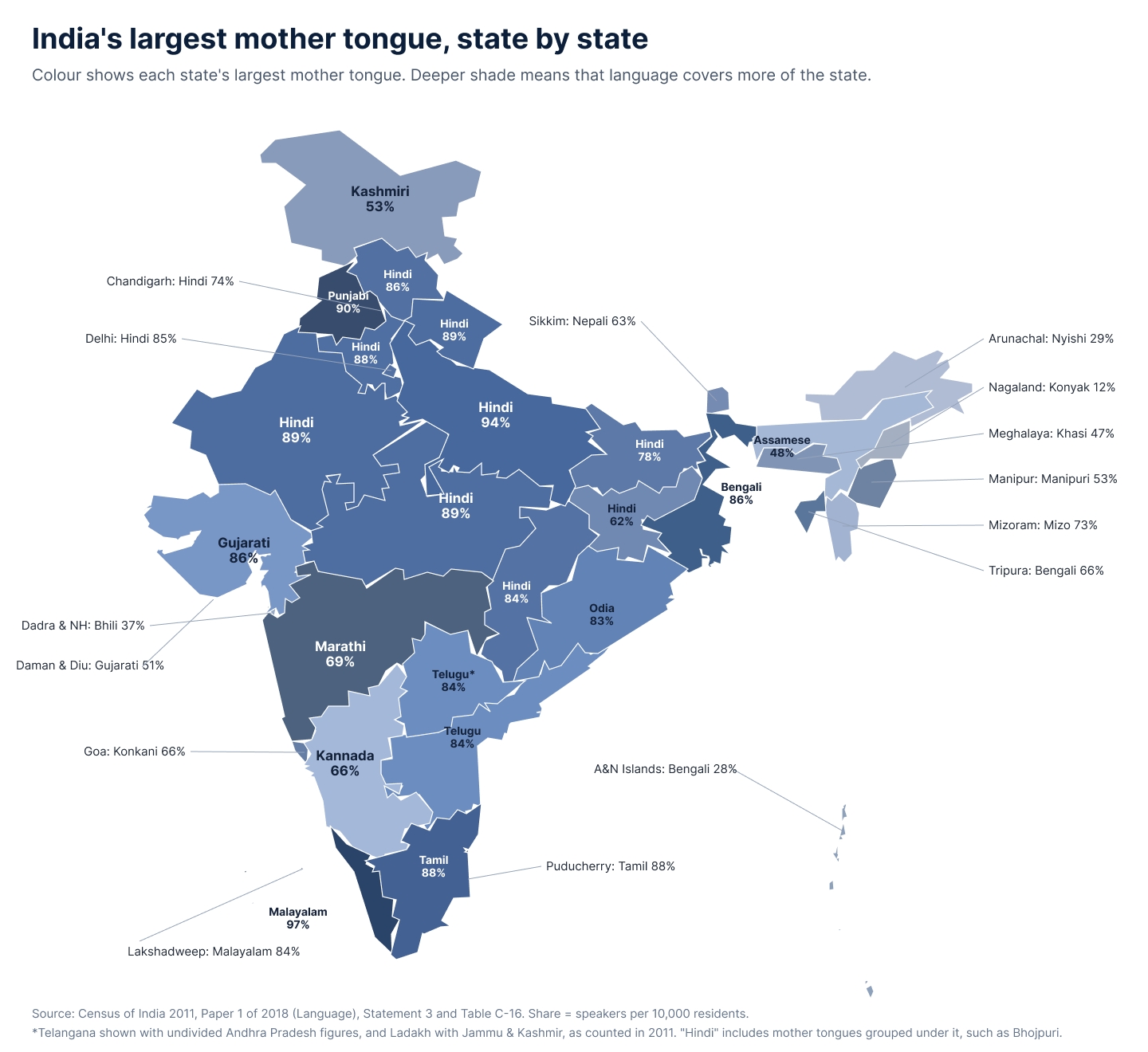
More than a quarter of Indians also speak a second language, and people pick a language based on who they are talking to. When a call comes from an unknown number, most people guess Hindi or English. That is why the same pattern keeps showing up on calls:
- Callers open in the language they think you expect, then move to their own.
- The important part, like an objection, a salary date or a promise to pay, comes after that move.
- If the agent replies in the wrong language, the caller stops explaining and soon hangs up.
Three ways voice agents fail
Good AI voices already exist for many Indian languages. The hard part is deciding which language to use, and when.
Stuck in one language. The agent is set up in Hindi and stays in Hindi. Customer records can suggest a language, but the person who answers may not match the record.
Switching too late. Some agents switch only when the caller asks, or only after several turns. The customer hears at least one reply in the wrong language, usually right after sharing something personal.
One model for every language. Speech recognition quality varies a lot from one language to the next. In AI4Bharat's Vistaar benchmark, models built for Indian languages got about 1 in 7 Hindi words wrong, but nearly 1 in 3 Malayalam words. Noisy phone lines make it worse.
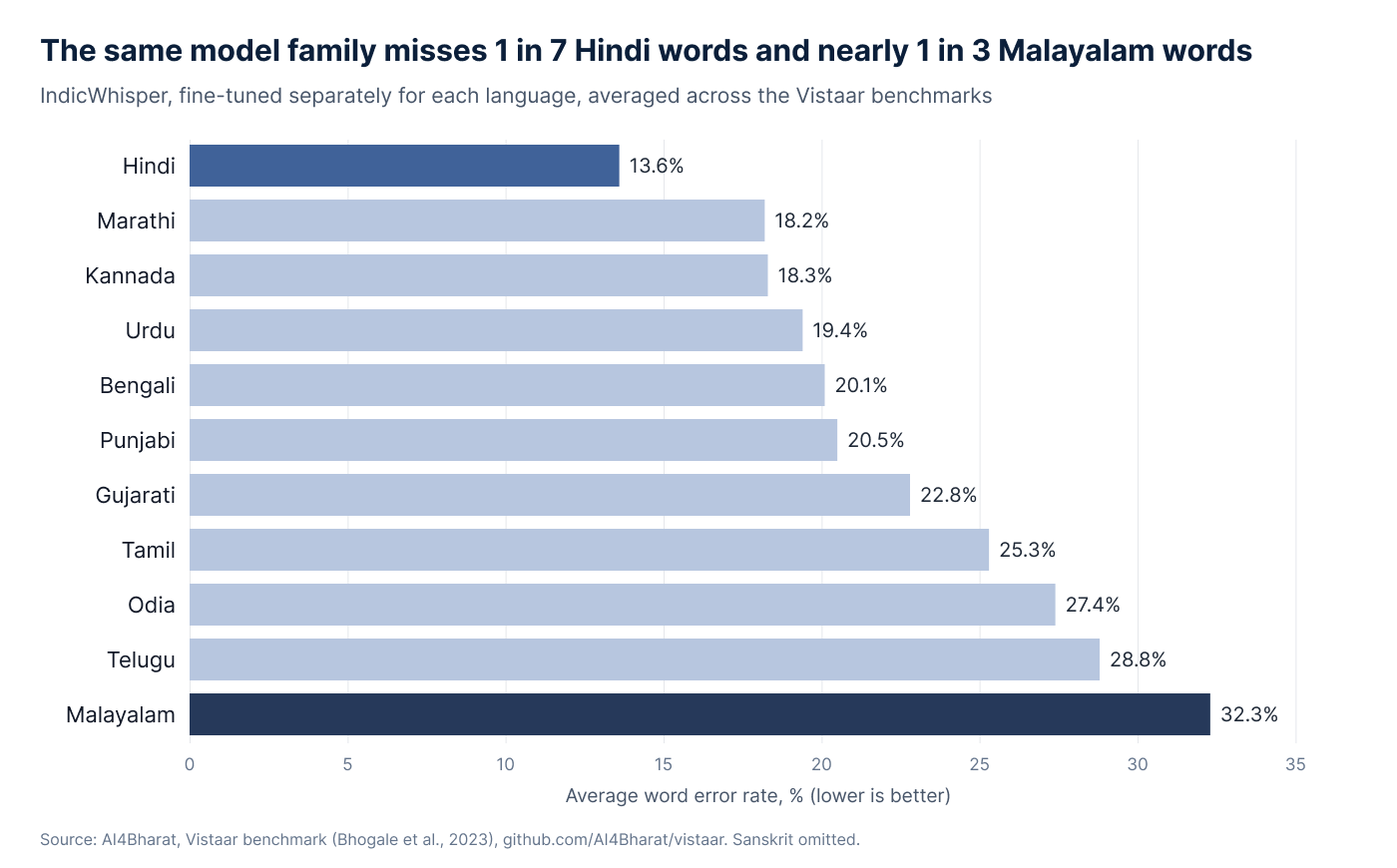
So on Bolna, each language on an agent gets its own speech recognition and voice model, for example Sarvam for Hindi and Deepgram for English. When a better Tamil model comes out, it goes into the Tamil slot and the rest of the agent stays the same.
Tip: when comparing vendors, ask for one recorded call that switches language twice.
How LiD works on Bolna
Language identification (LiD) on Bolna has two parts.
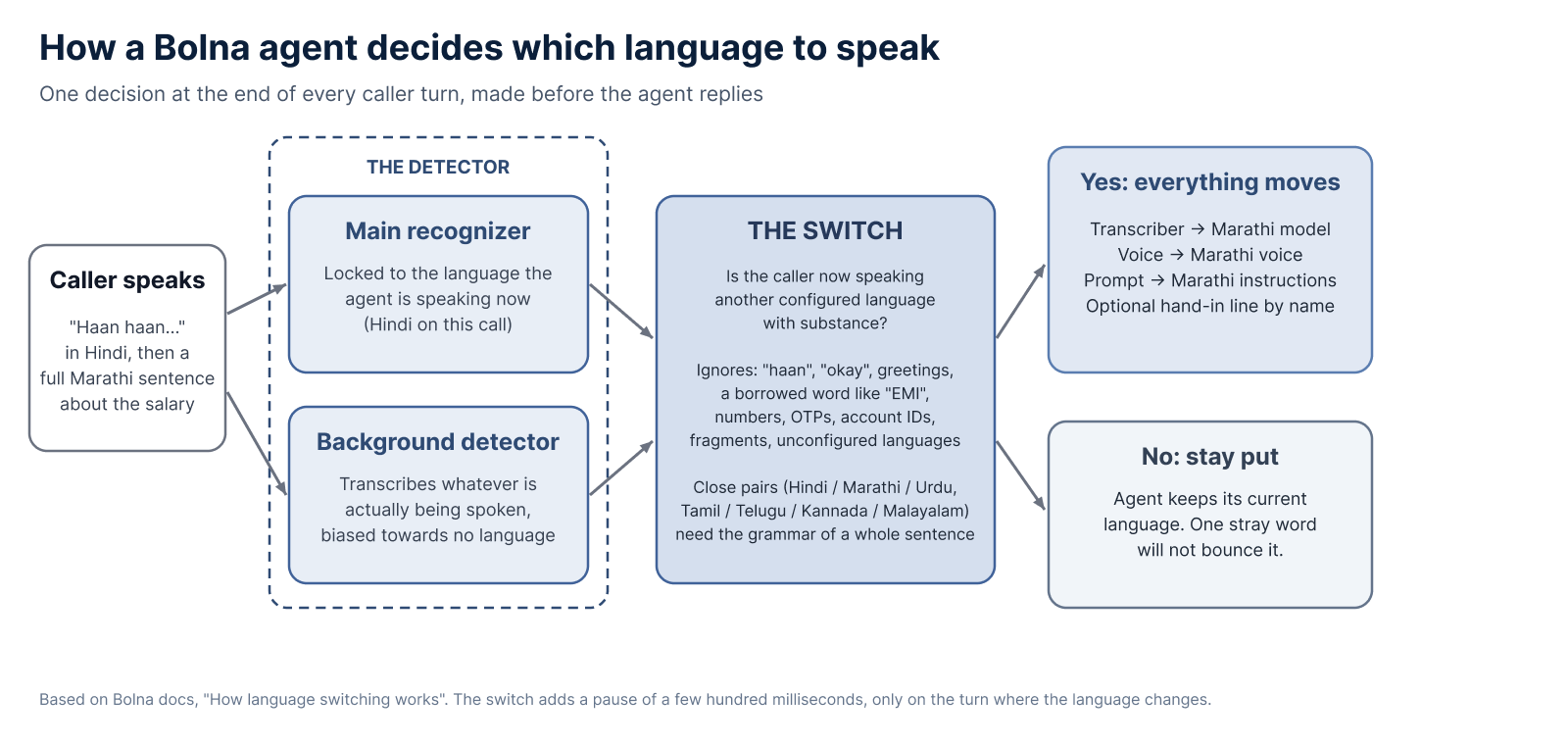
The Detector. Two listeners run during the call. One is set to the language the agent is currently speaking. The other writes down whatever it hears, without assuming any language.
The Switch. At the end of each caller turn, before the agent replies, the Switch asks one question: has the caller moved to another language this agent supports? It is careful by design. It switches when the caller speaks a full sentence in another language, asks for a language, or keeps answering in one. It ignores fillers like "haan" and "okay", English words like "EMI" inside a Marathi sentence, and numbers such as OTPs or account IDs.
When it switches, the whole agent moves together. Speech recognition, voice and the agent's instructions all change to the new language, and the agent can introduce itself in that language. The switch adds a pause of a few hundred milliseconds, only on that one turn.
On the opening call, the Switch treats "हाँ हाँ" as a filler. Hindi and Marathi are close, so it looks at the grammar of the whole sentence. "मला माहीत आहे" is Marathi; in Hindi it would be "मुझे पता है". So the Switch moves to Marathi, and the next reply is in Marathi.
Teams that want more control can set an agent to switch only when the caller asks.
Why speed matters
In everyday conversation, people leave a gap of only about 200 milliseconds between turns. Research across ten languages, from Japanese to languages spoken in Mexico and Papua New Guinea, found people everywhere keep this gap short.
A caller who has just switched to Marathi expects the next reply right away, and in Marathi. An agent that sends one more Hindi reply while it works things out breaks that rhythm. That is why Bolna makes the decision before the reply is written.
Where it helps
Language identification helps on any call where the useful part is personal:
- Lending: EMI reminders and collections, where salary dates and payment promises come up.
- Sales and lead qualification: objections about fees, income or eligibility.
- KYC and insurance renewals: why a document is missing or a payment is late.
- Healthcare reminders: a family member often takes the phone.
- Deliveries: confirming a new time slot or address.
- Support lines: callers describe problems best in their own language.
The numbers
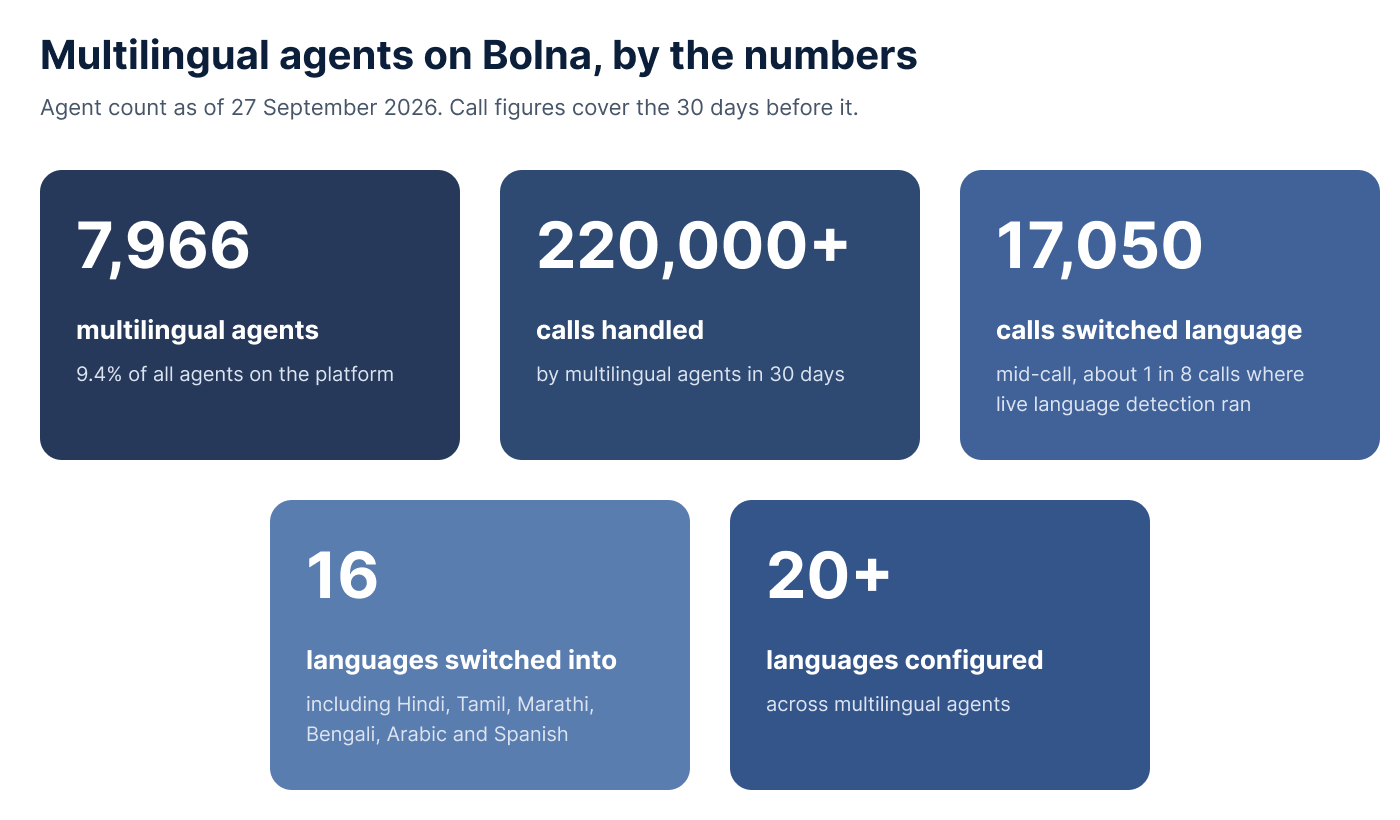
As of 27 September 2026, Bolna had 7,966 multilingual agents, 9.4% of all agents on the platform. In the 30 days before that, they handled more than 220,000 calls, and 17,050 of those switched languages mid-call. That is about one in eight of the calls where live detection ran.
The choice of caller
Nobody on the opening call asked for Marathi. The borrower simply switched, the way people across India do many times a day. A good agent notices that early and follows on the very next turn, so the customer never has to ask.
Try it yourself. Call Mr. Bolna on +91 22 6998 0337, start in any language and switch partway through a sentence. Then set up your first multilingual agent with the multilingual agent quickstart.
Sources
- Census of India 2011, Paper 1 of 2018: Language
- Language Atlas of India 2011
- AI4Bharat, Vistaar benchmark (2023)
- Stivers et al. (2009), Universals and cultural variation in turn-taking in conversation, PNAS
- Levinson and Torreira (2015), Timing in turn-taking, Frontiers in Psychology
- Bolna docs: How language switching works
- Bolna docs: Set up multilingual voice AI agents
- Bolna docs: Choosing a speech-to-text provider