Taking the Second Call with Workflows

Sonam Bala
Author
The problem with a singular call without follow-ups
When people imagine a voice AI agent making calls, usually it ends with just one call, irrespective of whether it was picked up by the callee, or a request for follow up was made. The consequence? The call dialled remained as good as no reach out if only the outcomes were to be taken into consideration.
To illustrate this better, think of a collections officer who has thousands of customers waiting to be reminded of their EMI due date. Some of them might not even be paying for various reasons, or some simply decided to change their borrowing plan. What might have started as a simple process to call up people to remind them of their due dates soon turned into various subsets depending on the technicalities of the particular case. Each case variable needed a different subsequent follow up or steps, but the first agent due to call the customers was never fed any of this information or given power to take actions on the basis of the call.
The success of the first call could only be determined if the callee picked up and the agenda of the call was resolved within that conversation. That specific problem can be solved with a workflow on Bolna. Let's see how.
What is a workflow
A planned workflow on Bolna determines the targeted customer's journey into various nodes with a specific action or next step dedicated to each, whether it is to place a call or determine what the agent got fed in the call, waiting period before retries, follow up WhatsApp message or closing of the call with a determined label depending on the context. The planned journey in the workflow determines the next step and is backed by a fallback to ensure no stranding of any targeted customer along the way.
A workflow can simultaneously run relevant reminders or links on WhatsApp while the call is in process, ensuring the call isn't lost despite the first verbal communication.
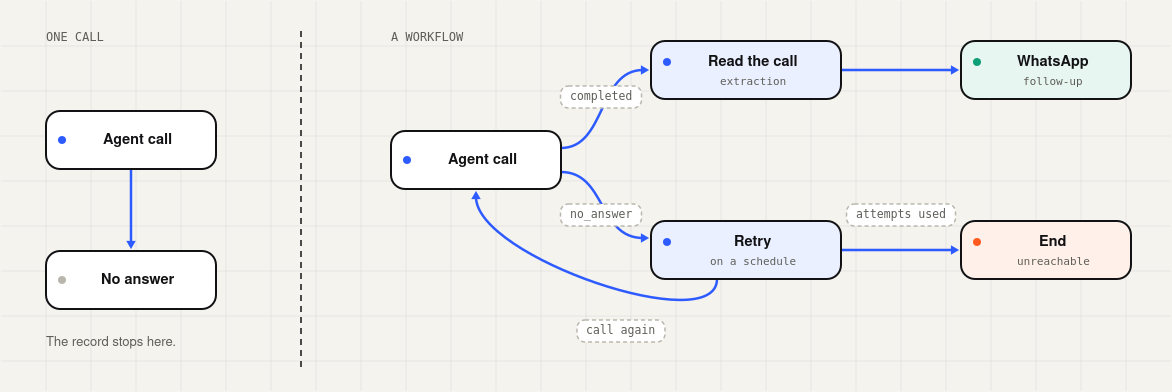
A single call ends at its first outcome. A workflow gives every outcome a determined next step to a conclusive end.
The origin of workflow as a process
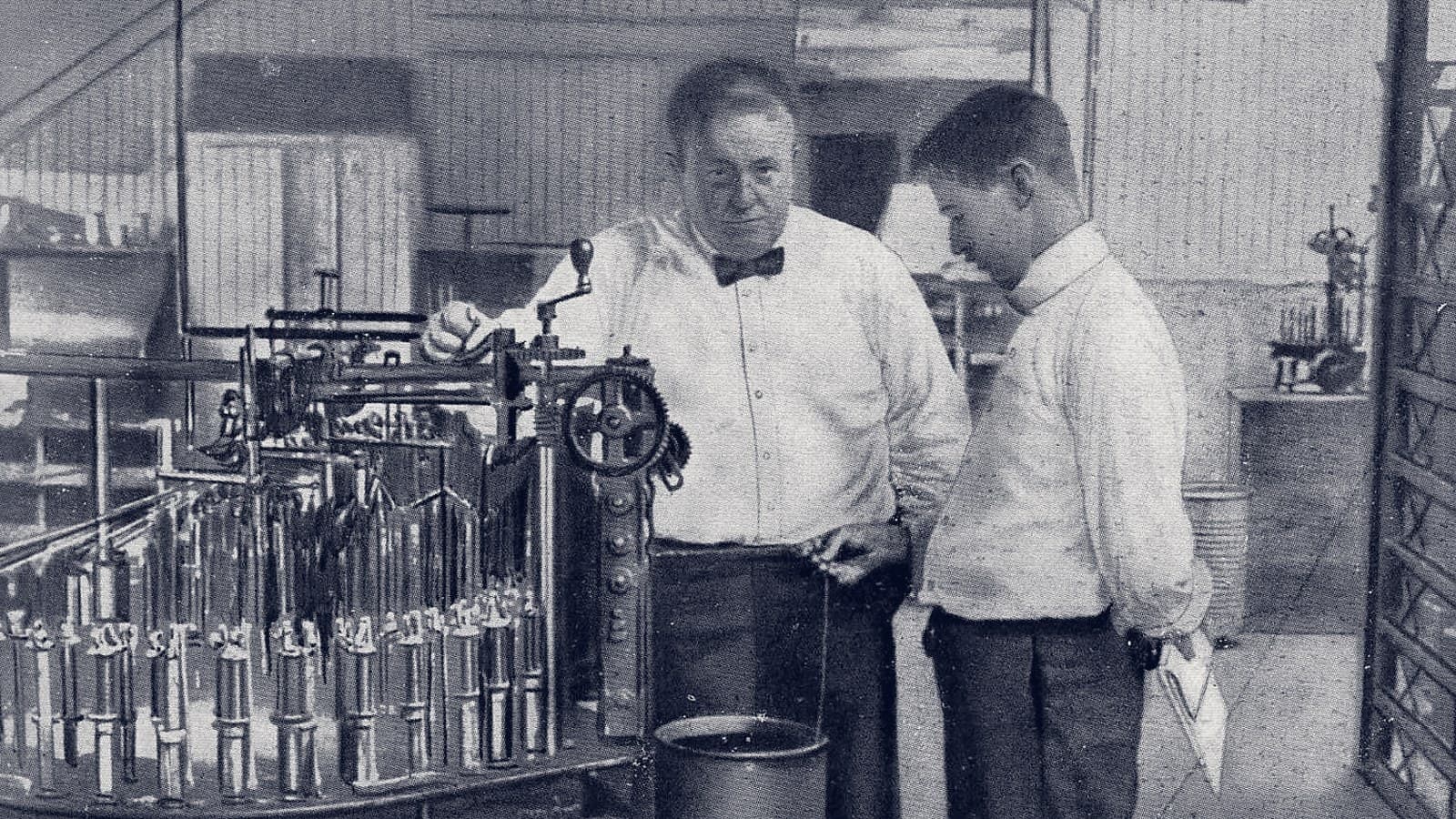
The attempt to organise any work in multiple sequential flows is perhaps as old as mankind itself, in order to give things a structure. But the tracing of this being contained within boxes and arrows can perhaps lead to Frank and Lillian Gilbreth, who exhibited the flow process chart to the American Society of Mechanical Engineers (ASME) in 1921. This presentation is also credited as the first structured attempt to document any process. This was followed by ASME making the symbol set derived from their work its standard protocol in 1947.
The world of software followed the precedent to form the Workflow Management Coalition to create workflow standards (1993 onwards) and the Workflow Reference Model (1995). Since then, multiple modifications have made their way into the process with changing times and requirements. And today, you can see that very same structure in a Bolna workflow, where a box can house a voice agent and carry a full conversation that can pass the context to the next one in a sequential manner.
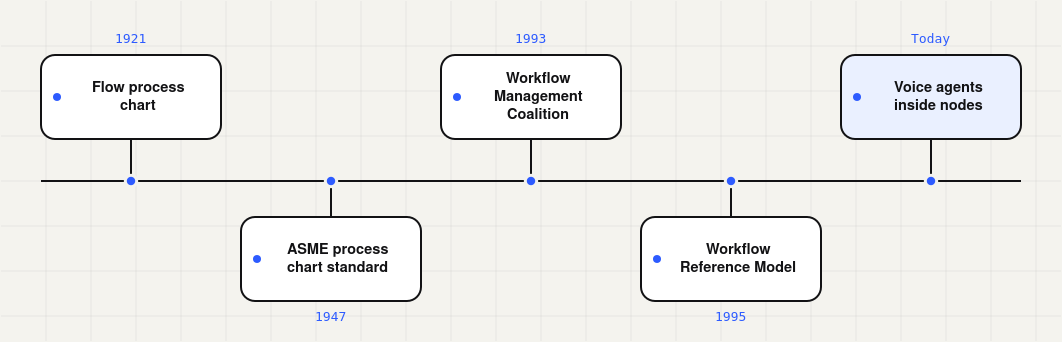
The timeline from paper process charts to voice agents inside workflow nodes.
Why follow-up matters in voice AI outreaches
What we usually see in the case of failed calls, or the ones which were never picked up, is that it's usually not the prompt breaking apart. The context that makes it break can vary depending on the situation the callee is placed in, e.g. a borrower being on a crowded bus, or the call dropping on a weak network. What would make the call reach a conclusion is perhaps a retry while the callee is still expecting the call, on the medium they anticipate.
Studies in the past have emphasised the timing of when a retry or reminder has to happen. In 2011, Harvard Business Review published a study of 1.25 million leads across 40+ US organisations, where those that contacted a hot lead within an hour were nearly 7x as successful as the ones who waited longer, and over 60x more successful than the ones who waited a day.
The healthcare industry had a similar precedent, with a Cochrane review of randomised trials finding that health appointments recorded 67.8% attendance without any reminder, which increased up to 78.6% with text reminders and over 80% with a phone call.
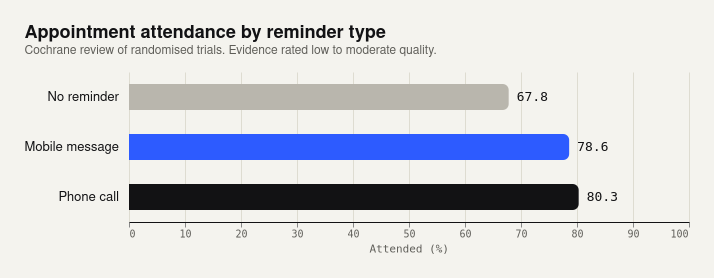
Attendance rates reported in the Cochrane review. Source: PubMed abstract.
These studies were published in a world where voice AI didn't exist as it does today, but they highlight something interesting about user behaviour across sectors. Users respond so much better when they are followed up with a nudge in a timely manner. It's human to put things on the back burner until a reminder comes along. That's the gap the workflow on Bolna bridges, helping enterprises make the follow-up call within the stipulated time without having a dedicated person follow up on each case manually or anyone having to remember them.
Remember that follow-up channels like WhatsApp have rules as well: a business can only send free-form texts within 24 hours of the customer's last response, and needs an approved template outside that window. Bolna assists businesses with approved templates through a native AiSensy integration, without ever needing a make.com or n8n in between.
How it works
The easiest way to see a workflow is to follow one person through it: Ramesh, whose EMI falls due on Saturday.
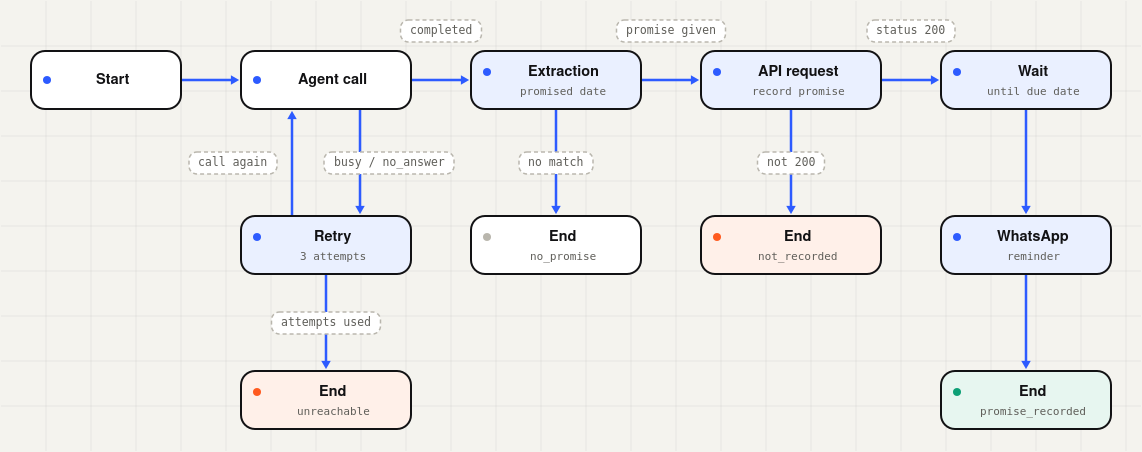
Ramesh's path through a collections workflow. Labels on the arrows are the cases each node checks.
The start node declares the fields each contact brings, such as mobile number, loan amount and due date. Typed fields are converted at upload, so "42000" in a CSV is compared as a number.
The agent node calls Ramesh with a Bolna voice agent, passes variables like his name and the amount due, and records the call's status.
The retry node takes over if he was busy or did not answer. It runs a schedule of up to ten attempts, sending him back to the call each time, and follows its own cases once they run out. It is also the only way to build a loop, since any other path back upstream is rejected at publish.
The extraction node sits right after the agent node and turns what the agent captured, such as a promised payment date, into variables the workflow can branch on.
Cases decide from there. They can compare values, check lists, search text or add scores, and they nest with all, any and not.
The api node posts the promised date to the lender's system and branches on the HTTP status, with network failures flagged separately.
The wait node holds Ramesh until his due date, read from his record, or for a set delay of up to 365 days.
The WhatsApp node then sends an approved reminder through AiSensy. For now it is fire-and-forget, so the workflow cannot branch on delivery.
The end node closes each path with a label and an outcome of success, failure or neutral, which feed campaign reports.
Throughout, the workflow keeps notes like a shopkeeper's khata. Values in state.* survive retries and waits, and each node keeps its own history, so the first call's result is still readable after a second call.
A detour: the eighteen motions
The Gilbreths named the smallest units of work therbligs, their surname spelled backwards with the "th" swapped, and defined eighteen of them. Two were avoidable delay and unavoidable delay. A century ago, waiting already deserved a symbol of its own.
A retry schedule and a wait node carry that instinct into software. The gap between Ramesh's second and third call is a decision written into the chart, made once and applied to every borrower after him.
What teams can do with it
For lenders, the clearest pattern comes from Bolna's own documentation: call the borrower, extract the promised date and record it through an api node, with a separate path when the lender's server cannot be reached.
Beyond lending, a handful of building blocks cover most outreach:
- Timed retries. Retry busy or unanswered calls on a schedule, with a clear exit for those who never pick up.
- Score-based branching. Route contacts down hot, warm or cold paths using scores the agent extracts.
- Scheduling from contact data. Wait until a date in the uploaded record, such as a due or renewal date.
- WhatsApp around the call. Send a template before a call, after it, or only when it did not connect.
- Memory across touches. Act on something a contact said days earlier.
Use cases across sectors
Two patterns come straight from Bolna's documentation.
Collections. Call, extract the promised date, record it, and send a WhatsApp reminder on the due date. Unreached borrowers end under their own label, so the collections head knows exactly how many there were. This is the workflow drawn above.
Lead qualification. Call new leads while the enquiry is fresh, score the conversation, follow up hot leads on WhatsApp and close cold ones cleanly.
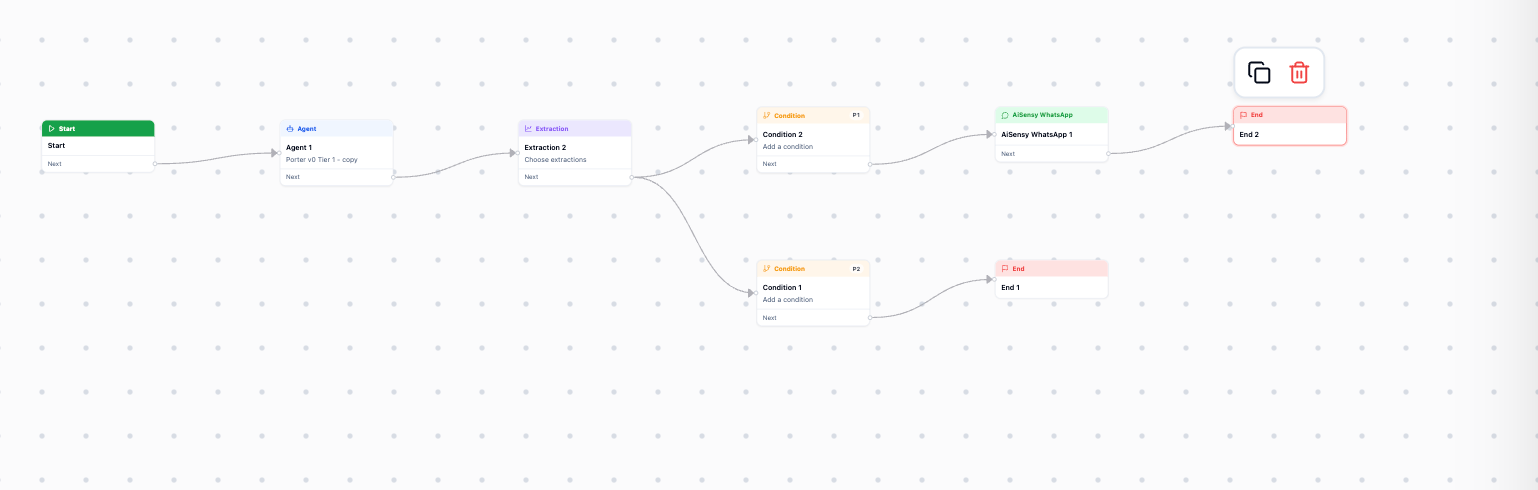
A lead qualification workflow in the Bolna editor: Start, Agent, Extraction and Condition nodes branching to an AiSensy WhatsApp node and two End nodes. Source: Bolna docs.
The same blocks extend to other sectors. These are patterns teams can build, not published customer examples.
Healthcare appointments. A WhatsApp reminder goes out the day before and a confirmation call on the morning, with an api node updating bookings for patients who reschedule.
Cash-on-delivery confirmation. Each order enters through Bolna's run endpoint and gets a call before dispatch, and customers who cannot be reached are flagged before the parcel ships.
Insurance renewals. A wait node holds each customer until a call date in their record, set weeks before the policy expires, with a WhatsApp template for anyone the call misses.
How to build your first workflow
Everything below happens in the Bolna dashboard, and none of it needs code.
Open the editor
In the left sidebar, expand Build and click Workflows. Click Create to start from a blank canvas with a Start node already in place, or Import to clone an existing workflow by its id.
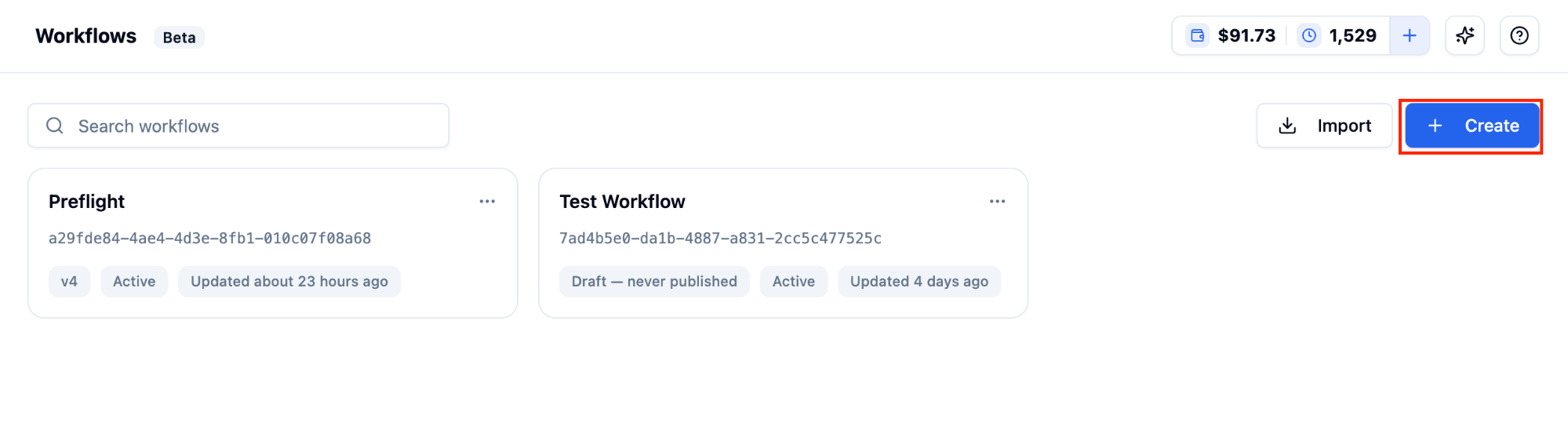
The Workflows list, with Create and Import in the top right. Source: Bolna docs.
Declare your fields
Open the Start node and add the contact fields your workflow needs, such as loan amount or due date.
Add nodes
Click Add node to open the catalog, grouped as Core (Agent, Extraction, Wait, Retry, Condition), External (API request, AiSensy WhatsApp) and Flow (End). Hovering an existing node and clicking its + drops a new node that is already connected to it.
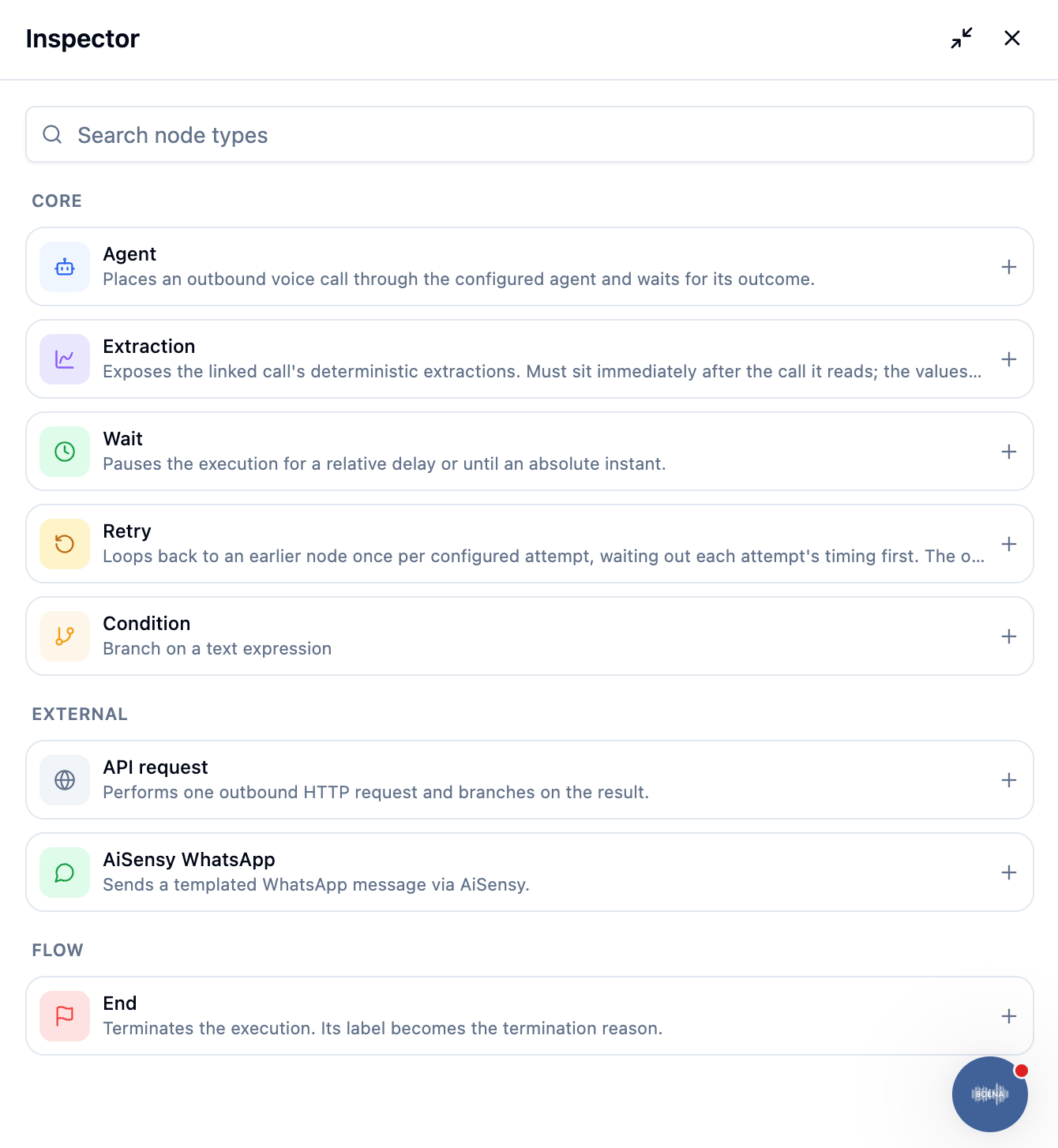
The node catalog, grouped into Core, External and Flow. Source: Bolna docs.
Connect and configure
Draw the connections, then open each node to set its cases and fallback. On a crowded canvas, the search button finds any node by name or type.
Link AiSensy
On a WhatsApp node, paste your AiSensy project API key and project ID, then click Link AiSensy account. Pick a live campaign and fill in its template variables. Send a test message to your own number before going further.
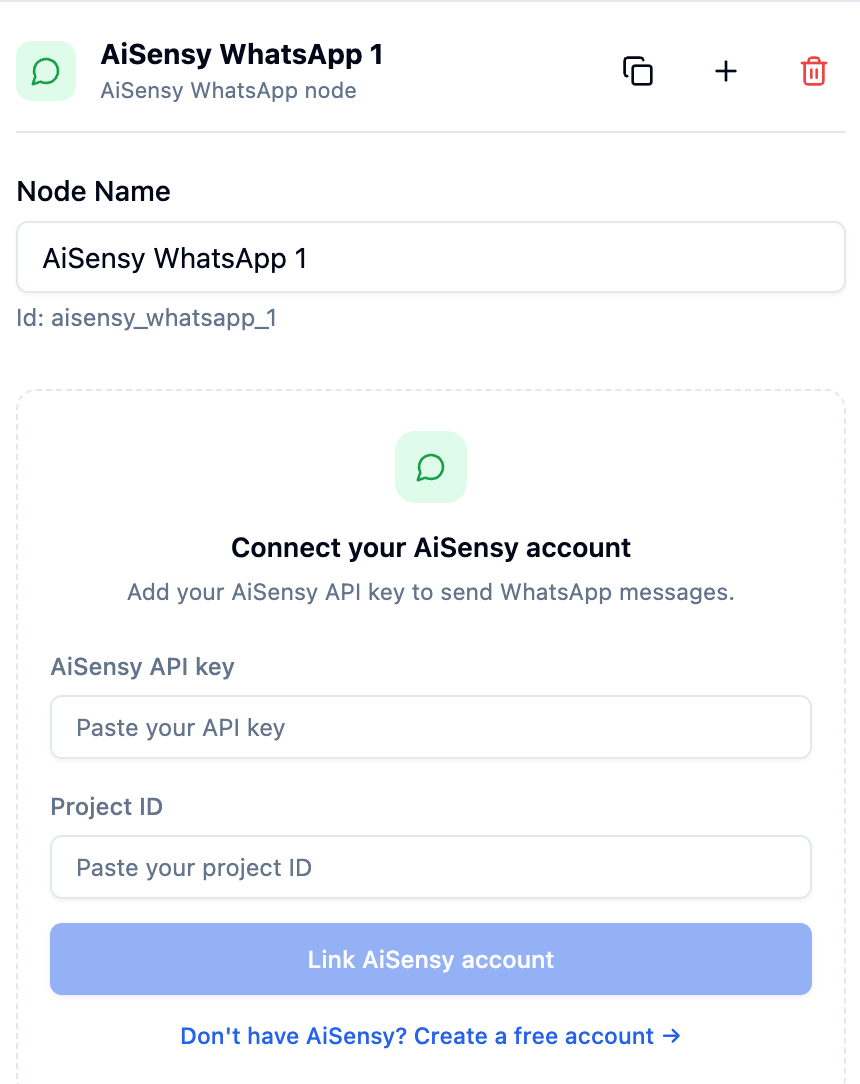
Linking an AiSensy account from the WhatsApp node. Source: Bolna docs.
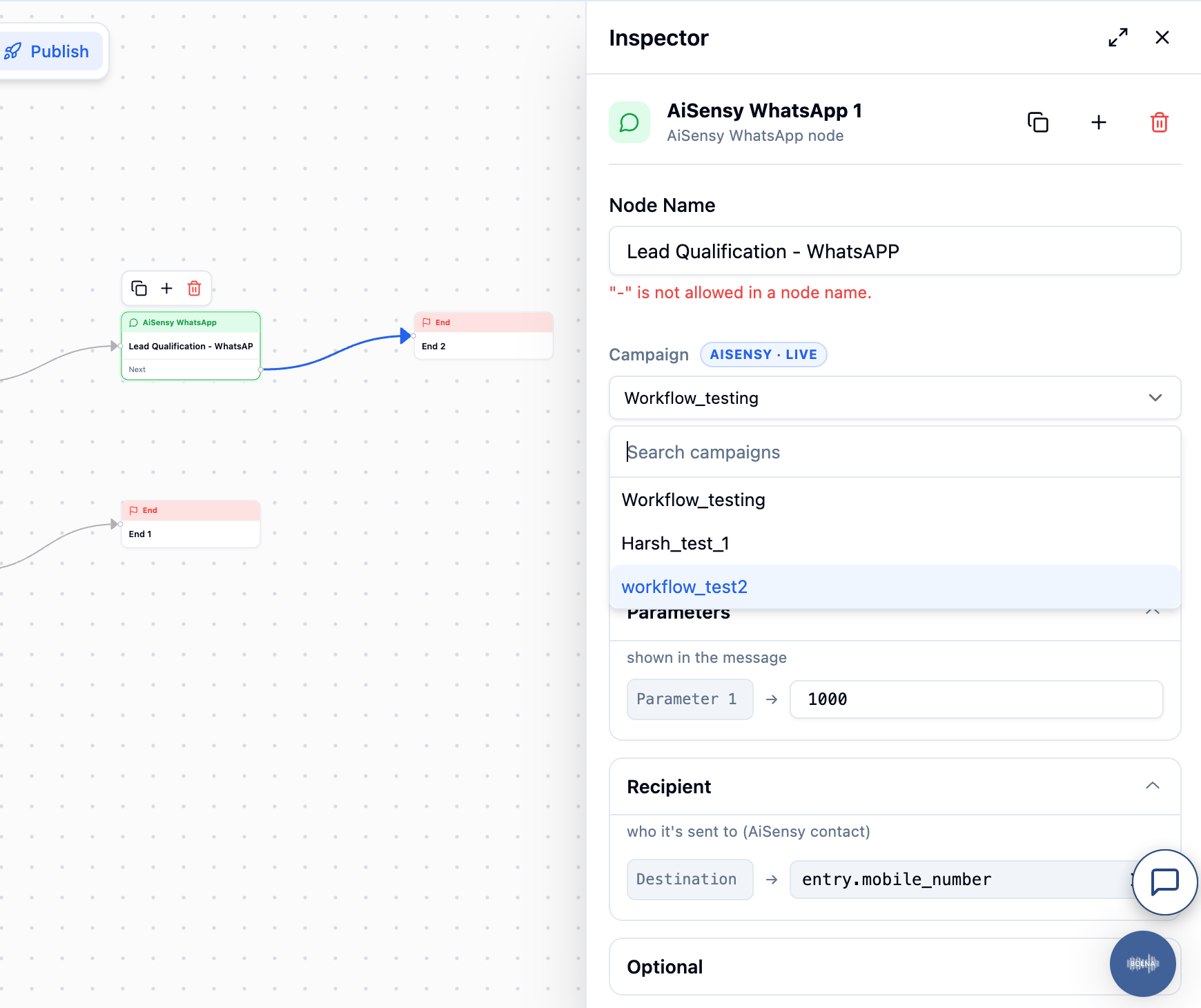
Selecting an AiSensy campaign in the node inspector. Source: Bolna docs.
Validate
Click the checkmark. A badge on it shows how many errors remain in the draft.
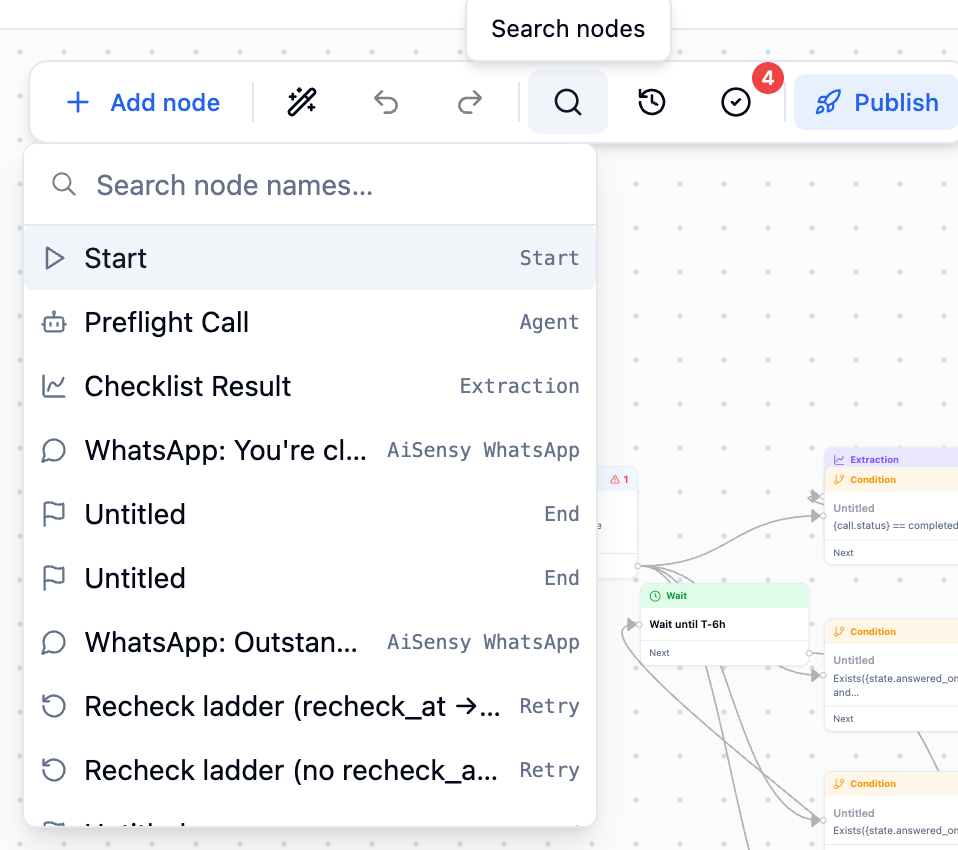
Node search, with the validate button showing a badge of 4 unresolved issues. Source: Bolna docs.
Publish
Publishing freezes the draft as a new version. Version history lists every version, newest first, and lets you view one, restore it into the draft, or save it as a new workflow. A restored version still has to be validated and published before it goes live.
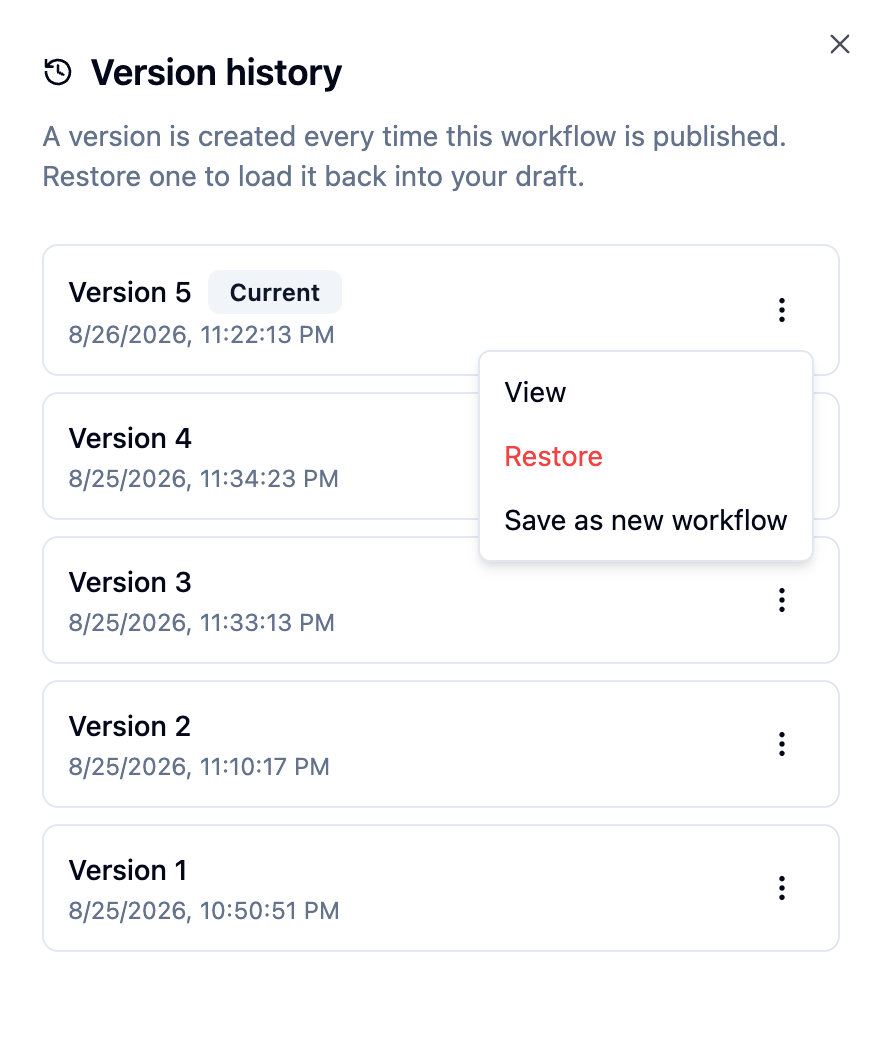
Actions on a past version: View, Restore and Save as new workflow. Source: Bolna docs.
The chart that runs itself
The Gilbreths drew their charts so people could see a process before they changed it. A hundred years later the chart does one more thing. It runs, one contact at a time, with a voice agent inside each box that can hold a conversation the Gilbreths could only have drawn a symbol for.
You can illustrate the effects with the example we started with in the beginning. The collections officers with thousands of due calls no longer have to manually track every call. The ones who never answered are on their second attempt, and the ones who will never answer will close under a label she chose weeks ago. The spreadsheet column of open questions has become a report already, with a Bolna workflow in place.
To begin with your first workflow, you can start with just four nodes: a start, a call, a retry and an end.
Sources
- Bolna docs: Workflows introduction
- Bolna docs: Using the workflow editor
- Bolna docs: Workflow nodes
- Bolna docs: Conditions and variables
- Bolna docs: AiSensy WhatsApp integration
- Flowchart, Wikipedia
- Flow process chart, Wikipedia
- Essential Business Process Modeling, ch. 7, O'Reilly
- The Workflow Reference Model, WfMC (1995)
- Are you letting online leads go cold?, SmartCompany
- How fast do marketing leads turn cold?, Goodreads
- Mobile phone messaging reminders for attendance at healthcare appointments, PubMed
- Cochrane review summary
- WhatsApp key concepts, Twilio
- Therblig, Wikipedia
- Time and Motion, The Korea Times