How We Built a Read-Only AI Agent for Root Cause Analysis in Production

One afternoon in late July, a support ticket landed in our bugs channel. An e-commerce customer's inbound calls were being rejected. Someone reacted to the message with an emoji. Two minutes later, a root cause analysis appeared in the Slack thread.
Before an inbound call connects, Bolna can call the customer's API to identify who is calling. The lookup has a three-second limit. This customer's API answered in 3.001 seconds. The lookup returned empty, the caller appeared unknown, and the agent was configured to reject unknown numbers. Our product lead confirmed the finding a few messages later.
The analysis came from RootCauseClaude, the production debugging agent we run in Slack. Since the end of June, it has handled about 200 investigations for roughly 15 people, primarily in support and customer success. Most first answers arrive within two to ten minutes. The agent can read our code, production logs, database replica, analytics store, and traces. It cannot write to any of them.
What is an AI root cause analysis agent
An AI root cause analysis agent investigates production incidents by gathering evidence from engineering systems, testing explanations, and returning a structured diagnosis. Ours behaves less like a chatbot and more like a careful teammate with a terminal: it follows a runbook, uses read-only tools, cites the artifacts behind every claim, and records what it learned for the next investigation.
The important design choice is not the model alone. Reliability comes from the system around it: a narrow event trigger, a bounded tool loop, infrastructure-level permissions, an evidence contract, and memory that remains reviewable in Git.
How the system works
A Slack reaction starts a job. A worker refreshes the repositories, loads the investigation prompt and prior knowledge, then gives Claude access to read-only tools. The model inspects evidence and produces two outputs: a Slack response and a reusable knowledge note. Only the Python harness performs writes, such as saving a transcript or committing that note.
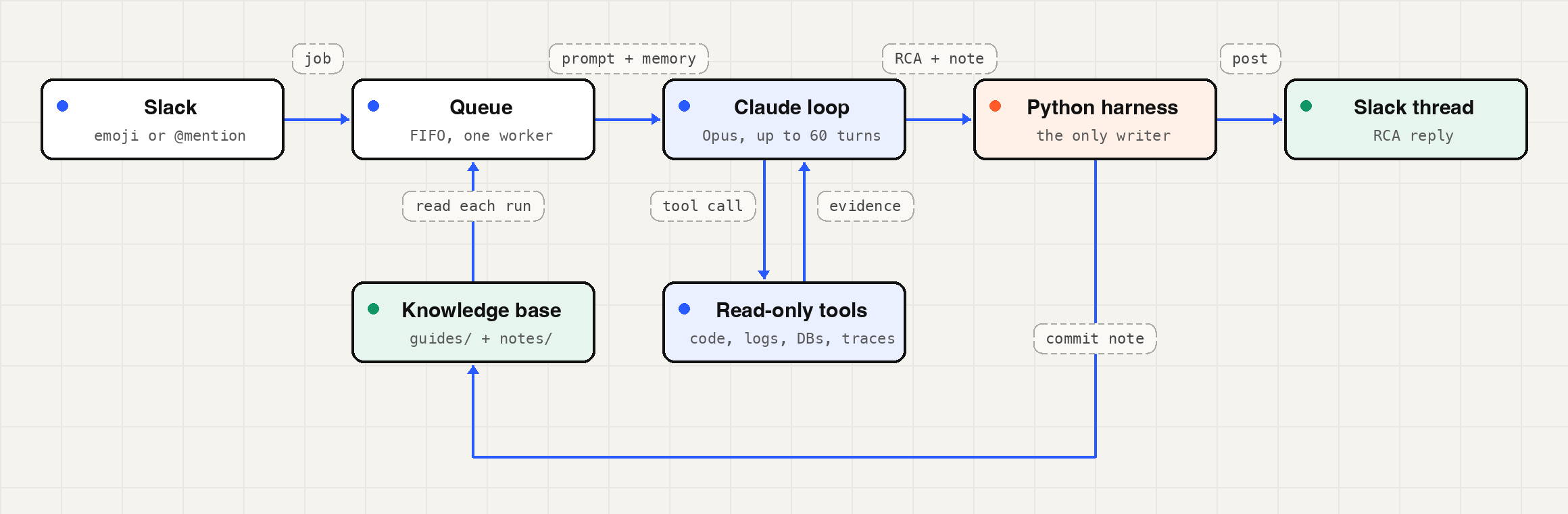
The model only reads. The Python harness does every write, posting the reply to Slack and committing the note back to Git.
| Stage | Component | Responsibility |
|---|---|---|
| Trigger | Slack Socket Mode | Receives an emoji reaction or app mention and deduplicates work with bot reactions. |
| Queue | FIFO worker pool | Runs long investigations within the memory budget. The current deployment uses one worker. |
| Reasoning | Anthropic Messages API | Executes the bounded tool use loop with caching, retries, and usage accounting. |
| Evidence | Read-only tools | Queries code, Loki, Postgres, ClickHouse, Datadog, public pages, and deployment manifests. |
| Output | Python harness | Posts the RCA, stores the transcript, and commits the note. |
From a Slack reaction to an investigation
The bot is one Python process on a small EC2 instance. It connects to Slack over Socket Mode, so it needs no inbound port, public URL, or load balancer. It listens for two events: reaction_added for our custom emoji and app_mention when someone tags it by name.
When an event arrives, the bot checks for its own reactions on the message. It adds eyes when it accepts a job, then replaces that marker with a tick or warning when the run finishes. Those reactions also act as deduplication state. If the process restarts mid-queue, it will not run the same message twice, and we do not need a separate database for that guarantee.
Jobs enter a FIFO queue drained by a small worker pool. We currently run one worker. Each investigation is a long sequence of model calls and shell commands, and serial execution keeps a 1 GB instance comfortable. The worker code already supports higher concurrency when the box grows.
Before each run, the worker fetches and resets every repository it reads to the upstream tip. That includes our open source voice engine, service repositories, a daily dump of Kubernetes manifests, the knowledge base, and the bot's own repository. The bot therefore reads the latest master branch and the latest system prompt. Updating its investigative behavior is a Markdown edit and a push; code changes still require a restart.
The agent loop
The first version invoked Claude Code in headless mode with claude -p. In July, we replaced that integration with a tool use loop built on the Anthropic Messages API. The loop is under 300 lines. Owning it gives us per-run token accounting, explicit retry and cache rules, and the ability to run a second bot in the same process.
The RCA agent runs Claude Opus with adaptive thinking at high effort. It can use:
Read,Grep, andGlobacross the workspace, constrained by arealpathprefix checkBashwith a 30-second command timeout for Loki, ClickHouse, and read-only Postgres queries- Anthropic server-side
web_fetchfor public pages such as vendor status sites - Six typed Datadog tools for span search, traces, span aggregation, monitors, events, and incidents
Each run is capped at 60 turns, 16,000 output tokens per response, and 15 minutes of wall-clock time. Only rate-limit and overloaded-service responses, HTTP 429 and 529, are retried. The loop tries each of those up to three times with exponential backoff. Authentication and validation errors are not retried because another attempt will not change the result.
Prompt caching makes long investigations affordable
An investigation can require dozens of model calls, and every call carries the conversation so far. We use two cache breakpoints. The first sits on the system prompt. Because the API renders tool schemas before that block, the same breakpoint also covers the tool definitions. The second breakpoint moves to the newest message on each turn, so the next request reads the stable prefix from cache and pays full input price only for new content.
In an early cost check, 92 percent of tokens were cache reads. There is an accounting trap: the usage object reports cache reads and cache writes separately from input_tokens. If a dashboard adds only input and output tokens, reported usage appears to collapse precisely when caching starts working. We add both cache tiers back into the total, and each RCA ends with the run's token count.
The system prompt is a production runbook
Most of the system knowledge lives in system_prompt.md, a file of about 200 lines. It begins with what we call the iron law: "No root cause claim or fix recommendation without investigation first."
The prompt first requires triage. The agent retrieves logs and database rows for the call and determines whether a platform defect exists. Many reports turn out to be expected behavior, a caller-side issue, or an isolated carrier failure. Saying so with evidence is a complete answer. A confirmed platform issue proceeds through a fixed sequence:
- Read complete errors instead of isolated snippets.
- Check what changed or shipped recently.
- Trace the bad value backward to where it first appeared.
- Find a working call and compare it with the broken one.
- Form one hypothesis, then try to disprove it.
The rest of the prompt captures knowledge an experienced engineer has and a new hire does not.
The prompt explains where and how to search
Where the logs are. We have three Loki data sources. The voice pipeline writes to two of them depending on the region, and a call appears in exactly one. In one measured run, a data source returned zero lines while the other returned 1,339. The bot therefore queries both on every voice-pipeline search, merges results by timestamp, and names the sources checked whenever it reports that no logs were found.
What an empty result means. Loki estimates query cost from index statistics before execution and rejects scans above 400 GB. A week of voice-pipeline logs is about 628 GiB, so a wide query can be refused before it searches anything. Adding a line filter does not reduce the estimate because the stream selector determines the scan. The runbook tells the bot to narrow the time window, inspect query status before trusting a count, and never translate a refused query into "no logs found."
Where the data is. Point lookups use a Postgres read replica. Date-range questions such as "how often" or "since when" use a ClickHouse mirror fed by change data capture because those scans can time out on Postgres.
How deployment state is verified. The agent reads a daily Kubernetes manifest dump for resource limits, replica counts, and image tags. Image tags are Git SHAs, and each Datadog span carries the commit it ran. If the two disagree, the span wins because a deployment may have landed after the daily dump.
Read-only by construction
A useful investigator needs a shell, so the prompt cannot be the safety boundary. The guarantees sit below the model:
- Every production data credential is read-only, including the Postgres role, ClickHouse user, Grafana token, and Temporal Cloud key.
- The EC2 instance has no push access to any product repository.
- Neither bot has a file-writing tool, and file reads cannot escape the workspace.
Every write is performed by the Python harness after the model finishes: resetting repositories before a run, storing the per-thread transcript, and writing the knowledge note. The model can recommend a fix, but it cannot apply one or alter production data.
The evidence contract
Every response follows the same five-part structure: TLDR, what happened, root cause, fix steps, and confidence with open questions. The answer is designed for a phone screen, so it uses short bullets and turns a sequence of log lines into a compact timeline.
The root cause section has a hard rule: every bullet must include an artifact, such as a file:line reference, verbatim log line, database row, or trace URL. A claim without an artifact moves to open questions. The agent must also distinguish the trigger from the underlying defect, name a competing explanation, explain how it ruled that explanation out, and state its confidence. Fix steps remain recommendations.
"Real issue, cause not established" is a valid successful outcome, just like "not a bug." An investigator that always produces a cause will eventually send someone to fix the wrong thing. We prefer a clear account of what remains unknown.
Git-based memory turns incidents into reusable knowledge
The bot reads a knowledge base from its own Git repository before each investigation. The repository has two parts:
guides/contains one engineer-written guide per service. Each guide explains the real request lifecycle, common failure modes and their confirming log lines, where to search, and operational gotchas. The bot treats these files as authoritative.notes/contains a short record generated after each investigation: symptom, root cause with artifacts, fix, and aconfidence:line in the front matter. The bot treats a matching note as a lead to test, not a fact to repeat.
One model response carries both deliverables, separated by a sentinel line:
===RCA-KNOWLEDGE-NOTE===
Everything above the sentinel is posted to Slack verbatim. Everything below becomes the knowledge note. Each note is named from the Slack thread timestamp and rewritten on every turn in that thread. If an engineer corrects the bot in Slack, the next answer rewrites the note with the correction. We deliberately keep inconclusive notes because knowing where a previous trail ended can prevent the next investigation from repeating it.
The write path is narrow. The harness stages only notes/, resets to the remote tip before writing so each push fast-forwards, and holds a process-wide lock across fetch, write, commit, and push.
Follow-up questions resume the investigation
When someone tags the bot in a thread it has already answered, the bot resumes from the stored transcript. A new emoji reaction starts a fresh investigation. Transcripts can grow quickly, so we cap them at 300 KB. We do not remove old messages to fit the cap. Instead, we replace the contents of the oldest tool results with an elision marker. Dropping a complete message can orphan a tool_use from its matching tool_result, which the API rejects with a 400. The loader validates those pairs and starts fresh if the structure is no longer sound.
Implementation details that caused real failures
Forwarded Slack screenshots use a different payload
Many bug reports arrive as screenshots forwarded from another channel. Slack stores forwarded files under attachments[].files rather than files, and forwarded text is not present in message.text. The bot reads both locations. It sends up to three images, each no larger than 5 MB, before the text in the user turn so the cache breakpoint lands on the text.
Slack mimetype metadata is not enough
If a Slack app lacks the files:read scope, requesting url_private can return HTTP 200 with an HTML login page. Trusting the declared mimetype would base64-encode that login page and send it to the model as an image. We inspect magic bytes instead. When an attachment cannot be read, the prompt tells the model that an image was unavailable rather than allowing it to reason as though no screenshot existed.
Slack Markdown needs its own conversion
Slack uses mrkdwn rather than standard Markdown. The harness converts bold text, bullets, and links, then splits long replies at 2,900 characters on line boundaries.
The bot diagnosed a bug in its own tool loop
In early August, a run failed with an API 400: container_id is required when there are pending tool uses generated by code execution. Server-side web_fetch runs inside a container. After a run creates one, each continuation must echo its ID. Our loop did not.
Someone replied "retry" and asked the bot to investigate its own failure. It recognized that the error did not originate in a product repository, explained the container contract, and proposed the correct fix: preserve the ID from the first response and send it with every continuation. We shipped that change the next day.
Production incidents the agent explained
A warning that was a decoy
We spent time investigating "No recording URL found" warnings on a group of calls. In nine minutes, the agent showed that the calls had never been dialed. The real error occurred earlier: the batch-scheduling endpoint returned a 500 whenever a timestamp ended in Z, the ISO 8601 UTC suffix, and a catch-all exception handler swallowed the failure. An engineer confirmed the diagnosis in the exact function.
A failure that looked like speech recognition
A customer's calls ended after about eight seconds with every speech-recognition provider except one, which made the providers look responsible. In five minutes, the bot showed that they were unrelated. Inbound calls without recipient data were crashing the WebSocket handler because only the outbound branch checked for null.
A carrier-side failure at scale
The agent is equally useful when Bolna is not the source of the bug. When one carrier began failing calls, the bot found the carrier's error code across all 8,512 failures over three days. Support could take that evidence directly to the carrier.
Results and operating profile
| Metric | Observed value |
|---|---|
| Investigations | About 200 since late June for about 15 people |
| First response time | Most answers arrive in 2 to 10 minutes |
| Tokens per run | About 0.1 million to 2.5 million |
| Early average cost | About $1 per investigation |
| Cache efficiency | 92 percent of tokens served from cache in an early cost check |
| Deployment | One EC2 instance with 1 GB RAM and one worker |
| Implementation size | About 2,600 lines of Python |
What we learned
A production debugging agent becomes useful when it is constrained enough to be trusted and informed enough to test its own conclusions. In our implementation, five choices matter most:
- Enforce safety with infrastructure permissions rather than model instructions.
- Treat the system prompt as a maintained runbook with service-specific search rules.
- Require evidence for each causal claim and allow inconclusive outcomes.
- Use prompt caching and correct token accounting to make long investigations economical.
- Save each investigation as reviewable memory, then treat that memory as a hypothesis to verify.
The result is not an autonomous engineer and does not need to be. It is a read-only investigator that can collect evidence, follow a repeatable method, and give the next person a useful starting point. Every incident leaves behind a note, so the next investigation starts with more context than the last.
It also takes the job seriously. Someone once tagged it with nothing but "what's up?" Twenty-one seconds later, it posted a formal verdict: "Not an issue — the flagged message contains no report of a fault." Fair enough.
Further reading
- Bolna, the voice AI platform this agent helps us run
- How Bolna works: Voice AI platform architecture
- Dynamically identify incoming callers, the lookup behind the 3.001-second incident
- Block incoming callers by number or prefix
- Batch calling API
- Call executions API and raw call logs
- Bolna on GitHub, our open source voice engine
- BigQuery to ClickHouse at 15M call minutes a day, the story behind the ClickHouse mirror the agent queries