

universal-3-6-pro, is trained on real voice-agent and phone audio, so it holds up on the turns that break voice agents: one-word answers, background voices, and callers who switch language mid-sentence. On Bolna it is also a strong choice when you need accurate proper nouns, because it accepts both a keyword list and a free-form description of the call.
Quick config
tools_config.transcriber block. See Create Agent API for the full schema.
Supported models
Recommendation: use
universal-3-6-pro. It is the most accurate of the family, it covers 13 languages that universal-3-5-pro does not, and AssemblyAI charges the same rate for both.
What universal-3-6-pro improves
AssemblyAI trained it on tens of thousands of hours of real voice-agent and phone conversations, so the gains land on conversational audio rather than clean dictation. Against universal-3-5-pro:
Upgrading is a one-field change: set
model to universal-3-6-pro. Nothing else in your transcriber block has to change, though check your language is still on the list below.
Supported languages
universal-3-6-pro code-switches across 32 languages, so a caller who mixes languages mid-sentence is handled without changing configuration.
universal-3-5-pro covers 19 of these. The 13 it does not handle, and that universal-3-6-pro adds, are Afrikaans, Cantonese, Estonian, Galician, Korean, Marathi, Norwegian Nynorsk, Persian, Romanian, Russian, Urdu, Xhosa and Zulu. If your agent uses one of those, universal-3-6-pro is the only option.
AssemblyAI keeps the canonical list at Multilingual transcription: supported languages.
Bolna’s
language field takes the plain language code shown above, not a locale code: send "language": "en", not "en-IN". See Create Agent API for how model and language are validated as a pair.Key settings
Keyword and context biasing
AssemblyAI is one of the few providers that accepts both fields, which is what makes it worth choosing when your calls are full of brand names or product codes.keywordsis sent as AssemblyAI’s keyterms prompt, up to 100 terms. Per-term weights are not supported, so Bolna strips anyterm:numbersuffix before sending.contextis sent as AssemblyAI’s prompt, up to 1,750 characters in any script, and is available on the Universal-3 models only.
Session settings
assemblyai_config tunes the AssemblyAI session itself. Every field is optional: a field you leave out keeps AssemblyAI’s own default, so an agent without assemblyai_config behaves exactly as before.
- When unset, AssemblyAI uses
balanced, a VAD threshold of0.2on the Universal-3 models (0.4on legacy models) and a longest pause of1280ms. - On the legacy
universalmodel,mode,interruption_delayand the voice focus fields are not sent. min_latencyspeeds up partial transcripts, not the end of the turn, so it does not make the agent reply sooner. Bolna replies once the turn ends; keepbalancedfor voice agents.- An invalid value, such as
interruption_delayabove1000orvoice_focus_thresholdwithoutvoice_focus, is rejected when you save the agent.
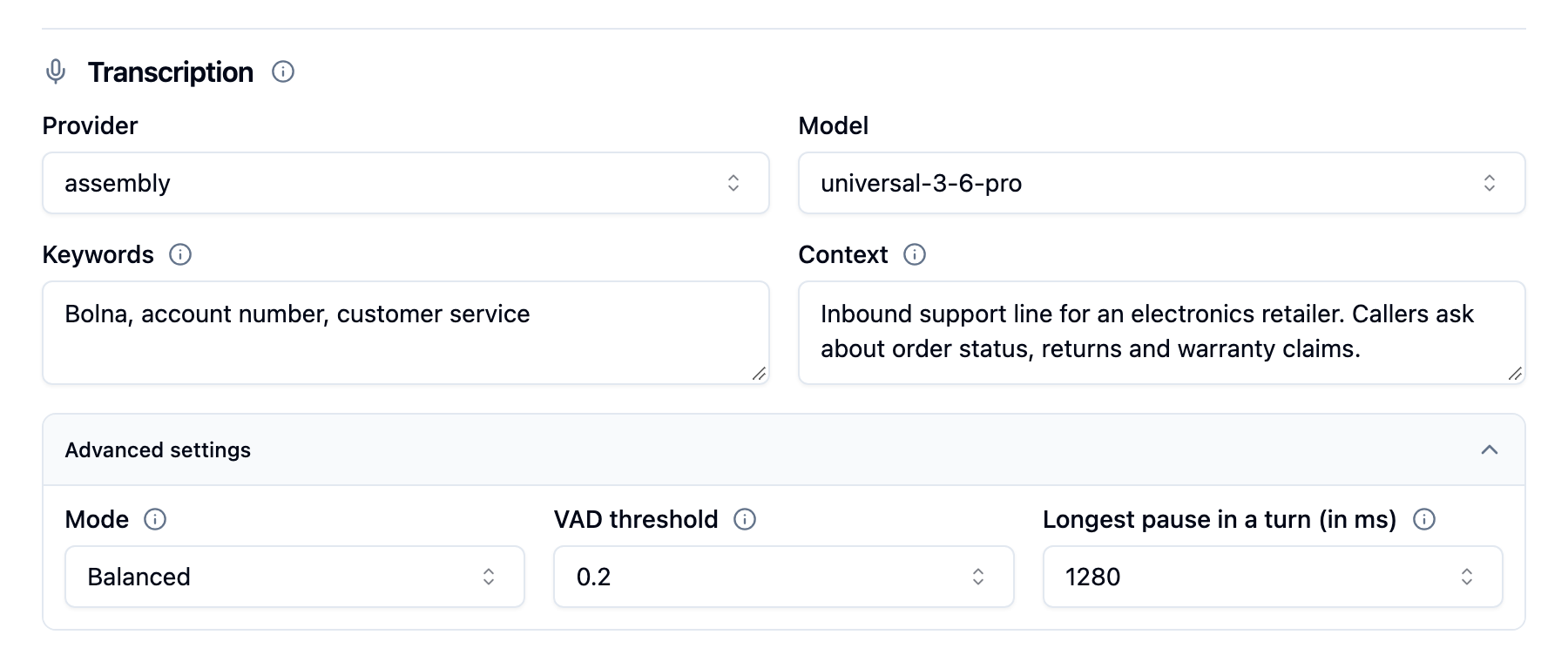
AssemblyAI transcription with Advanced settings expanded, showing Mode, VAD threshold and Longest pause in a turn at AssemblyAI's defaults
Agent context
On the Universal-3 models, Bolna gives AssemblyAI the agent’s last spoken reply as context for the caller’s next turn. When the agent asks “Can you spell your last name?” or “What are the last four digits of your card?”, AssemblyAI knows what kind of answer is coming, which helps on short answers, spelled-out names and numbers. AssemblyAI carries the caller’s earlier turns forward on its own. There is nothing to configure:- The context updates after every reply the agent speaks, including the welcome message.
- If the caller interrupts, the context becomes the part of the reply they actually heard.
- Long replies keep their last 1,750 characters, where the question usually is.
- The legacy
universalmodel does not support agent context, so nothing is sent there.
Turn handling
AssemblyAI’s streaming API is turn-based. It emits partial transcripts as the caller speaks and marks the end of a speaking turn explicitly, and Bolna treats only that end-of-turn signal as final, which keeps your agent from replying to half a sentence. Audio format and sample rate are set by Bolna from the channel the call arrives on, so there is nothing to configure there.FAQ
Should I use universal-3-6-pro or universal-3-5-pro?
Should I use universal-3-6-pro or universal-3-5-pro?
Use
universal-3-6-pro unless you have measured universal-3-5-pro to be better on your own audio. universal-3-6-pro covers 32 languages against 19, is markedly better on short answers and noisy lines, and AssemblyAI charges the same rate for both, so there is rarely a reason to stay on the older model.My agent is on the old universal model. Will calls break?
My agent is on the old universal model. Will calls break?
No. Existing agents keep running on the legacy engine. The model is hidden from new agent configuration, and saving an agent that still uses it prompts you to pick a replacement.
Why is my context being ignored?
Why is my context being ignored?
Context is supported on the Universal-3 models only. On the legacy
universal model the field is dropped. Check your agent is on universal-3-6-pro or universal-3-5-pro.The agent replies before the caller has finished. What do I change?
The agent replies before the caller has finished. What do I change?
AssemblyAI decides when the caller’s turn has ended, so tune that first. Raise
max_turn_silence (Longest pause in a turn in the dashboard) for callers who pause while reading out numbers or addresses, and min_turn_silence if brief pauses end turns too early. See Session settings. endpointing is the extra pause the agent leaves after the turn has ended, before it speaks.Line noise keeps interrupting the agent. What do I change?
Line noise keeps interrupting the agent. What do I change?
Raise
vad_threshold (VAD threshold in the dashboard) so AssemblyAI needs more confidence before it treats audio as speech, or set voice_focus to suppress background voices. If quiet callers start getting missed, lower vad_threshold again.Can I turn off agent context?
Can I turn off agent context?
No. It only adds context and is always on for the Universal-3 models. The legacy
universal model does not support it.Can I use an unlisted language?
Can I use an unlisted language?
My language works on universal-3-6-pro but not on universal-3-5-pro. Why?
My language works on universal-3-6-pro but not on universal-3-5-pro. Why?
universal-3-5-pro only covers 19 of the 32 languages. Afrikaans, Cantonese, Estonian, Galician, Korean, Marathi, Norwegian Nynorsk, Persian, Romanian, Russian, Urdu, Xhosa and Zulu arrived with universal-3-6-pro. Move the agent to universal-3-6-pro.Related
- Keywords and context: biasing transcription towards your vocabulary
- Languages Tab: configure the transcriber in the dashboard
- Deepgram transcriber: the default English option
- Soniox transcriber: the other provider supporting both keywords and context