

What are webhooks?
Webhooks allow you to receive real-time call data from Bolna as call status updates happen. When a call status changes, Bolna sends an HTTP POST request to your server with the execution data.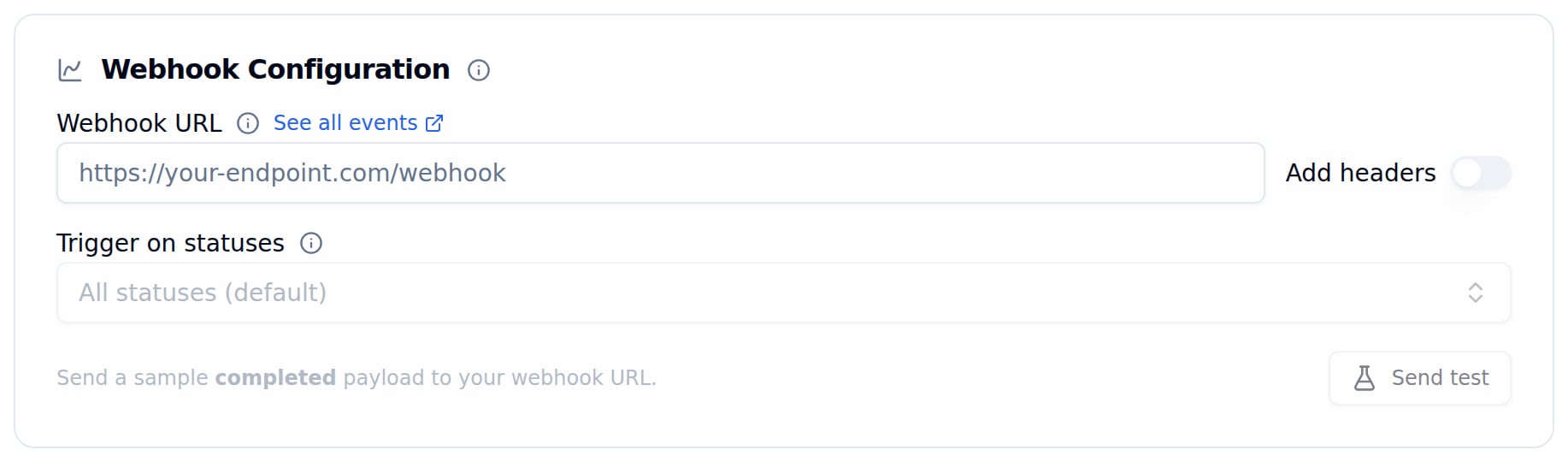
Webhook Configuration card in the Extractions Tab
Setting up webhooks
1
Go to Extractions Tab
Open your agent and navigate to the Extractions Tab.
2
Enter Webhook URL
In the Webhook Configuration card, enter your endpoint URL in the Webhook URL field. Optionally use Trigger on statuses to limit which statuses are sent, turn on Add headers to attach custom headers, and click Send test to post a sample
completed payload.3
Save Agent
Click Save agent to activate the webhook.
IP whitelist
Webhooks are sent from the following IP addresses. Whitelist all three on your server to ensure you receive all webhook events.
Webhook payload
As call status updates (scheduled → queued → in-progress → completed), Bolna sends POST requests to your webhook with the current execution data.Pre-call webhooks
The same payload shape is reused for pre-call webhooks — notifications fired by a custom function tool or the Transfer Call tool before the tool runs (for example, to send a transfer reason before a call is transferred). Learn more in the Pre-call Webhooks guide, or the Transfer Call guide.Use cases
CRM integration
Automatically update customer records after each call
Real-time dashboards
Build live dashboards with call metrics and analytics
Workflow automation
Trigger actions based on call outcomes
Data logging
Log all call data to your preferred storage system
Call statuses
View all call statuses
Learn about all valid call status types in Bolna Voice AI
Next steps
Extractions tab
Configure extractions and the call summary
Call history
View raw call data and recordings
Get execution API
Understand the execution data structure
Batch calling
Automate outbound calling campaigns