How to get started with Graph Agents on Bolna?

Sonam Bala
Author
This is Chapter 2. Chapter 1 covers where Graph Agents started and why one long prompt breaks on multi-step calls.
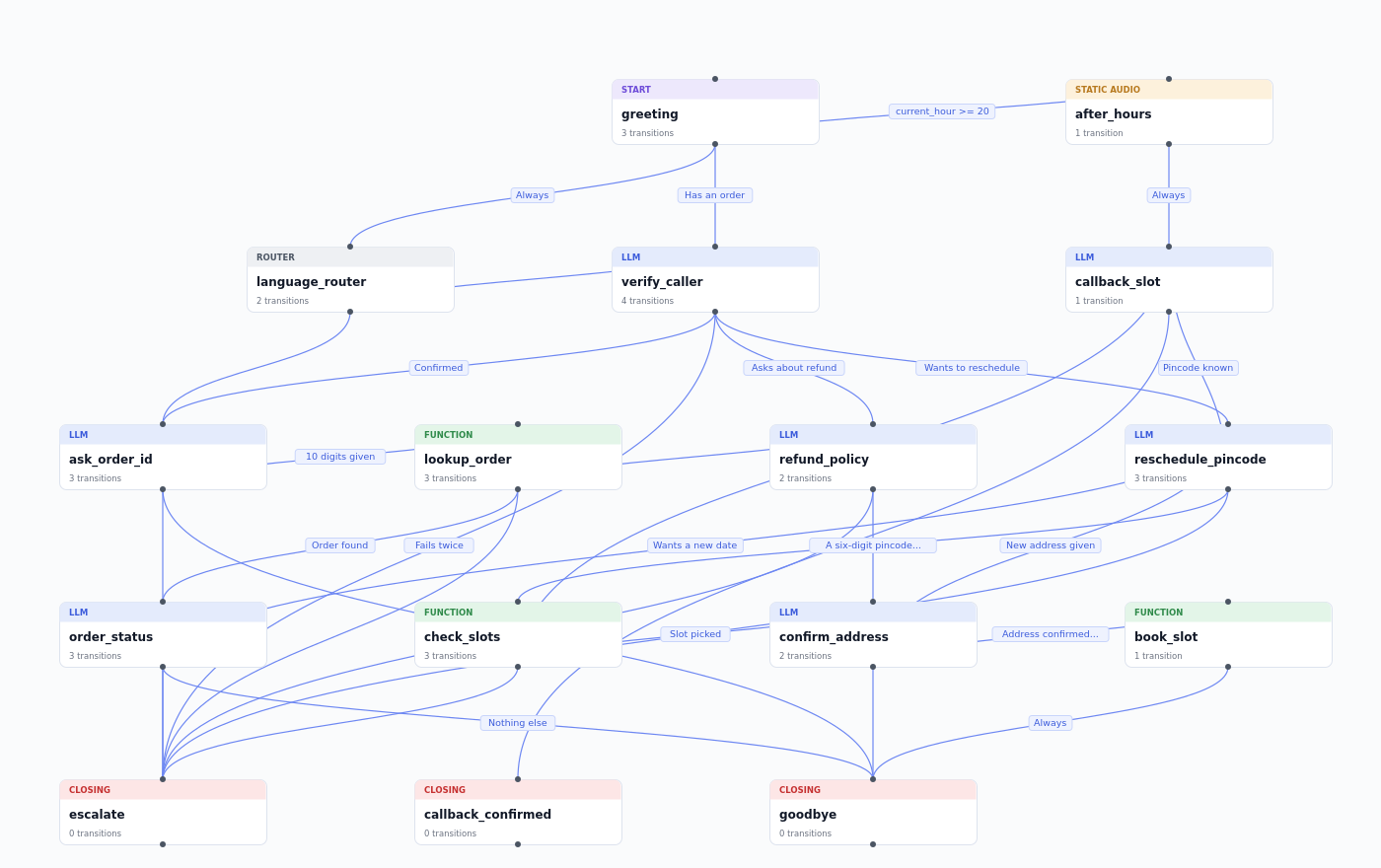
A production graph for a support line with 16 nodes and 31 transitions. However large the canvas gets, each node still does one dedicated job with precise closing depending on the steps required by the conversation at the specific turn.
How it works
Nodes
An LLM node sends its prompt and the conversation so far to the model, which writes the reply, and most of the call happens here. A static node plays audio that Bolna generates from your text in the agent's voice when you save the agent, then serves from cache. At runtime there is no LLM or TTS call, so it plays in about 50 milliseconds against roughly 800 for an LLM node. A router node never speaks. It reads the conversation and dispatches it to the right node within the same turn.
The editor also gives each node a role badge, so a flow reads at a glance: Start where the call begins, Closing where it ends, and Function, Static Audio or LLM for the steps in between.
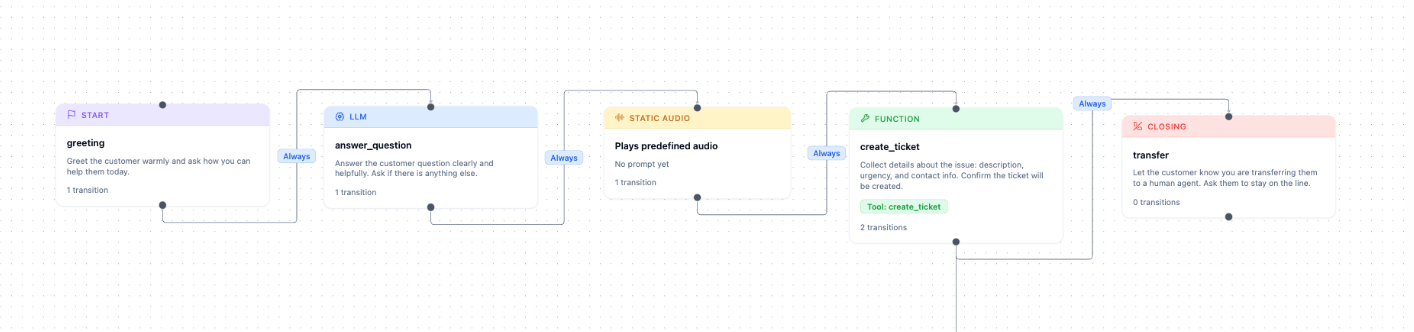
The five role badges: Start, LLM, Static Audio, Function and Closing.
Transitions
Intent transitions let the routing LLM judge whether the caller's reply matches a condition, such as "Customer provides a valid order number." Rule transitions check variables like the current hour or a retry count. Always transitions fire every time, for nodes with a single exit. Event transitions ignore speech and fire only when your system sends an event through Bolna's API, and only on the node that is active.
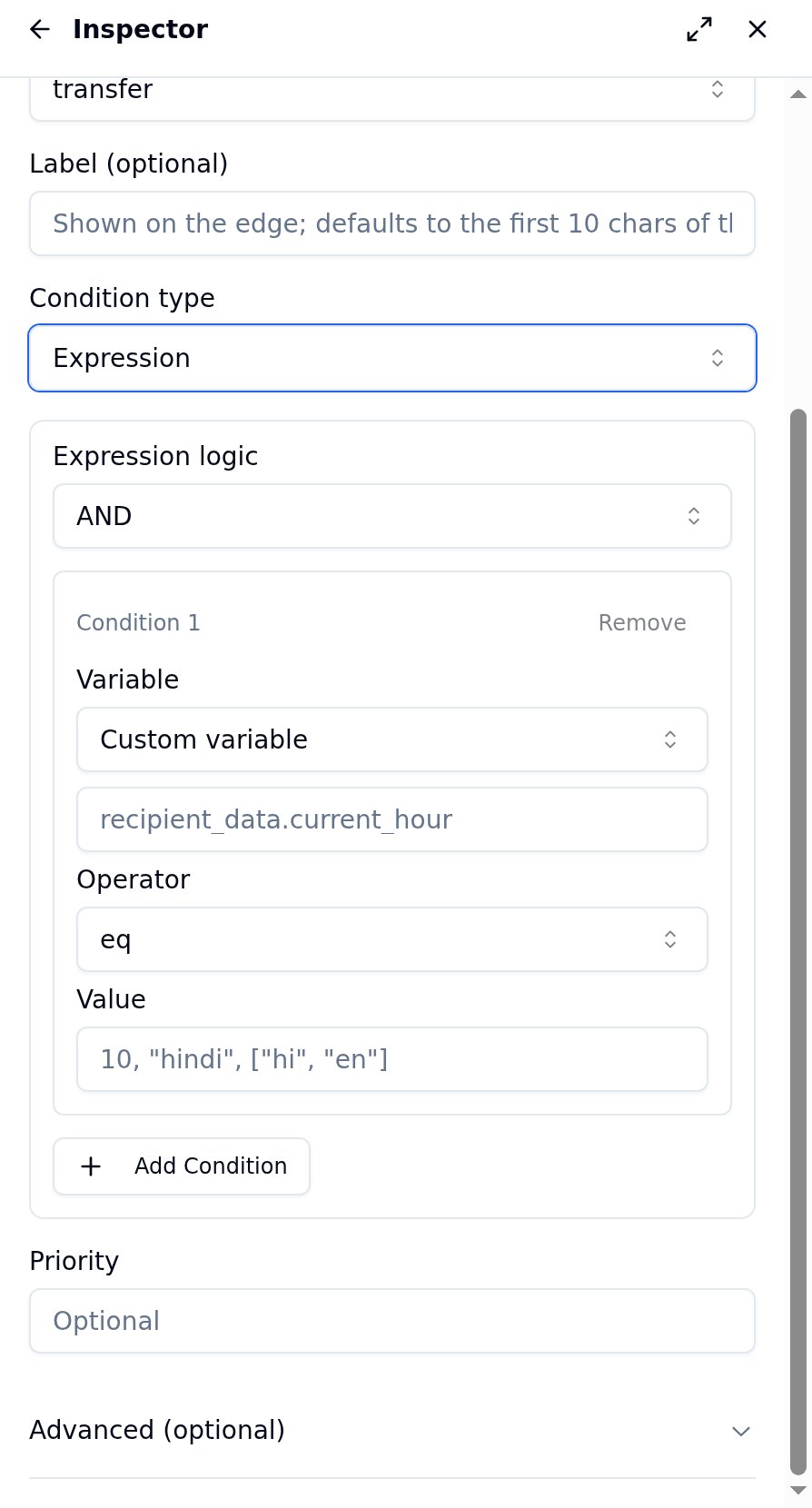
The edge inspector builds a Rule transition, with the AND/OR selector and a condition row.
Routing order
After each caller message, Rule and Always transitions are checked first, in priority order. A match moves the call in under a millisecond, at no LLM cost. Only when nothing deterministic matches does the routing LLM step in, which typically takes 150 to 300 milliseconds. If nothing fits, the agent stays on the current node and asks again naturally.
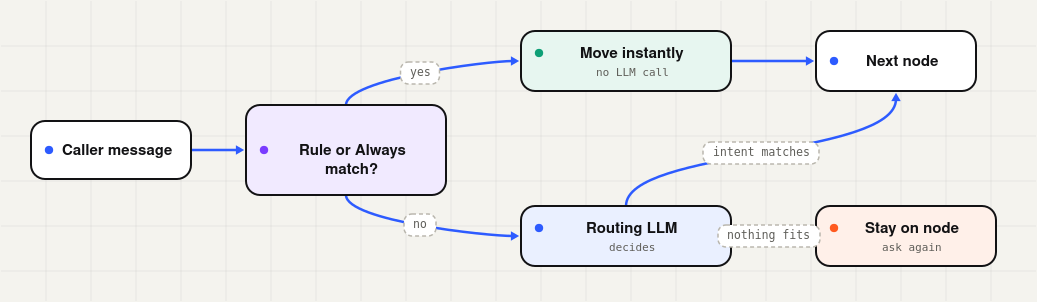
One routing turn following deterministic rules first, the routing LLM only when they don't match.
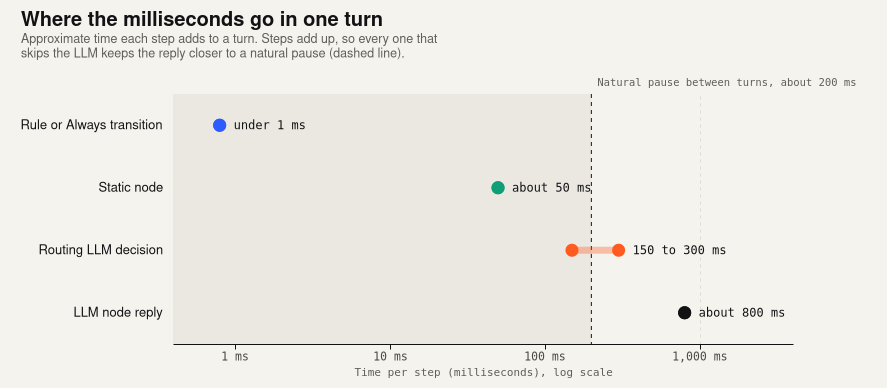
Rules and static nodes add almost no latency to a turn, while each LLM step adds hundreds of milliseconds. That is why the routing LLM only runs when no rule matches.
Per-node control
Set a node's interruption threshold to 0 and the caller cannot cut it off, so a disclosure on a static node plays in full on every call. Intent transitions can extract values as they route, turning a spoken order number into {{order_id}} for later prompts and API tools without a separate extraction step. Built-in variables like the current hour and weekday let you send after-hours callers to a callback flow, provided the call carries a timezone. Without one, time-based rules never match. Each node can also override the routing model, attach its own knowledge base, replay itself after silence, or force a transfer function so the handoff always happens.
Where it fits
Collections is the clearest case. The agent verifies the borrower, plays the disclosure on an uninterruptible static node, states the due amount and sends a payment link. When the payment webhook fires, an Event transition moves the call to confirmation without the caller having to say "I've paid." A request for more time routes to a promise-to-pay node instead.
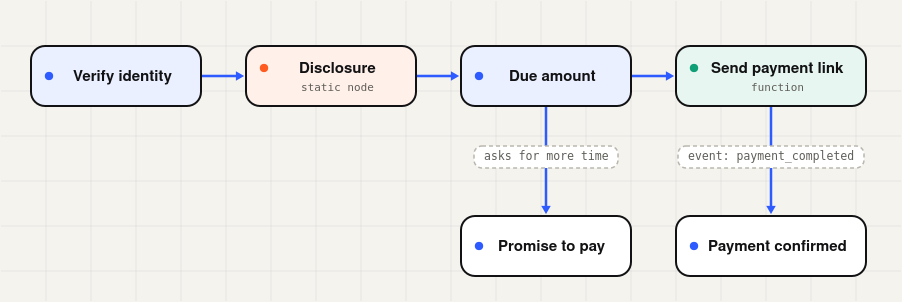
A collections graph, with an event transition waiting on "payment_completed".
Lead qualification gives each question its own node, saves budget and timeline as variables, and sends hot leads straight to a live transfer. Support agents validate an order number before looking up its status and escalate after two failed attempts. Appointment booking checks the hour and weekday before offering slots, while onboarding and KYC walk through each detail in sequence so nothing is skipped.
For an agent that only answers questions, a regular conversation agent is enough. Graph agents earn their place when a call has stages with different goals, or when some decisions belong to rules rather than the model's best guess.
How to build your first Graph Agent
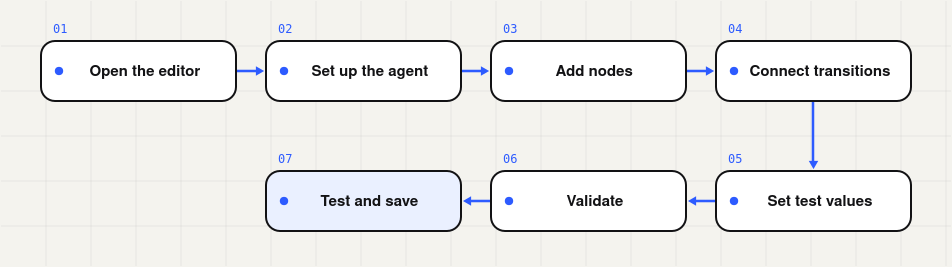
How to get started from an empty canvas to a saved agent.
Open the editor
In the left sidebar, expand Build, click Graph Agent and then Create. The dialog lets you start from a blank graph or a ready-made template. The editor has three areas: the canvas in the centre, the inspector on the right and the toolbar along the top.
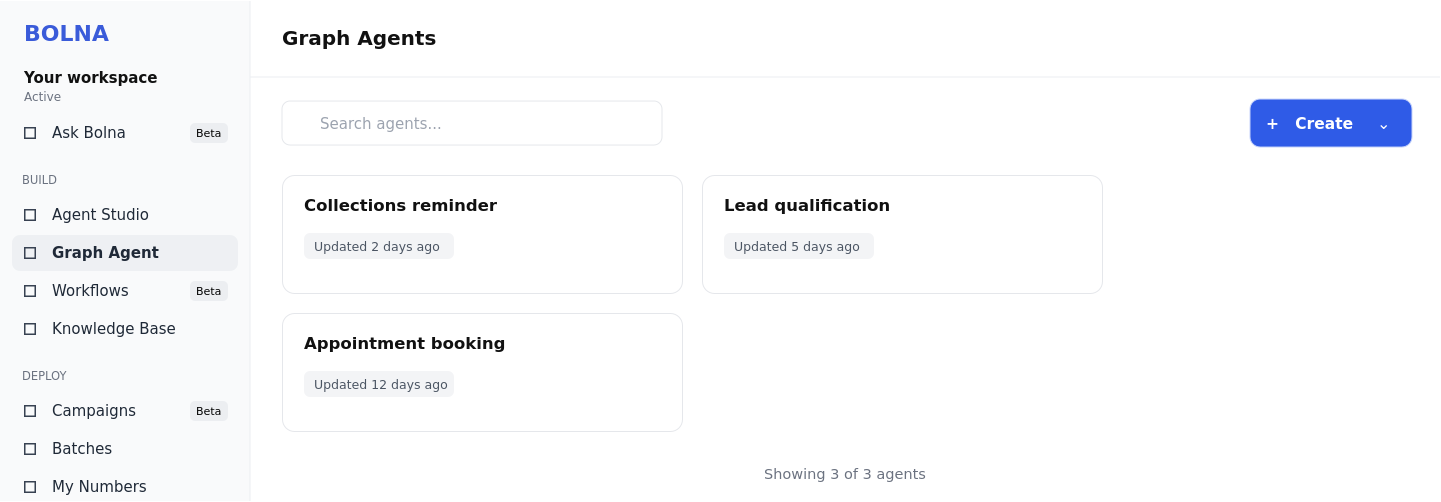
The Graph Agents page, with Create at the top right.

The toolbar, from Add node through Version history, Validate and Save.
Set up the agent
With nothing selected, the inspector opens on Agent setup. Add your welcome message and a global prompt for anything that applies on every step, such as persona, language rules, pronunciation and guardrails, then choose your LLM and voice. Keep the global prompt short. It travels with every LLM call, so each extra line is paid for on every node. Save the specifics for the nodes themselves.
Add your nodes
Double-click an empty part of the canvas or click Add node, then pick LLM Node, Static Audio Node or Router Node. A good node prompt states its purpose, the exact question to ask, what counts as a valid answer and what to do when the caller gets it wrong. For an order number, that means asking for all 10 digits, asking once more if the count is off and offering a transfer after two failed attempts.
Each node only gets one job to do. A node that collects an order number should not also ask for the caller's name or reason for calling.
Connect them with transitions
Click a node to reveal its output handle, the small circle on its bottom edge, and drag from it to create a transition. Pick a trigger and describe when it should fire. Write Intent conditions as facts about what happened, such as "Customer provides a valid order number," since that text becomes the description the routing LLM reads. Keep conditions specific enough that two of them cannot both be true at once.
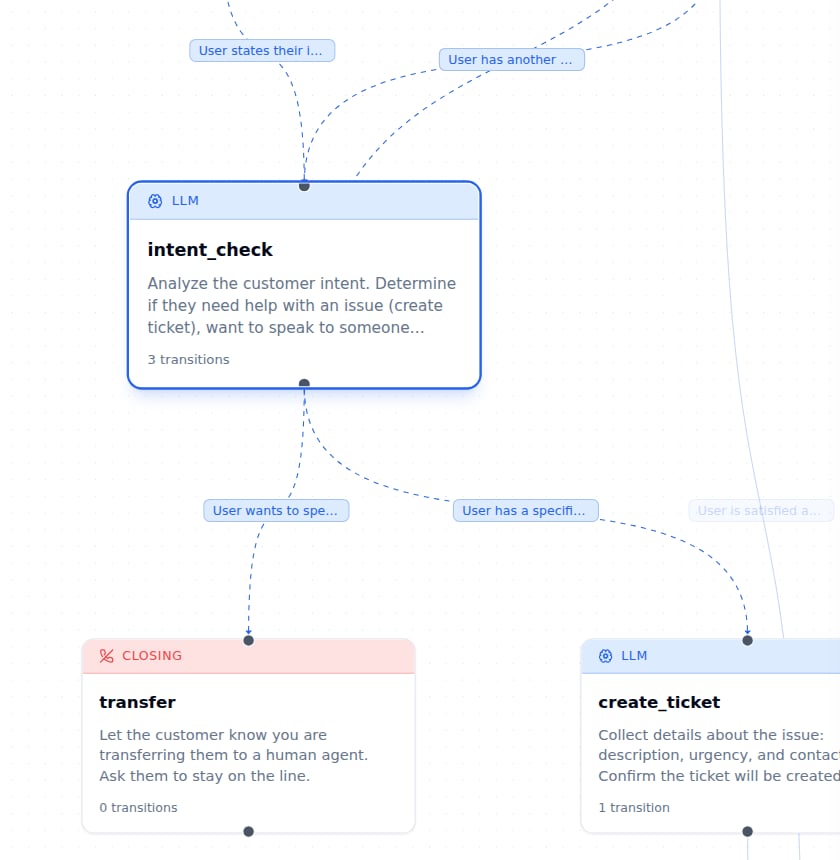
A node with three outgoing Intent transitions, each labelled with its condition.
Set test values
Click Variables in the toolbar. The editor finds every {{variable}} token in your prompts, welcome message and transitions, so you can fill in realistic values like a customer name or order ID before testing. These values stay in your browser and are not saved into the agent.
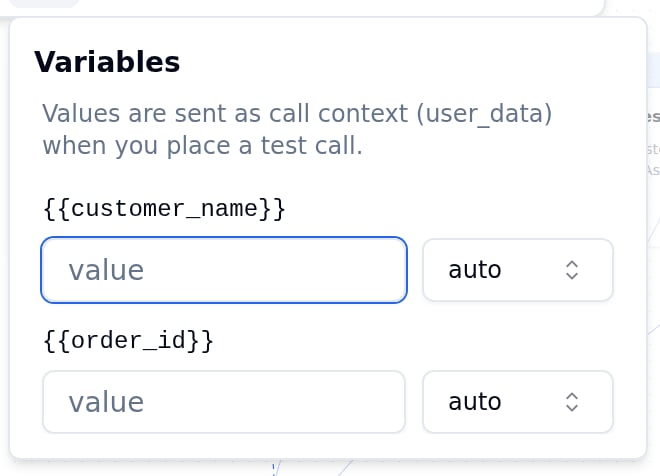
The Variables panel with auto-discovered tokens.
Validate, test and save
Click Validate to check the graph. Errors block saving until they are fixed. Warnings do not, though they are usually worth a look. Click any issue and the canvas scrolls to the node or transition at fault, with the inspector open on it.
Then open the Test agent tab. Chat with agent runs the flow as text and shows which node is active on each turn, while Get call from agent places a live call that behaves exactly as it would in production.
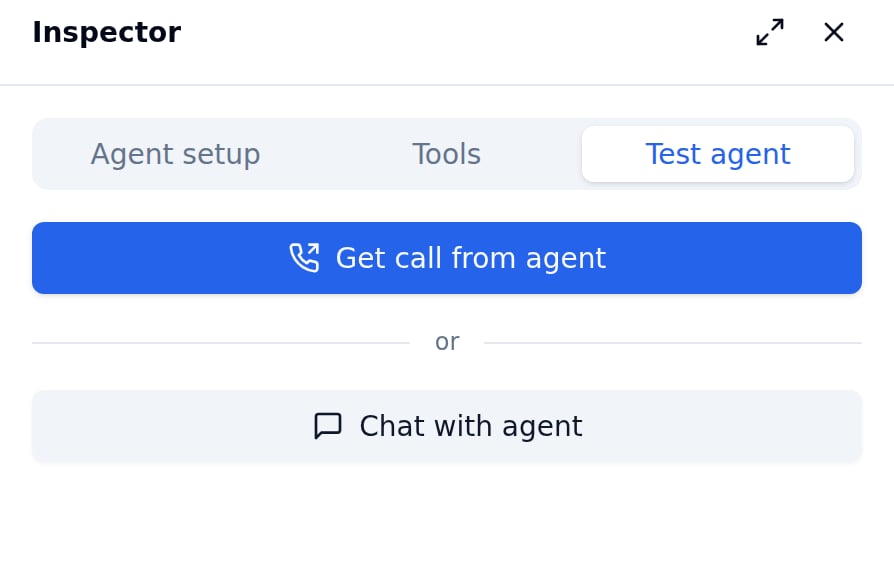
The Test agent panel with its chat and call options.
Every save creates a snapshot in Version history, and restoring one adds it as a new save without erasing the record. Once a flow works, export it as JSON and import it into your next agent, so you never start from an empty canvas.
Build calls that follow the plan
Sources
- Bolna docs: Graph Agents introduction
- Bolna docs: Static nodes
- Bolna docs: Managing nodes
- Bolna docs: Managing transitions
- Bolna docs: Edges and routing
- Bolna docs: Debugging (routing latency)
- Bolna docs: Using the editor
- Bolna docs: Variables
- Bolna docs: Validation
- Bolna docs: Testing
- Bolna docs: Version history
- Bolna docs: Import and export