

Start a multilingual call in a chosen language
A multilingual agent no longer has to open every call in its default language. When you know the customer’s likely language, start that call in any language the agent has configured. The starting transcriber, voice and per-language prompt switch together, the welcome message is spoken in that language’s voice, and mid-call switching works as before.- On the API, pass
"agent_data": { "language": "hi" }toPOST /callor the web-call session mint - Everywhere else, set an
agent_languagevariable: a batch CSV column, inbound caller data, a SIP header mapping, a workflow variable, oruser_dataon/call - Invalid languages are rejected with a
400on/calland web calls, and mark only that row aserrorin a batch; inbound calls and workflows fall back to the default language - On single-language agents,
agent_languagestays an ordinary prompt variable, so existing calls are unaffected
Eleven v4 Turbo is available for voice agents
ElevenLabs’ newest model, Eleven v4 Turbo, can now be selected as a synthesizer. It is built for real-time conversation, at a median inference latency of about 100 ms, and supports 74 languages, including Hindi, Tamil, Bengali, Marathi, Gujarati, Kannada, Malayalam, Telugu and Punjabi.- Pick Eleven v4 Turbo (Beta) from the ElevenLabs model dropdown in your agent’s Languages tab, or pass
eleven_v4_turboas the model over the API - Almost every ElevenLabs voice in Bolna works with it; the few that do not render on v4 are left out of its voice list
- Like Eleven v3, it ignores
speed,styleandsimilarity_boost, andtemperaturemaps to three stability presets (0.0creative,0.5natural,1.0robust)
AssemblyAI Universal-3 models
universal-3-6-pro and universal-3-5-pro replace the English-only engine Bolna was pinned to, and both accept keywords and context together. Use universal-3-6-pro: against universal-3-5-pro it makes 45% fewer errors on short answers like “yes” or “no thanks”, leaks 22% less background speech into the transcript, and covers 32 languages rather than 19, at the same latency and the same price.The legacy universal model is deprecated and no longer selectable on new agents. Existing agents keep running on it; move them to universal-3-6-pro when you next edit them.AssemblyAI transcriber · Keywords and contextExtra request params for custom LLMs
Agents running on a custom LLM can now send your server parameters beyond the OpenAI standard. The most common use is turning a reasoning model’s thinking off, which removes the silence it adds before every reply: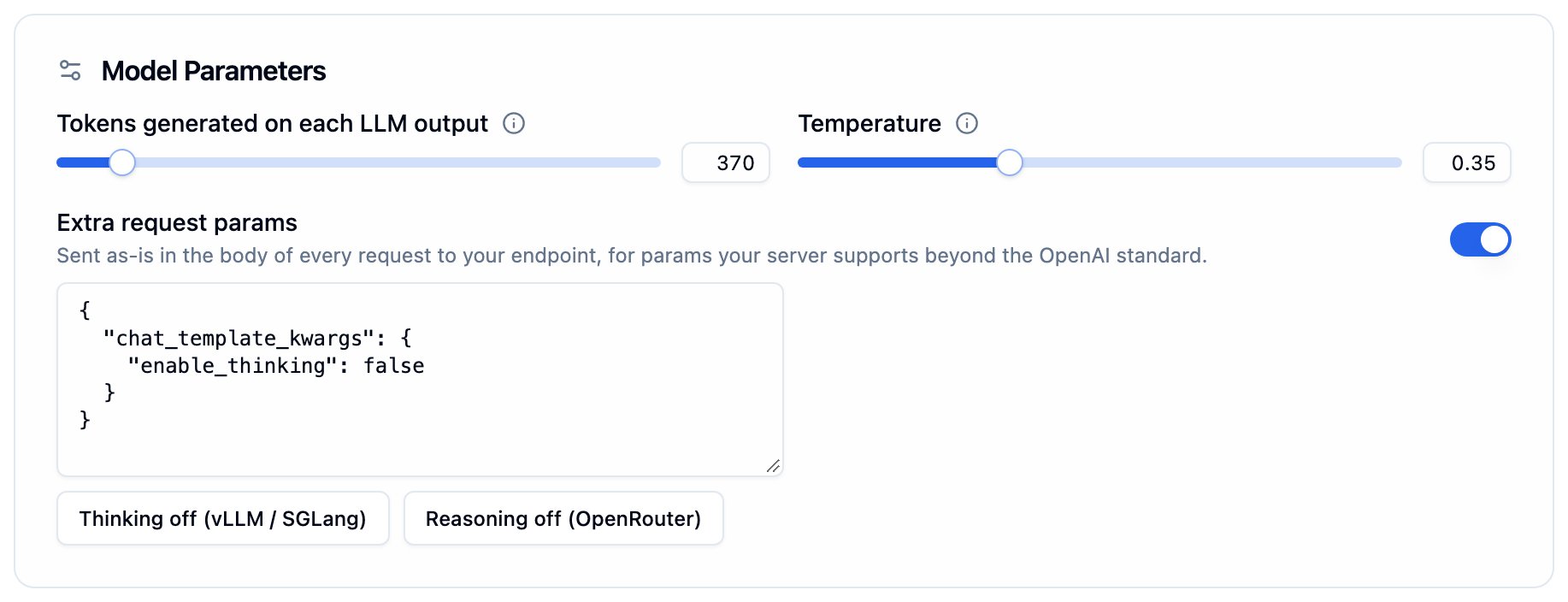
Extra request params under Model Parameters, shown when a custom model is selected
- Set per agent under Intelligence → Extra request params, with one-click examples for vLLM/SGLang and OpenRouter, or as
llm_config.extra_bodyover the API - Sent on every request to your endpoint, including graph agent routing and the end-of-call and voicemail checks
- Saving is refused for non-custom providers and for keys Bolna controls, such as
model,messagesortools - Bolna no longer sends
service_tierto custom endpoints, so strict OpenAI-compatible servers that rejected it now work
Callers can interrupt the goodbye
When your agent decides a conversation is over, callers often cut in with one last question just as it says goodbye. Until now the agent ignored them, finished its goodbye and hung up. Turn on Allow interruption under Engine → Final Call Message and the agent stops, cancels the hangup, and answers instead.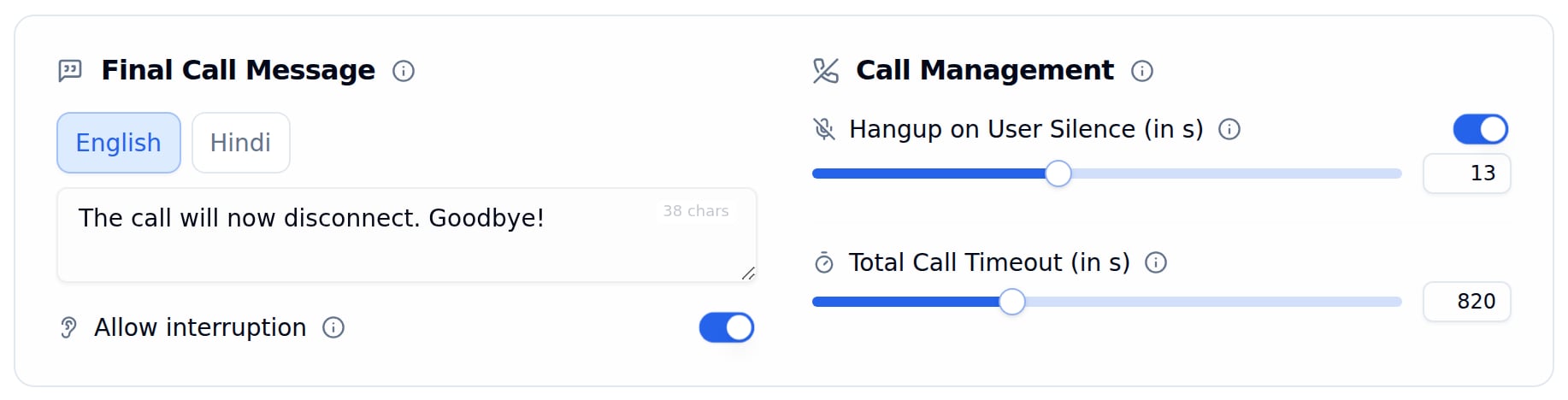
Allow interruption under Final Call Message
- Off by default, so existing agents behave exactly as before
- Applies when the agent ends the call through the hangup prompt; silence, call-timeout, transfer and voicemail hangups still end the call
- Available through the API as
interruptible_hangup_messagein the agent’stask_config
Soniox joins Bolna as a new voice synthesizer
Soniox is now available as a text-to-speech provider. Its real-timetts-rt-v2 model speaks 63 languages — including ten Indian languages — from a single model, with 200 named voices. Soniox is also available as a transcriber, and one SONIOX key serves both.- Runs over a persistent WebSocket, so model output is spoken as it streams in rather than in fixed chunks
- 200 named voices addressed by name or by a cloned voice id, with
speedandreduce_silenceto tune delivery
🔔 Workflow execution webhooks
A workflow can now POST to your server every time an execution finishes, so you no longer have to poll for outcomes. One request per contact, sent the moment that contact’s journey ends.- Set the webhook URL and headers in the workflow’s
settingsthrough the Update Workflow API. Updates are merged, so you can add or remove a single header without resending the others - The payload carries
status,outcome,termination_reasonand atrailof every node the contact passed through, with the branch each one took - Executions that end without reaching an end node — cancelled, aborted, or failed — report too
- Missed a delivery? The Resend Webhook API sends it again with the original payload
🎯 Keyword and context biasing for speech-to-text
Voice agents mishear the words that matter most: brand names, SKUs, the name of your own company. Two transcriber fields bias recognition towards your vocabulary, in the agent’s Audio tab and through the API.keywords, the comma-separated term list, is now honoured by seven providers rather than two: Deepgram, AssemblyAI, Soniox, Azure, Smallest, ElevenLabs and Gladiacontextis new. A sentence or two describing the call, supported by AssemblyAI, Soniox and Sarvam
keywords.Per-term weights (Bolna:5) reach the engines that support them and are stripped for the rest. Fields a provider cannot use are shown disabled rather than hidden.Keywords and context · Audio tab · Create Agent API📘 Create Agent API reference now covers every provider
The Create Agent API reference documented a fraction of what the API actually accepts — two transcribers and four synthesizers. It now lists the full set, with the exactprovider and model values each one takes:- 11 transcribers — Deepgram (including Flux), Sarvam, OpenAI, Azure, ElevenLabs, AssemblyAI, Gladia, Smallest, Soniox, Gemini and Google
- 12 synthesizers — ElevenLabs, Cartesia, Sarvam, Smallest, Deepgram, Polly, Azure, Rime, Maya, Kalpa, OpenAI and Gemini
- 18 accepted LLM provider values, including the LiteLLM-routed ones that have no reference page
- Sarvam transcription takes a plain language code — send
"language": "hi", not"hi-IN", which is rejected cartesia,sarvam,smallest,rime,openaiandpollyrequire alanguagekey insideprovider_config- Two provider values don’t match their product names: the AssemblyAI transcriber is
assembly, and the Azure synthesizer isazuretts keywordsis read by Deepgram and ElevenLabs only, and aword:boostsuffix is stripped before storage — send plain termsPOST /v2/agentreturns aversion_idalongsideagent_idandstate
✨ Edit your prompt by chatting with AI
The Agent Tab has a new AI edit button above the prompt. Describe the change you want — “ask for the order number first”, “shorten the closing script” — and you get a proposed rewrite as a diff to read before anything touches your prompt.- Approve edit or Discard each proposal, then keep the conversation going for the next change
- Reopening the panel resumes the conversation for that agent and language
- Revert AI edit change puts the prompt back to how it was when the session started
- Free during beta
Extraction categories API
Extraction categories are now first-class API objects. A category is the set of dispositions evaluated together in a single LLM pass — one category means one LLM call per conversation — and the category owns the model used for that pass.New endpoints:POST /agent/{agent_id}/extraction-categories— create a category (name + model) and attach it to an agentGET /agent/{agent_id}/extraction-categories— list an agent’s categories with their dispositionsPATCH /extraction-categories/{category_id}— rename a category or change its model; renames propagate to all its dispositionsDELETE /extraction-categories/{category_id}— delete a category and all of its dispositions
category_id (preferred) alongside the existing category name — a name that does not match one of the agent’s categories creates a fresh category — and every disposition response includes category_id. Move a disposition between categories by updating it with a new category_id; a category emptied by a move or delete is removed automatically.Call summary toggle
- Call summaries are an agent-level toggle:
call_summary_enabled(boolean, off by default) on the agent create and update APIs and in agent responses. When on, a platform summary pass runs after each call and writes the summary to the execution’ssummaryfield and toextracted_dataunderGeneral > Call Summarywith only asubjectivevalue; agents with the toggle off produce no call summary.
Kalpa Labs joins Bolna as a new voice synthesizer
Kalpa Labs is now available as a text-to-speech provider. Itskalpa-tts-multilingual-beta-v0.1 model speaks English, Hindi, and code-switched Hinglish from a single model, with no language parameter to set. An English-only kalpa-tts-beta-v0.1 model is also available.- Runs over a persistent WebSocket, so model output is spoken as it streams in rather than in fixed chunks
- Named voices from Kalpa’s catalog, addressed by name or voice id
- Supports both telephony (mu-law) and web (native 24 kHz) audio
📦 Migration guide: moving off legacy extraction fields
Custom Analytics (custom_extractions), Agent Extraction (agent_extraction), and flat extracted_data keys are being retired on 18th September, 2026 in favor of Extractions. A new guide walks through what changes in the payload, how to rebuild each legacy feature, and how to verify a migration against real transcripts before switching off the old read path.📘 Migrating to Extractions🛒 Bolna is now on AWS Marketplace
You can now buy Bolna directly through AWS Marketplace, with Pilot and Enterprise contract tiers available as monthly or annual terms. Procuring this way lets you draw down your existing AWS committed spend and consolidate billing onto your AWS invoice.An “AWS Marketplace” tile is also now available on the Integrations page in your dashboard, linking straight to the listing.📘 Buy Bolna on AWS Marketplace🌐 More accurate language switching for multilingual agents
If your voice agent speaks more than one language, it’s now much better at telling when a caller has actually switched languages, instead of reacting to a single stray word.Before: one borrowed word — like an English word inside a Hindi sentence — could make the agent switch languages by mistake.Now:- The agent only switches when the caller speaks a full sentence in another language, or clearly asks for one by name.
- Everyday things like “okay,” a phone number, or an OTP no longer count as a language change, even mid-sentence.
- If the agent misreads a word, it recovers on the caller’s next turn instead of staying stuck in the wrong language.