

How to set up inbound calls with Bolna?
To handle incoming calls with your Bolna Voice AI agent, you need to assign a phone number to your agent. When someone calls that number, your agent will automatically answer and have a conversation based on your configured prompts and settings.You will need to assign a phone number to your Bolna Voice AI agent for automatically answering all incoming calls on that phone number
What are my options for getting a phone number?
Method 1. Purchase a phone number from the Bolna Dashboard.
Please refer to a step by step tutorial for purchasing phone numbers on Bolna.Purchasing phone numbers on Bolna
Method 2. Connect your telephony account and use your own phone numbers.
Connect your Twilio account
Use your own Twilio phone numbers with Bolna
Connect your Plivo account
Use your own Plivo phone numbers with Bolna
Connect your Vobiz account
Use your own Vobiz phone numbers with Bolna
Connect your Exotel account
Use your own Exotel phone numbers with Bolna
How to set up inbound calls from the dashboard?
Inbound settings live inside Agent Studio → Calling tab → Inbound Calling (see the Inbound Calling settings for the full reference).1
Open the Calling tab and turn on Inbound Calling
Select your agent in Agent Studio, open the Calling tab and switch on the Inbound Calling toggle.
Inbound Calling toggle in the Calling tab
2
Choose the phone number to assign to the agent
Open the Inbound number dropdown and pick one of your purchased or connected numbers. If you don’t have one yet, choose Purchase new number.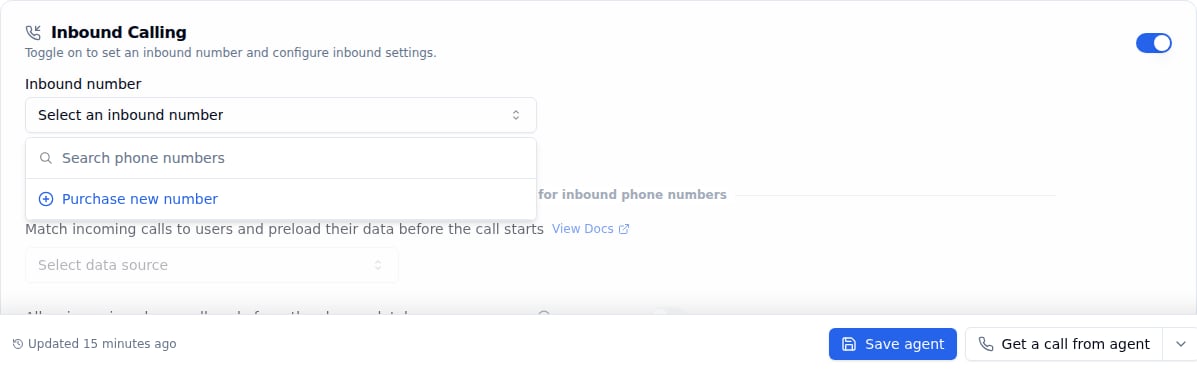
Select an inbound number for the Bolna Voice AI agent
3
Save the agent
Optionally configure a caller database and spam prevention below the number, then click Save agent. The number now answers calls with this agent.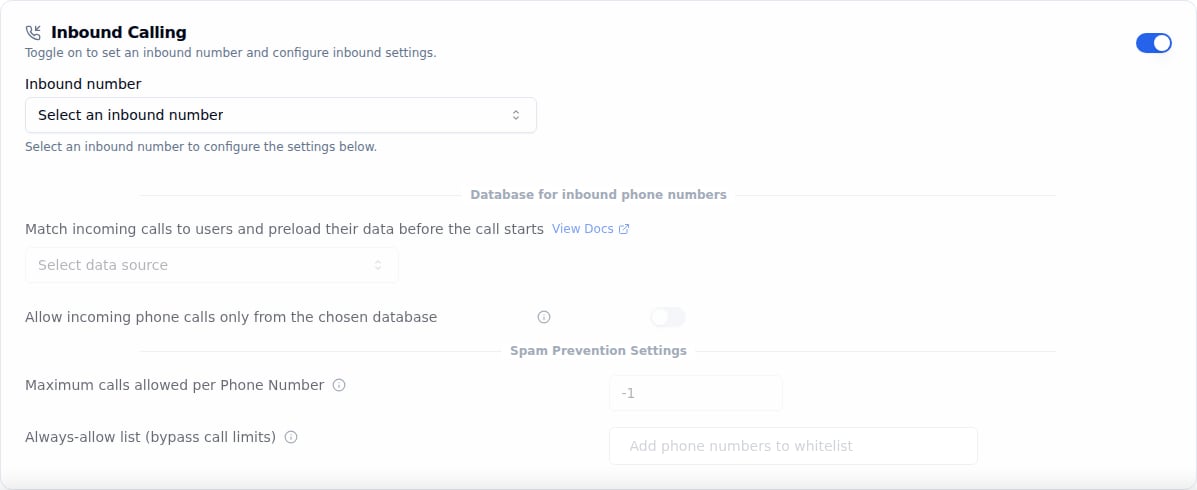
Inbound Calling settings unlocked after enabling the toggle
How to set up inbound calls using APIs?
Step 1. Use List Phone Numbers API to list all available phone numbers.
Step 2. Use Set Inbound Agent API to assign a phone number for Bolna Voice AI agent.
Next steps
Ready to start receiving inbound calls? Configure your agent and explore related features:- Make outbound calls to complement your inbound setup
- Supported telephony providers for integration options
- Call transfer functions to route to human agents
- Monitor call status in real-time