Inbound
Answer calls on your numbers
Calls to your numbers reach Bolna’s SIP edge and go to the agent assigned to that number, or to the trunk’s default agent.
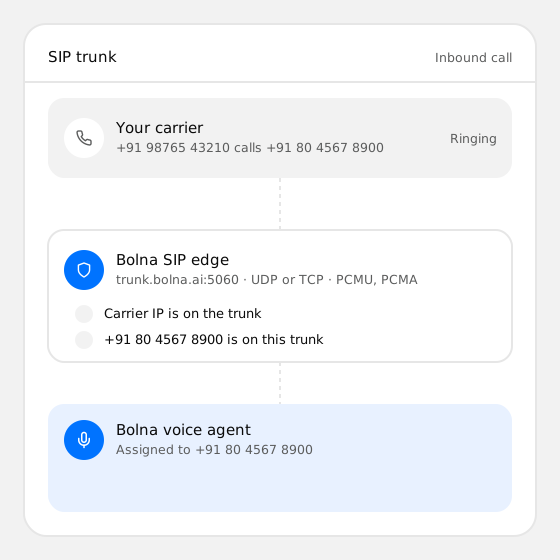
A connection between your carrier and Bolna over SIP. Your carrier sends calls for your numbers to Bolna’s voice agents, and carries the calls they place, with one of your numbers as the caller ID.
Teams that already have a carrier, numbers and negotiated rates, and want AI voice agents on those lines instead of moving to new numbers.
A SIP trunk with at least one number, your carrier’s gateway host and the IP addresses it calls from. A SIP username and password only if your carrier issued them.
Step 01
In the Bolna dashboard, open SIP Trunks, pick your carrier’s preset or Custom, and add the carrier’s IP addresses and your numbers.
Step 02
Send inbound calls for your numbers to sip:trunk.bolna.ai:5060 and allowlist Bolna’s IPs. The trunk page lists every value with a copy button.
Step 03
Assign an agent to each number for inbound calls, switch your outbound agents to the trunk, and place a test call each way.
Inbound
Calls to your numbers reach Bolna’s SIP edge and go to the agent assigned to that number, or to the trunk’s default agent.
Outbound
Agents place calls through your carrier’s gateway and show one of your trunk numbers, so customers see a number they know.
India
Connect Airtel, Exotel, Plivo, Vobiz, Acefone or VoiceLink, and run Hindi and other Indian-language agents on your +91 numbers.
Transfers
Transfer a live call to your team through the same trunk, to a phone number or a SIP address on your carrier.
SIP headers
Read P-Asserted-Identity, Diversion and up to 20 custom X- headers on inbound calls, and send your own headers on the calls agents place.
Scale
Allow 1 to 1,000 simultaneous calls per trunk, add up to 8 gateways, and manage trunks from the dashboard or the API.
| Value | |
|---|---|
| Point your numbers at (inbound) | sip:trunk.bolna.ai:5060 |
| Transport | UDP or TCP on port 5060 |
| Codecs | G.711 μ-law (PCMU) and A-law (PCMA) |
| DTMF | RFC 2833 telephone events |
| Carrier presets | Plivo, Telnyx, Twilio, Exotel, Vobiz, Vonage, or Custom for any SIP carrier |
| Outbound authentication | Bolna’s IP address, a username and password, or both |
| Channels per trunk | 1 to 1,000 simultaneous calls, 10 by default |
| Gateways per trunk | Up to 8 |
| Carrier IPs per trunk | Up to 32 public IPv4 addresses or ranges |
| Carrier | How to connect | Notes |
|---|---|---|
| Airtel | Custom trunk | Your Airtel Business account team sets up their side |
| Exotel | Exotel preset | The preset fills in the gateway and Exotel’s signalling IPs |
| Plivo | Plivo preset | Indian numbers need a Plivo account in its India data region |
| Vobiz | Vobiz preset | An inbound and an outbound trunk in Vobiz, one trunk in Bolna |
| Acefone | Custom trunk | Acefone support sets up their side |
| VoiceLink | Custom trunk | Uses your VoiceLink SIP username and password |
Secure, compliant and dependable, from the first pilot to full scale.
Built for your busiest hour. Even if the model fails, the call doesn’t
A dedicated team, with service levels shaped around your business
Data residency, encryption, access controls, full audit trails and more
Run Bolna in your own cloud or on-premise, your data remains yours
Certified by

Product
Answer every inbound call on your numbers with a voice agent.
Product
Run reminder, collection and lead calls at scale.
Product
Voice agents that speak Hindi, English and other Indian languages.
Developer tool
Let people talk to the same agent from your website or app.
Deployment
Self-host Bolna voice AI in your own cloud or data center.
Docs
Create trunks, add numbers and assign agents from code.