Custom Function Calls: Complete Guide for Bolna Voice AI
Build custom function tools with Bolna Voice agents using OpenAI standards. Complete guide with schema examples, code snippets & implementation best practices.
Custom functions let your Voice AI agent call your own APIs during live conversations. Check order status, update a CRM, book appointments, or integrate with any system - all while on a call.
The LLM sees your function’s name and description to understand what the function does
2
Decides When to Call
Based on conversation context, the LLM decides if this function should be triggered
3
Extracts Parameters
The LLM collects required parameter values from the conversation with the caller
4
Bolna Executes API Call
Bolna makes the HTTP request to your API endpoint with the extracted parameters
5
Response Feeds Back
The API response is returned to the LLM, which continues the conversation naturally
The description is everything. The LLM relies heavily on your description to know when to call the function. A vague description = unreliable triggering.
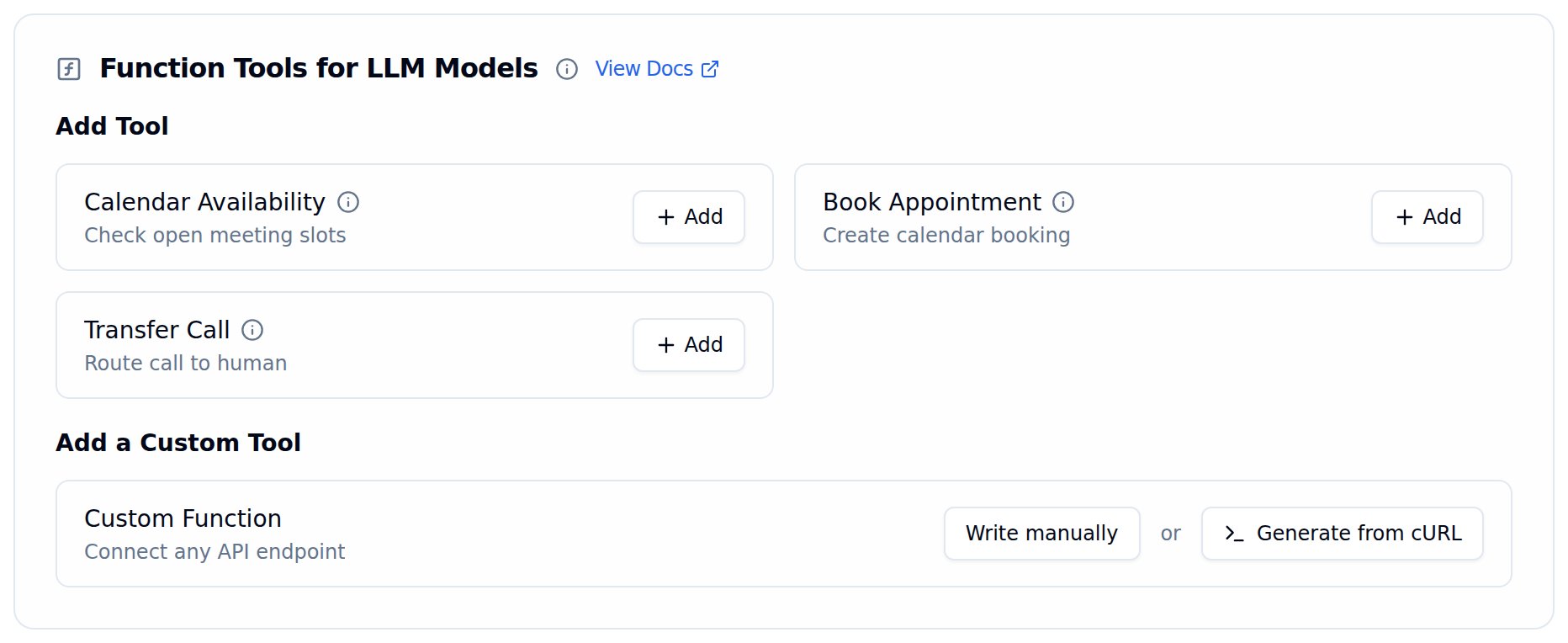
In the Tools Tab, click the Generate from cURL button under Add a Custom Tool.
2
Paste your cURL command
Paste the full cURL request into the text area. Bolna will parse the URL, method, headers, and body.
Generate function from cURL dialog where you paste a cURL command to auto-generate a custom function
1
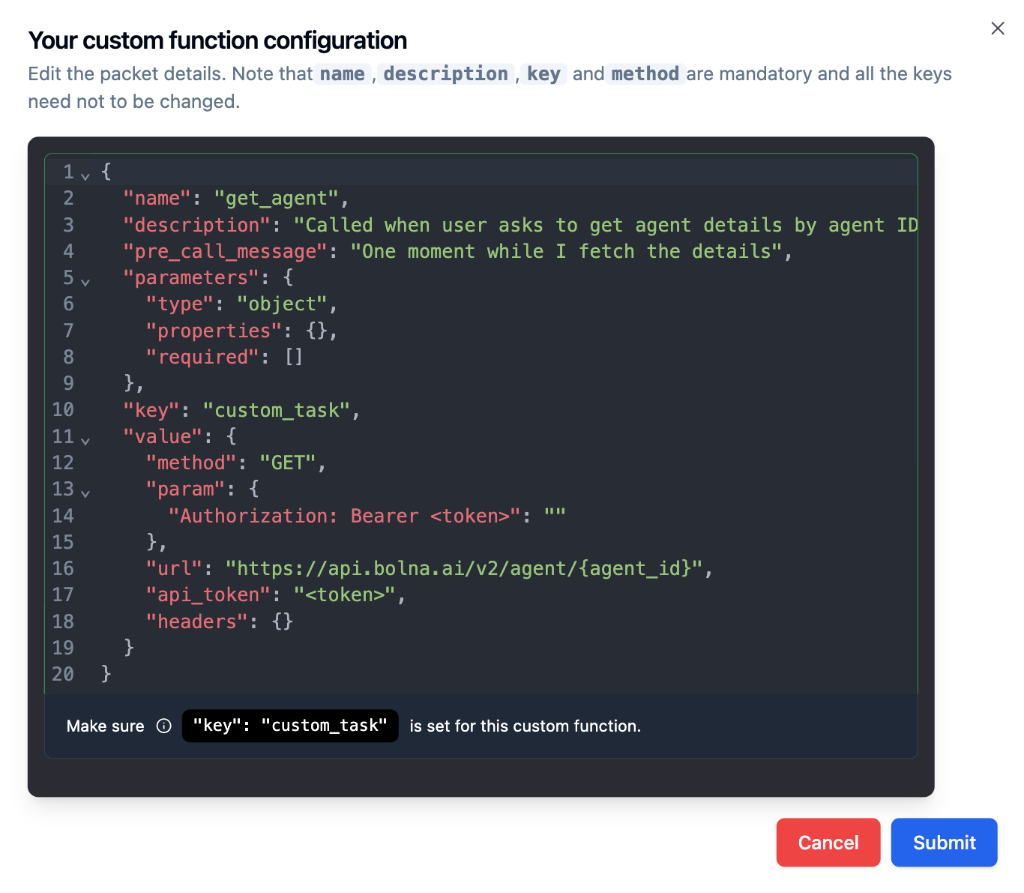
Review the generated schema
Bolna generates a function configuration with auto-populated name, description, method, URL, and auth. Review all fields carefully.
2
Refine and submit
Update the function name, improve the description for better LLM triggering, confirm parameters, and click Submit.
Generated function configuration from a cURL command with auto-populated name, description, URL, and authentication
The import is a starting point, not a final configuration. Always verify authentication, parameter names, required fields, and the API URL before using the function in production.
Parts 1-2 follow the OpenAI function calling specification - they define what the function does. Parts 3-5 are Bolna extensions that define how to execute the API call automatically.
The following examples use illustrative endpoints and credentials to demonstrate the schema structure. Replace the URLs, tokens, and parameter values with your own API details when implementing.
GET Requests
POST Requests
Check Order Status
A customer calls and asks “Where is my order?” The agent collects the order ID and fetches the status from your backend.What the agent says:“Let me check the status of your order.”What Bolna sends:
{ "name": "check_order_status", "description": "Use this function when the customer asks about their order status, delivery update, shipping progress, or tracking information. The customer must provide their order ID.", "pre_call_message": "Let me check the status of your order.", "parameters": { "type": "object", "properties": { "order_id": { "type": "string", "description": "The customer's order ID. Usually starts with ORD- followed by numbers, e.g., ORD-78234." } }, "required": ["order_id"] }, "key": "custom_task", "value": { "method": "GET", "param": { "order_id": "%(order_id)s" }, "url": "https://api.yourstore.com/orders", "api_token": "Bearer sk_live_abc123", "headers": {} }}
The agent would then say something like: “Your order ORD-78234 has been shipped and is expected to arrive by March 15th. Your tracking number is 1Z999AA10123456784.”
Look Up Account Balance
A customer calls and asks “What’s my current balance?” The agent verifies their identity using their registered phone number and account ID, then fetches the balance.What the agent says:“Let me pull up your account details.”What Bolna sends:
{ "name": "get_account_balance", "description": "Use this function when the customer asks about their account balance, available credit, remaining amount, or account summary. Requires the customer's account ID and phone number for verification.", "pre_call_message": "Let me pull up your account details.", "parameters": { "type": "object", "properties": { "account_id": { "type": "string", "description": "The customer's account ID, usually starts with ACC- followed by numbers." }, "phone": { "type": "string", "description": "The customer's registered phone number for identity verification." } }, "required": ["account_id", "phone"] }, "key": "custom_task", "value": { "method": "GET", "param": { "account_id": "%(account_id)s", "phone": "%(phone)s" }, "url": "https://api.yourbank.com/accounts/balance", "api_token": "Bearer fin_api_key_001", "headers": { "X-Request-Source": "voice-agent" } }}
The agent would then say something like: “Your current account balance is Rs. 24,500.75. Your last transaction was on March 12th.”
The phone parameter can be auto-injected using the {{from_number}}context variable, so the caller does not need to repeat their number.
Book an Appointment
A caller wants to schedule a consultation. The agent collects their name, preferred date, and time, then creates the booking.What the agent says:“I’m booking that appointment for you now.”What Bolna sends:
{ "name": "book_appointment", "description": "Use this function when the caller wants to book, schedule, or set up an appointment, consultation, or visit. Collect the patient's name, their preferred date and time, and the reason for the visit.", "pre_call_message": "I'm booking that appointment for you now.", "parameters": { "type": "object", "properties": { "patient_name": { "type": "string", "description": "Full name of the patient" }, "preferred_date": { "type": "string", "description": "Preferred appointment date in YYYY-MM-DD format" }, "preferred_time": { "type": "string", "description": "Preferred time, e.g., '10:30 AM' or '2:00 PM'" }, "reason": { "type": "string", "description": "Brief reason for the appointment, e.g., 'General consultation' or 'Follow-up'" } }, "required": ["patient_name", "preferred_date", "preferred_time"] }, "key": "custom_task", "value": { "method": "POST", "param": { "patient_name": "%(patient_name)s", "preferred_date": "%(preferred_date)s", "preferred_time": "%(preferred_time)s", "reason": "%(reason)s" }, "url": "https://api.yourclinic.com/v1/appointments", "api_token": "Bearer clinic_token_xyz", "headers": { "Content-Type": "application/json" } }}
The reason field is optional (not in the required array). If the caller mentions a reason, the LLM includes it. If not, it is skipped without asking.
Create a Support Ticket
A customer calls with a complaint or issue. The agent collects the details and creates a support ticket in your helpdesk system.What the agent says:“I’m creating a support ticket for this issue right away.”What Bolna sends:
curl --location 'https://api.yourhelpdesk.com/tickets' \--header 'Content-Type: application/json' \--header 'Authorization: Bearer helpdesk_key_789' \--data '{ "caller_phone": "+919876543210", "issue_category": "billing", "description": "Customer was charged twice for their February subscription", "priority": "high"}'
Function schema:
{ "name": "create_support_ticket", "description": "Use this function when the customer reports a problem, complaint, issue, or bug. Create a support ticket with the issue category, a summary of the problem, and priority level. The caller's phone number is automatically available.", "pre_call_message": "I'm creating a support ticket for this issue right away.", "parameters": { "type": "object", "properties": { "caller_phone": { "type": "string", "description": "The customer's phone number" }, "issue_category": { "type": "string", "description": "Category of the issue: billing, technical, account, shipping, or other" }, "description": { "type": "string", "description": "A brief summary of the customer's issue in 1-2 sentences" }, "priority": { "type": "string", "description": "Priority level: low, medium, or high. Set to high if the customer is upset or the issue is time-sensitive." } }, "required": ["caller_phone", "issue_category", "description"] }, "key": "custom_task", "value": { "method": "POST", "param": { "caller_phone": "%(caller_phone)s", "issue_category": "%(issue_category)s", "description": "%(description)s", "priority": "%(priority)s" }, "url": "https://api.yourhelpdesk.com/tickets", "api_token": "Bearer helpdesk_key_789", "headers": { "Content-Type": "application/json" } }}
The caller_phone can be auto-injected using context variables. Add {{from_number}} to your agent prompt, and the LLM will use it automatically instead of asking the caller for their number.
Context variables defined in your agent prompt are automatically substituted into custom functions. The LLM won’t ask the caller for these values - they’re already available.
A custom function can fire a pre-call webhook — a notification sent to a URL of your choice before the tool’s main API call runs. A common use case is a tool that transfers the call, where your system needs to receive the transfer reason before the transfer happens.
The pre-call webhook is fire-and-forget. A slow or failing webhook endpoint never blocks or fails the function call itself.
The built-in Transfer Call tool supports the same pre-call webhook fields, fired before the transfer happens.
pre_call_webhook_param is a JSON template that is completely independent from the tool’s main param. You can reference any argument the LLM produced for the tool using the same %(field)ssubstitution syntax used by param. Static values are passed through as-is.
{ "name": "transfer_support", "description": "Transfers the call to a support agent when the caller asks for a human or has an issue the agent cannot resolve.", "parameters": { "type": "object", "properties": { "reason": { "type": "string", "description": "Why the caller wants a transfer" } }, "required": ["reason"] }, "key": "custom_task", "value": { "method": "POST", "url": "https://your-api.com/transfer", "param": { "reason": "%(reason)s" }, "pre_call_webhook_url": "https://your-api.com/pre-transfer-hook", "pre_call_webhook_param": { "transfer_reason": "%(reason)s", "channel": "voice" } }}
In the example above, %(reason)s is replaced with the LLM’s argument for this tool call, while "channel": "voice" is a static value passed through unchanged.
The webhook body is the same execution record you receive on the post-call execution webhook (execution id, agent id, telephony details, status, etc.), merged with the fields from your pre_call_webhook_param:
Because the call is still in progress when the pre-call webhook fires, fields that are only finalized at call end (transcript, cost, summary) won’t be complete yet.
Webhook sent to the agent-level Webhook URL (the same URL used for post-call execution webhooks).
Not set
Set or not set
No pre-call webhook fires.
pre_call_webhook_param is the master switch. If it is not set, no pre-call webhook fires — even if pre_call_webhook_url is configured. The agent’s normal post-call webhook is unaffected.
Agent-level URL fallback: when pre_call_webhook_param is set without a pre_call_webhook_url, the pre-call webhook is sent to your agent’s configured Webhook URL. If you already use that endpoint for post-call execution webhooks, it will now also receive pre-call webhooks. Distinguish them by the in-progress status and the extra fields from your pre_call_webhook_param.
Bolna calls your endpoint from a fixed set of source IPs. If your API sits behind a firewall or an IP allowlist, permit all three or the tool call will fail and the agent will have nothing to say back to the caller: