Overview
Bolna Voice AI includes built-in language detection that automatically identifies the language your users speak and adapts system messages accordingly. This feature ensures a seamless multilingual experience by analyzing conversation patterns and switching predefined messages to match the detected language. When a user speaks in English, Hindi, Tamil, or any other supported language, Bolna detects this and automatically delivers system messages in that language, creating a more natural and personalized conversation flow.How detection works
Bolna’s language detection activates after 3 conversation turns. During these initial turns, the system collects and analyzes user transcripts to identify the dominant language being spoken. This approach ensures accurate detection by gathering enough conversational context before making a language determination, while still being fast enough to adapt early in the call. Once the dominant language is identified, Bolna automatically switches all configured system messages to match that language for the remainder of the conversation.Supported message types
Language detection currently affects three types of system messages that can be configured with multilingual variants:1. User online check message
When the agent needs to check if the user is still on the call after a period of silence, it sends a “is user online” message. You can configure this message in multiple languages, and Bolna will automatically select the appropriate version based on the detected conversation language.
Configure multilingual user online check messages in Bolna Voice AI dashboard
2. Call hangup message
When the agent ends a call, it can deliver a closing message in the user’s language. Configure multilingual variants to ensure users receive a natural farewell in their preferred language.
Set up multilingual call hangup messages for Bolna Voice AI agents
3. Function tool calls
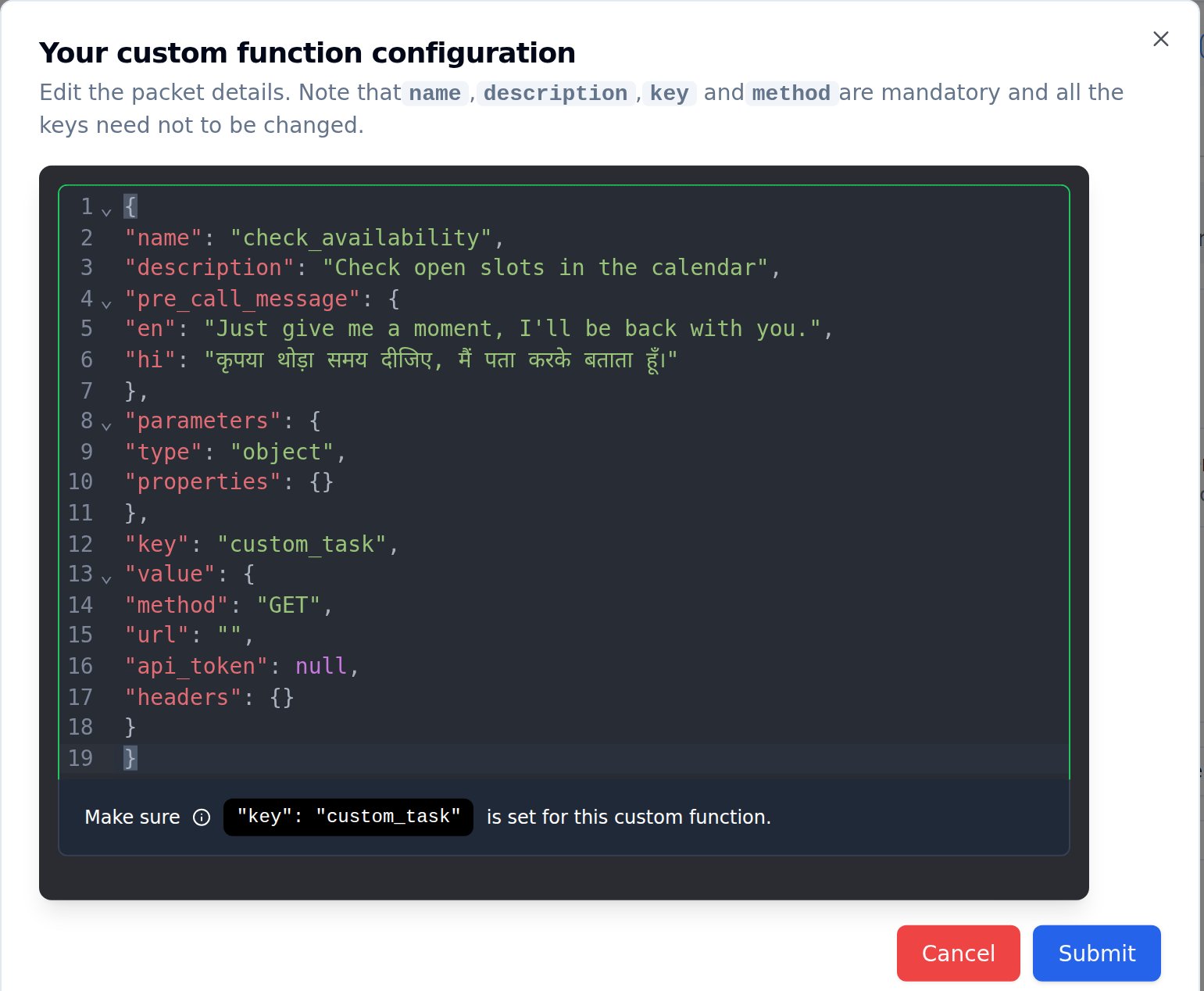
When the agent executes a custom tool or API call, it typically plays a brief message to let the user know to wait. This message can also be configured in multiple languages.
Configure multilingual pre-call messages for custom function tools in Bolna Voice AI
Language fallback behavior
When selecting a message, Bolna follows this fallback logic: it first attempts to use the message in the detected language, then falls back to English (en) if the detected language is not available, and finally uses the first available language in the configuration if neither is found.
This ensures your agent always has a message to deliver, even if you haven’t configured all possible language variants.
Supported languages
Language detection supports all Indian languages available in Bolna, identified by their ISO 639-1 codes. Common codes includeen for English, hi for Hindi, bn for Bengali, ta for Tamil, te for Telugu, mr for Marathi, gu for Gujarati, kn for Kannada, ml for Malayalam, pa for Punjabi, and many more.
For a complete list of supported languages, see the multilingual language support documentation.
Best practices
When implementing multilingual messages, ensure all your configured languages have consistent message variants to provide a uniform experience. Keep messages concise and culturally appropriate for each language rather than using direct translations. Test your agent with native speakers of each language to verify the messages sound natural.Related documentation
- Multilingual language support - Complete list of supported languages
- Writing prompts in non-English languages - Best practices for multilingual prompts
- Custom tools configuration - Configure pre-call messages for API tools