

Prerequisites
Before creating a trunk in Bolna, configure the following on your SIP trunk provider’s portal.1. Whitelist Bolna’s IP Address
Bolna’s SIP media server IP is:ip-based authentication, this is the IP you will add as your identifier — Bolna will be recognized solely by its source IP.
2. Set the Origination URL (for inbound calls)
If you want calls to your DID numbers to ring through to Bolna, point your SIP trunk’s origination URI to one of the following, depending on the transport you’ve chosen for the trunk:
In your provider portal this is usually labeled as:
- Origination URI or Origination URL
- Inbound SIP URI
- SIP Termination Point
- Route to / Forward to
If your provider only accepts an IP, use
sip:13.200.45.61:5060 for UDP/TCP. TLS inbound requires a hostname so the carrier can validate Bolna’s TLS certificate.3. Codec Configuration
Bolna’s SIP layer uses G.711 u-law (ulaw) audio by default. Ensure your trunk allows ulaw, or at minimum alaw, in its codec preferences. G.729 and other compressed codecs are not recommended.4. Decide on media encryption (optional)
Bolna supports two media modes for BYOT trunks:- Plain RTP (default) — works on every transport. No setup needed on your side.
- SDES (encrypted RTP) — supported on the TLS transport only, since the encryption keys travel inside the SIP signaling channel. To use SDES, your carrier must also have SDES/SRTP enabled on its end.
Create your trunk via the dashboard
The dashboard is the easiest way to onboard a trunk. If you’d rather use the API, skip ahead to Or via API.1. Open SIP Trunks → New Trunk
In the dashboard, navigate to SIP Trunks and click New Trunk.2. Fill in the basics
- Name — a label only you see, e.g.
Twilio Production. - Provider — the carrier (e.g.
twilio,plivo,telnyx,vonage,custom). - Auth type — pick Username / Password or IP-based, then fill in the matching fields.
- Gateways — add at least one gateway. Each row needs a hostname and a port; default port is
5060for UDP/TCP and5061for TLS.
3. Open Advanced Settings
Expand Advanced Settings to choose your transport, codecs, and media encryption.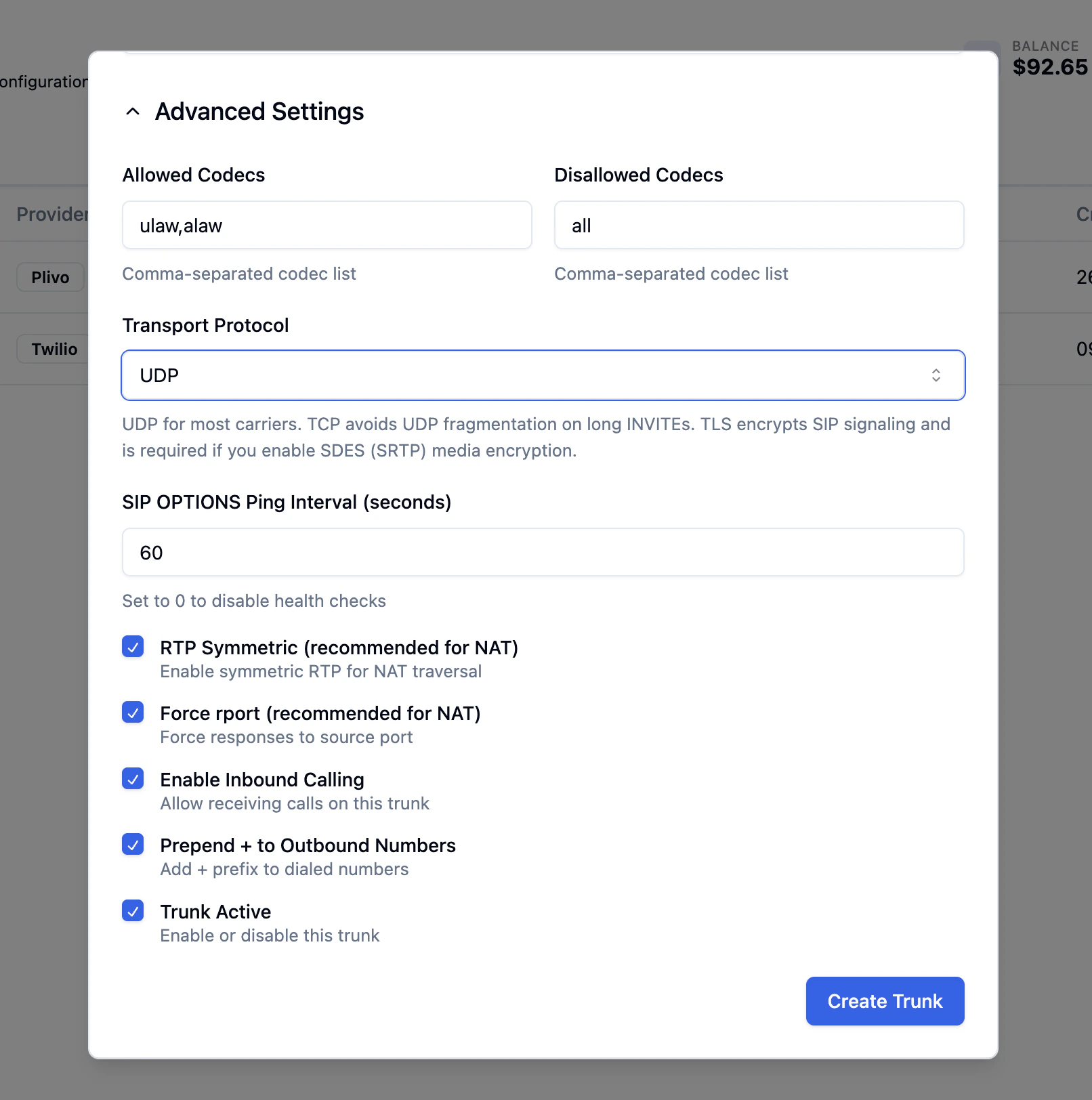
Transport Protocol
Pick the SIP signaling transport:- UDP — the default, used by most carriers.
- TCP — avoids UDP fragmentation when SIP INVITEs carry long headers (multiple Diversion / P-Asserted-Identity / Route entries). Pick this if outbound calls intermittently fail to negotiate media.
- TLS (encrypted signaling) — encrypts the SIP signaling channel. Required if you want SDES (SRTP) media encryption. Use port
5061on your gateways.
Media Encryption (TLS only)
When you set transport to TLS, a Media Encryption field appears. Pick SDES (RTP/SAVP, AES-128) to encrypt the audio stream end-to-end with your carrier. Leaving it on No keeps media as plain RTP even on a TLS-signaled trunk.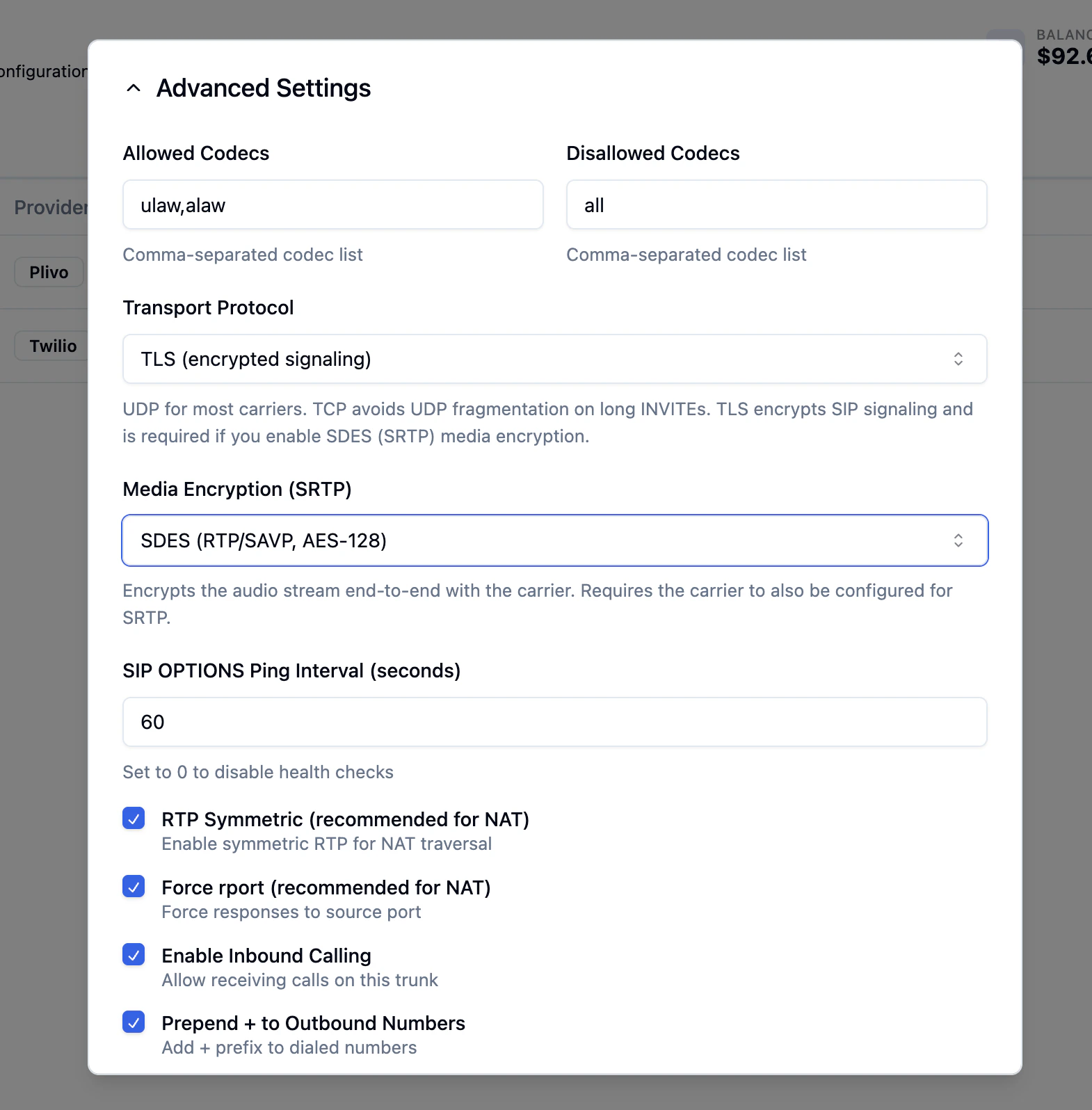
SDES requires the carrier to also be configured for SRTP. Check this in your provider’s portal before enabling it.
Other advanced fields
- Allowed / Disallowed Codecs — defaults
ulaw,alawandallare correct for most setups. - SIP OPTIONS Ping Interval — how often Bolna pings the carrier for trunk health. Default
60seconds; set0to disable. - RTP Symmetric / Force rport — keep enabled for NAT traversal.
- Enable Inbound Calling — turn on if you want Bolna to receive calls on this trunk.
- Prepend + to Outbound Numbers — typically on (E.164 dialing).
- Trunk Active — the master switch; uncheck to pause the trunk.
4. Click Create Trunk
The trunk is created with a generated ID. Use that ID when adding phone numbers (next section) and when wiring inbound or outbound calling to your AI agents.Or via API
Use the Create SIP Trunk API to register your trunk programmatically.Example — Twilio Elastic SIP Trunk (userpass)
Example — Plivo Elastic SIP Trunk (ip-based)
Example — Twilio Elastic SIP Trunk, TLS + SDES (encrypted)
Add Phone Numbers to Your Trunk
After creating a trunk, add your DID phone numbers using the Add Phone Number API.Phone number format: Bolna stores the number exactly as provided. When matching inbound calls, the platform performs a flexible lookup that checks both the number with and without a
+ prefix. Use a consistent format across your trunk and inbound DID configuration.Create Trunk field reference
Troubleshooting
Inbound calls connect but the caller hears silence (one-way audio)
The most common cause is an SRTP mismatch between Bolna and your carrier. If the trunk hasmedia_encryption="sdes" but the carrier has SRTP disabled (or vice versa), the SIP call sets up but the media path never establishes.
- Confirm SRTP is enabled on your provider’s side.
- If you need a quick test, set
media_encryption_optimistic=true— Bolna will fall back to clear RTP if the carrier does not offer crypto in its SDP. - If you don’t need encrypted media, set
media_encryption="no"and use UDP or TCP transport.
422 from Create / Update with media_encryption='sdes' requires transport='transport-tls'
SDES exchanges its keys inside SDP, so it must travel over an encrypted signaling channel. Either:
- Switch
transportto"transport-tls"(and update the gateway port to5061), or - Set
media_encryptionback to"no".
Outbound INVITE fails or rings forever on a particular carrier
If your carrier sends large SIP headers (long Diversion, P-Asserted-Identity, multiple Route headers), the INVITE may exceed the UDP MTU and get fragmented or dropped silently.- Switch
transportto"transport-tcp"— this avoids UDP fragmentation. You don’t need TLS for this; TCP alone is enough.
Next steps
- Set up inbound calls to route incoming calls to your AI agents
- Make outbound calls from your SIP trunk numbers
- Manage your trunk using the full SIP Trunk API